
Raspberry Pi 5 Extension for the Mainframe z16 and z17 Modular Case
Obliczymy ostateczną cenę na podstawie wybranego pliku. Sprawdzisz ją i zaakceptujesz przed płatnością.
Orientacyjna cena wydruku pliku
0,06 € – 0,07 € netto (bez VAT)
Dla pliku: Mainframe z1x Powerbutton v25_0.6n_0.32mm_PLA_MK3.5_3m.bgcode
To wstępna wycena jednego pliku. Dokładną cenę poznasz przed zamówieniem.
Plik i założenia wyceny
Plik użyty do wyceny
Średnia wycena orientacyjna: 0,06 € netto (środek widełek).
- Masa podana przez autora
- 1 g
- Czas druku podany przez autora
- 3 min
- Materiał u źródła
- PLA
- Materiał wyceny
- PLA
- Drukarka wyceny
- Bambu Lab P1S - 0.4 nozzle
- Proces wyceny
- 0.20mm Standard
Orientacyjna wycena wyłącznie wybranego pliku, oparta na masie i czasie druku podanych przez autora. Warianty plików nie są sumowane. Ostateczna cena zostanie obliczona po analizie pliku.
Zapisane na tym urządzeniu.

Raspberry Pi 5 Extension for the Mainframe z16 and z17 Modular Case: Powerbutton, Lid, Backplate & Stand
- Ocena
- 5 / 5
- Polubienia
- 7
- Wydruki
- 1
- Wyświetlenia
- 712
- Oceny
- 1
Aktualizacja u źródła:
Informacje o modelu
- Źródło
- Printables
- Kategoria
- Computers
- Licencja
- Standard Digital File License
⚠ Requires the:
Mainframe z17 Modular Case (Free)
or
Mainframe z16 Modular Case (Free)
for full functionality
🔌 Raspberry Pi 5 Extension for the Mainframe z16 and z17 Modular Case
This extension pack is designed to make the Mainframe Modular Case fully functional, adding essential features for cooling, accessibility, and stability.
Upgrade your Mainframe Modular Case with this extension pack and enjoy a sleek,
modular, and well-ventilated setup! 🚀
Mainframe z17 design (recommended)
This is the newest design.

Mainframe z16 design
This is and older design and it is not as refined as the z17 - but it still works.

🔹 What’s Included?
This package contains custom-designed parts that complete the modular case:
✅ A sliding lid with an airflow mesh for heat dissipation
✅ A backplate with an airflow mesh, port cutouts, and sliding mechanism
✅ A stand that raises the case for improved airflow from the bottom
✅ A power button
✅ A waveshare port protector
z17 Raspberry Pi Extension | z16 Raspberry Pi Extension |
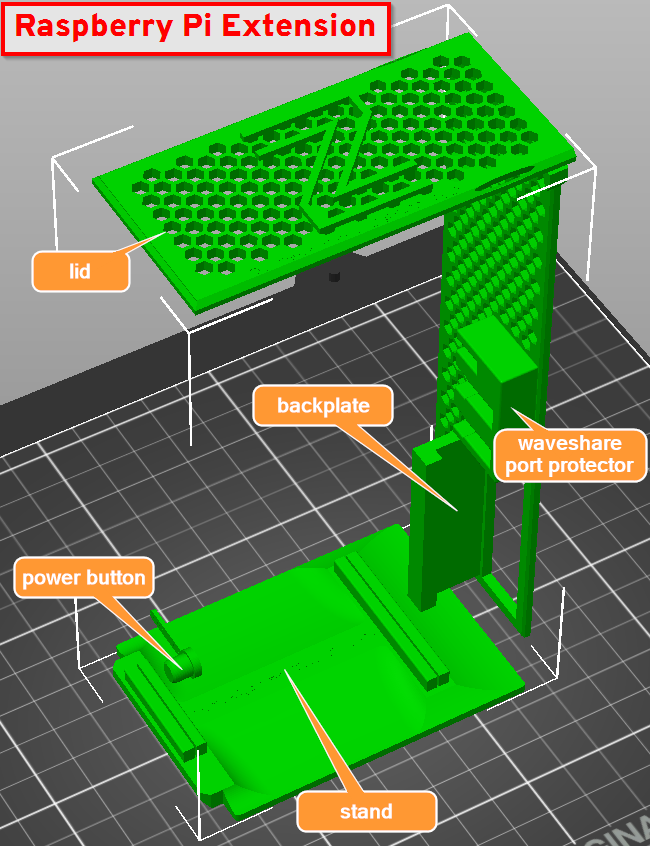 | 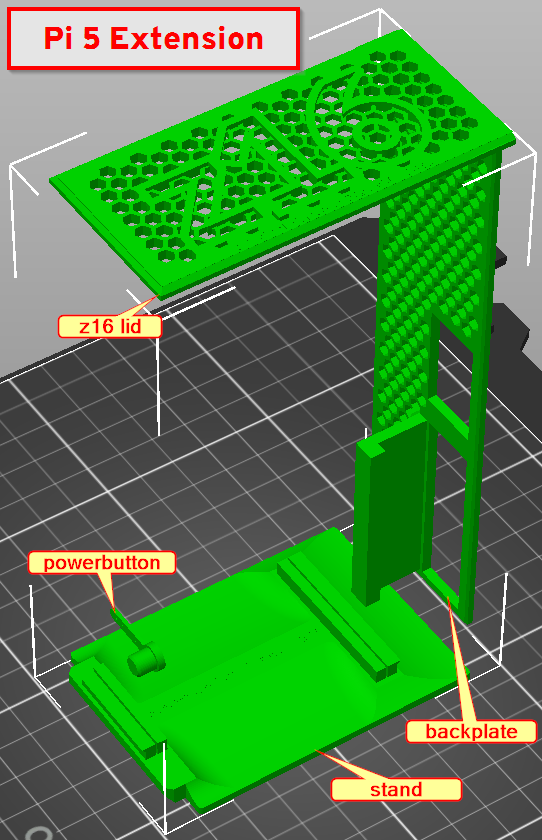 |
💡 Why is this a separate paid extension?
The free case shell is based on IBM's publicly available z16 or z17 model. To respect IBM’s ownership, this extension is a separately designed add-on that makes the case fully functional.
💚🌈🍀 Your purchase helps cover development costs and supports future improvements!
🔗 Get the free base model here: 🆓 Mainframe z17 Modular Case (Free)
🔗 Get the free base model here: 🆓 Mainframe z16 Modular Case (Free)
────────────────
🔹 Backplate Information
The backplate supports two different setups based on your cable preferences:
- Standard Cable Setup:
1x USB-C (for power)
1x or 2x Micro HDMI to Full HDMI adapters
- Waveshare Full HDMI Adapter Setup (SKU: 27009):
This adapter allows all ports to be accessible at the back using full-size HDMI cables:
1x USB-C (for power)
1x or 2x Full HDMI cables
🛒 Note: The Waveshare full HMDI Pi5 adapter SKU:27009 must be purchased separately.
────────────────
💡 Power LED Hole
The Mainframe Modular Case includes a small hole above the power button, designed for a Ø1.75mm white, transparent, or glow filament.
Simply insert a piece of filament to act as a light guide, transferring the power LED’s light from the Raspberry Pi to the front—just like a fiber optic cable.
Trim any excess filament flush with the front using flush cutters for a clean finish.
💡 Power Button Mount
To install the power button:
- Push the button through the hole in the case.
- Make sure the pin is in the vertical position initially.
- Then, rotate the pin to the horizontal position to lock it in place.
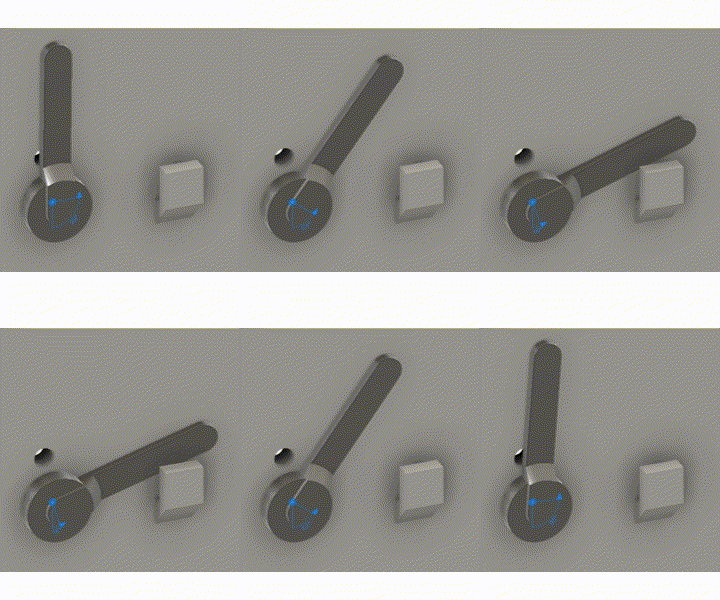
🚨Waveshare Full HDMI Adapter - External Power Plug Removal
Before using this model, make sure to remove the external power connector (the light green connector) on the Waveshare PCB. This small plug (often secured with micro screws) will block the Raspberry Pi board from fitting properly in the case.
For this project, the external power connector is not needed – but it’s a good idea to keep it safe in case you need to connect an external power supply later in another project.

🚨Waveshare Full HDMI Adapter - Add Waveshare Port Protector
The Waveshare Port Protector is simply press-fitted onto the HDMI adapter ports and protects them from cable strain.
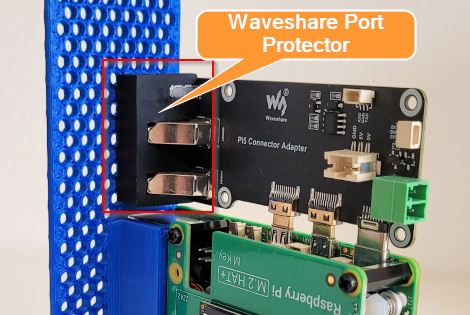
────────────────
Filament used
Prusament PLA Jet Black or Prusament PLA Galaxy Black
Prusament PLA Blend Royal Blue / Prusament PLA Orange
Print settings
Nozzle size 0.6
Layer height 0.32 Structural
Infill Grid 20% for Powerbutton, Stand
Supports
Support on build plate only for Powerbutton, Stand and Backplate for Raspberry Pi 5
Build plate
Smooth PEI Steel Sheet / Textured Steel Sheet
────────────────
Change log
| Date (DMY) | Change |
|---|---|
| 19-04-2025 | Added two new lid variants for the z16 and z17 models. These updated lids feature increased side friction to ensure a more secure fit and prevent them from slipping out unintentionally. |
| 29-04-2025 | Changed the descriptions to include the z17 modular case Added model files and print files for the z17 parts Added a new folder structure: /common/ for parts used by both the z16 and z17 /z17/ for specific z17 parts /z16/ for specific z16 parts |
| 01-06-2025 | Added two new sections and images to the model description:
|
| 04-06-2025 | Added z17 assembly image and updated some descriptions Added Power Button Mount description |
────────────────
Support my work
Like this model? Donate at https://paypal.me/hjembaek