
Flower Light
Obliczymy ostateczną cenę na podstawie wybranego pliku. Sprawdzisz ją i zaakceptujesz przed płatnością.
Zapisane na tym urządzeniu.
Informacje o modelu
- Źródło
- Printables
- Kategoria
- Other Art & Designs
- Licencja
- Creative Commons — Attribution — Noncommercial
This is Flower. Did a quick mount for a series of 10 LED V-shaped channels.:
This is my first release, but you can see some of my other work on insta: @nova_pony
Post your build! I would love to see it in white..
Print:
No supports required. I bumped up the infill to 30% for strength since, depending on the way you hang it, there is some bending stress produced by the channels on their mount. Other than that, just use your standard settings.
Materials:
LED channels: These or similar, https://www.amazon.com/gp/aw/d/B0B7JD2DK2?psc=1&ref=ppx_pop_mob_b_asin_title
Choice of addressable LEDs (I used ws2815 60/m, 12V)
Choice of LED controller (I used a 'dig quad' with WLED because it has 5 outputs and made wiring and power injection very simple.
Printed base and LED channel end caps
Optional:
ws2815 JST connectors to make the fixture able to disassemble, as pictured
Mirror metal garden ball for center reflection
Assembly:
Wiring:
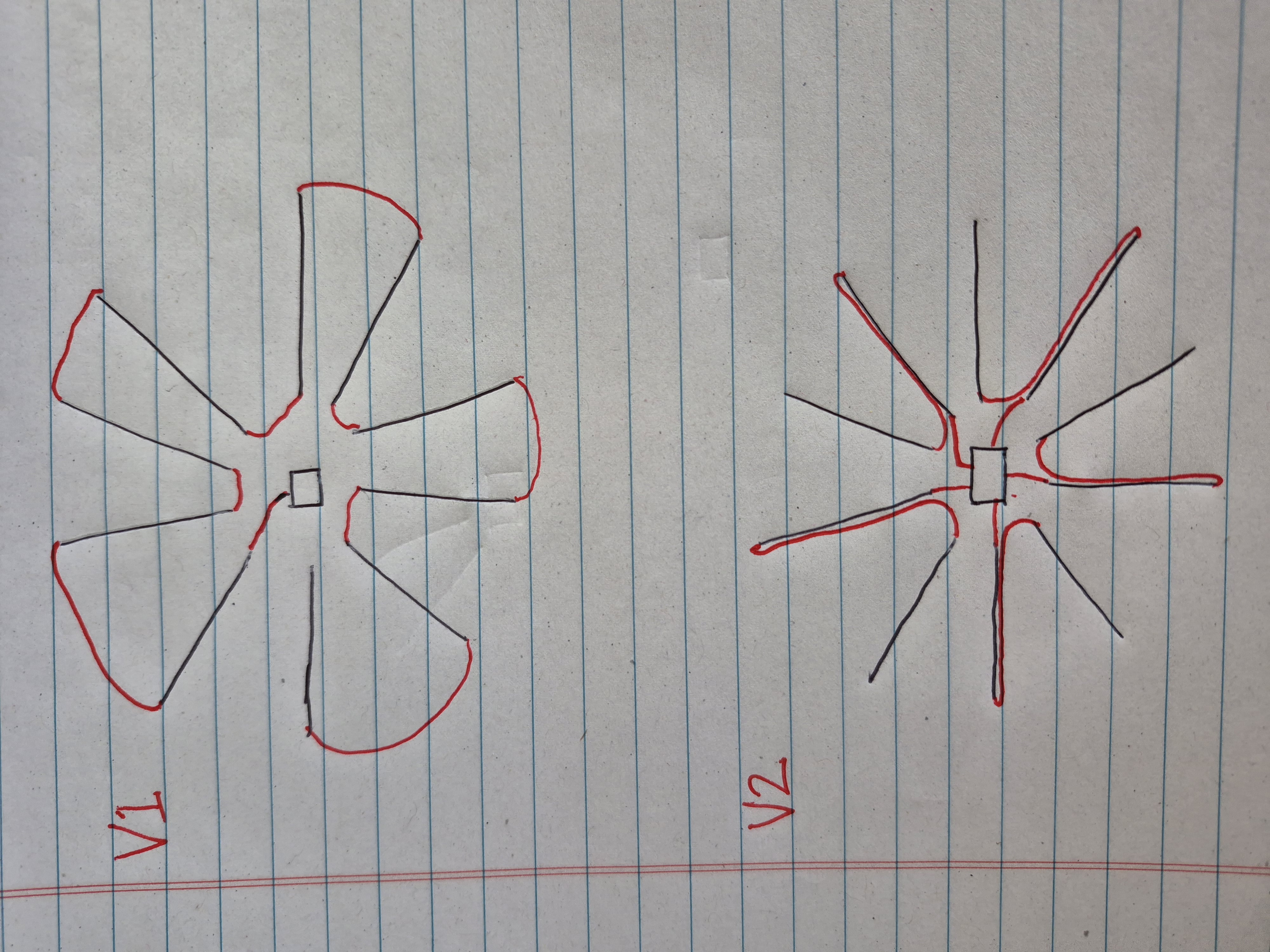
V2: Since I used a 5 channel controller, I just soldered 2m (2 segments) together, five times, for a total of 10m. I accomplished this by routing the wires at the end of the first meter back through the hole in the LED channel and connecting to the second meter. Connect to controller and configure WLED for 5 outputs. This is the cleanest looking method.
V1: Alternatively, all 10m can be connected in series, but depending how it is wired, you will need some additional power injection. This is how I did the V1 configuration and the wiring between channel ends can be seen in the photos. V2 (as described above) does not have these visible wires. The wiring could be routed through the extra slot in the channels but this would create considerable voltage drop based on the length of low gauge wire added to the system.
Photo Shows data line routing for V1 Vs. V2:
Inserting the assembled LED channel into the mount slots is a very tight fit. I will open them up a little when I have time, but as-is I would recommend sanding the interior of the slots a bit if you have trouble getting them to seat all the way to the shoulder.
I included mounting holes for this controller case (https://www.printables.com/model/297135-quinled-dig-quad-v3-case), but you can add whatever mount holes you need in most slicers.
I also included holes to tie the mirror sphere. I drilled a couple holes into the mirror sphere at the sides and stuck a clothes pin in the hole. I then attached the clothes pin to the mount holes with clear plastic hanging wire.
WLED Configuration:
If using V1 config, create a segment for each channel and play from there. If using V2, configure the 5 outputs in LED settings, then set up segments similarly to V1.