
Memory Card holder & Wallet
Obliczymy ostateczną cenę na podstawie wybranego pliku. Sprawdzisz ją i zaakceptujesz przed płatnością.
Zapisane na tym urządzeniu.
Informacje o modelu
- Źródło
- Printables
- Kategoria
- Other Fashion Accessories
- Licencja
- Creative Commons — Attribution — Noncommercial — NoDerivatives
Replace your wallet. Easy access to credit cards, ID and memory card. Also fold cash and place it between cards.
RFID blocking requires both sides of credit card to be blocked. This is designed to have blocking in the center. Complete blocking requires a second barrier on the outside. Instructions are included.
NOTE: Aluminum foil provides basic RFID blocking.
If you require ultimate blocking, checkout products like the VAULTCARD - RFID Blocking & Jamming.
///////
When printing, just lay flat, on bed, without support. Print the two halves with the notch side laying on the bed, to prevent the notches from being distorted during print.
Use the “Blank Card or Clip” as outer cover.
RFID Blocker in mid section
print the template
use the template and thin sharpie to draw an outline on aluminum tape
cut to size
apply sticky side of tape into the inner half, with shiny side up
press around middle and edges to ensure proper fit.
press in the other half, by flattening down all edges
recommend super glue gel for blank card
RFID Blocker in Clip, print pause method.
Use belt clip template and cut aluminum tape to size
The included 3mf file has a pause for Creality K1 Printer. If you cannot use the 3mf file, insert a PAUSE immediately after gap is created, before it is printed over.
print until paused
use glue stick to fully cover shiny side of aluminum tape (THIS IS CRITICAL)
when printer pauses, line up edge of aluminum tape, sticky side down, and smooth out air gaps as it is aligned into model. (To make application easier, just peel back a small portion of the backing along the longest edge. Line up the edge, then slowly install. Use the backing to smooth out application of tape.)
press around middle and edges to ensure proper fitment.
resume print
NOTE: card thickness determines possible total. Can hold up to 12 cards.
Recommend UV resistant filament like PETG, ABS, ..
PLA filament is not recommended for outside or prolonged use.
Do a pre-assembly, of the double sided model, to ensure your printout doesn't have any debris preventing tight assembly.
During final assembly, simply add a drop of super glue gel or epoxy to the hidden indentations on the sides then on the end.
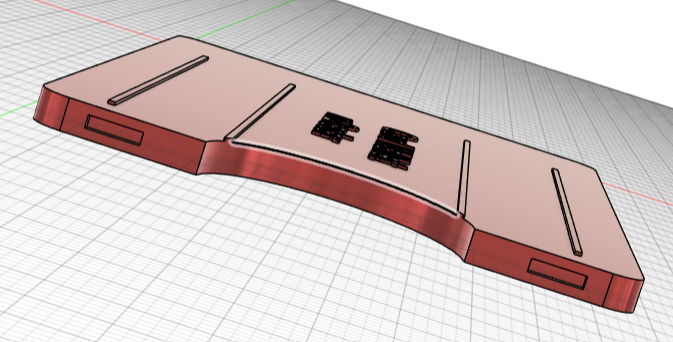
UPDATE: 5 Aug 2025 decided to just do the 10-12 card Wallet instead of multiple sizes. If you want a reduced size wallet, let me know.
UPDATE: 8 Aug 2025 included is a one and two card security card holder with built in RFID blocking. Just add an RFID blocking card on the outside as well as adding the foil in the main layer.
UPDATE: 11 Aug 2025 Added slot to hold SD card
UPDATE 30 Jan 2026 Added card slot for micro sdxc