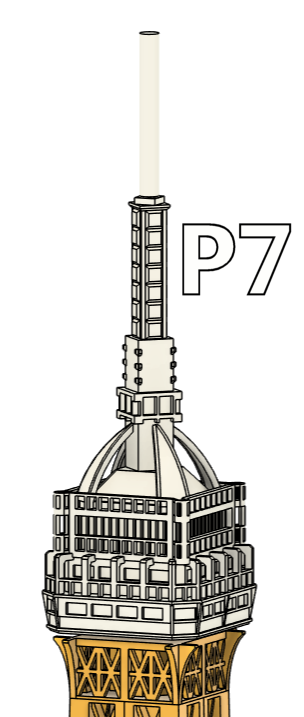
The 50 cm Eiffel Tower consists of 7 individual parts.
These parts were originally released separately over several months as a free preview of the complete project.
This free release now includes Part 7 of the Eiffel Tower, allowing you to print a representative section and see for yourself how detailed the complete model is before deciding to build it.
You can also visit myEiffel Tower collectionto discover my other Eiffel Tower models and related designs.
The 3D model of the Eiffel Tower consists of 7 segments that are stacked on top of each other and permanently joined using a bit of glue. The total height is 50 cm.
To print the model, a build volume of at least 210 × 210 × 130 mm is required, making it compatible with most common FDM printers.
This Eiffel Tower model is currently the most detailed FDM-printable version I’m aware of.
Since no official blueprints of the Eiffel Tower are publicly available, I created the model over the course of three weeks of manual work, based on dozens of detailed photographs. Many architectural features were carefully recreated to stay as true to the original as possible.
The complex structure of the Eiffel Tower posed unique challenges for FDM printing. Each segment was specifically optimized to reduce the risk of failed prints to nearly zero.
Moreover, the model requires no support – only Part 1 needs (simple) support structures in order to avoid splitting the segment further.
The segments were designed and thoroughly tested for printing with PLA, a 0.4 mm nozzle, and 0.2 mm layer height. Scaling the model is not recommended – especially enlarging it is likely to result in failed prints due to disproportionately increased delicate structures and bridges.
For those who want to go even higher: I’ve also published a separate XXL version with a tower height of one meter of this Eiffel Tower here on Printables.
Printing information for this part
The STL file is correctly aligned.
Layer height: 0.20mm STRUCTURAL
Perimeter: 2
Additionally, I recommend turning on “Extra perimeters on overhangs” (Expert mode required). It’s under “Print Settings → Layers and perimeters” in PrusaSlicer. Helps a ton with tricky overhangs!
Infill: 10 % - I use gyroid for a nice balance between structural stability and print speed.
Support: No supports required for this part.
I am looking forward to your Makes! :-)
If you like this design, feel free to check out my others here.