
Bookmark / Paperclip (Ghostclip)
Obliczymy ostateczną cenę na podstawie wybranego pliku. Sprawdzisz ją i zaakceptujesz przed płatnością.
Zapisane na tym urządzeniu.
Informacje o modelu
- Źródło
- Printables
- Kategoria
- Office
- Licencja
- Creative Commons — Attribution — Noncommercial
Summary Cont.
@PaulSmetkov_3771537 and I have designed an organizing device that can clean up your desk space and add a little life to it.
Lesson Plan
In order to learn and get comfortable with using Solidworks and formulating a plan to make a model, you and a partner will recreate an exact copy of this ghost clip. You must work with your partner to precisely follow directions and ensure that both models are identical. You can see Paul’s design at @PaulSmetkov_3771537 .
Construction Instructions
Setup:
1. Select the front plane, edit in sketch mode
Constraint box:
- Use the center rectangle tool
 to create a rectangle centered on the origin
 - Using the Smart DImension tool
, make the rectangle 13 cm vertically and 6 cm horizontally
- Mark the rectangle for construction
Creating the Outer Edges:
- Semi Circles:
- Select the centerline tool
and create a horizontal construction line that connects the left and right sides of the constraint box just above the bottom of the constraint box.
- Use Smart dimension
to make this line 1cm above the bottom of the constraint box.
- Select the arc tool
. Starting from the left of the construction line, create 3 connected arcs with the bottoms of the arcs tangent to the bottom of the constraint box and that connects to the construction line you had made.
- Use the smart dimension
tool to ensure that each arc has a radius of 1cm.
- Select the centerline tool
- Top triangles:
- Select the reference line tool
, make 6 horizontal line segments chained to each other that connect the left and right sides of the constraint box.
- Select all of the line segments and set them as equal
in the property manager
- Use the line tool
to create 6 triangles with the tip touching the top of the constraint box and the bottom segments connected to the edges of each horizontal line segment.
- Then select all of the triangles’ edges, and set them as equal
 to one of the base sides in the property manager
- Select the reference line tool
- Select the line tool
to create a vertical
line that connects the left endpoint of the semi circles and the triangles.
- Do the same for the right side of the triangles and semi circles.
Innards:
Eyes:
- Select the circle tool
and draw a circle in the top left area of the constraint box.
- Use the Smart dimension tool
to set the diameter of the circle to be 1.1 cm
- Select the smart dimension
tool to make the distance between the center of the circle to the left edge of the constraint box to be 1.75cm.
- Set the distance between the top of the constraint box to the center of the circle to be 2.75 cm.
- Using the mirror tool
, select the circle and mirror it about the line down the middle of the ghost clip
Smile:
- Using the line tool, create 2 vertical
lines, select and set them equal
.
- Drag one to the left-middle area of the innards, and the other to the right-middle area of the innards.
- Using the smart dimension tool
, make the top endpoint 8 cm from the bottom of the constraint box and 1.25cm from its respective side.
- Using the smart dimension tool
- Use the Smart Dimension tool
to make these lines 4 cm long
- Use the arc tool
to connect the bottom endpoints of the lines, make sure that the radius is 1.75 cm using smart dimensions
.
Using the offset entities tool , offset the smile inwards and use the smart dimension tool
 to make the thickness of this smile to be 0.5 cm. Cap ends with arcs.
Design Changes
To start the design process, Paul and I created a sketch of the ghost clip with added measurements and relations that would be seen if done in Solidworks. These relations also aided the design process later on, making the solidworks section much easier to understand.
There were some differences in the way we approached making the ghostclip on paper and on solidworks. This is because we had encountered errors that were not originally screened for in the drawing process.
Creating the constraint box and adding dimensions were simple enough. We had not encountered any errors.
This was similar with adding the semi circle sections; we had just followed our steps and added dimensions.
There was a slight hiccup when making the top triangles. In the drawing process, we had originally wanted to add a single construction line that is the bottoms of the triangles. When making it, there was no way to make each bottom side of the triangles 1 cm.
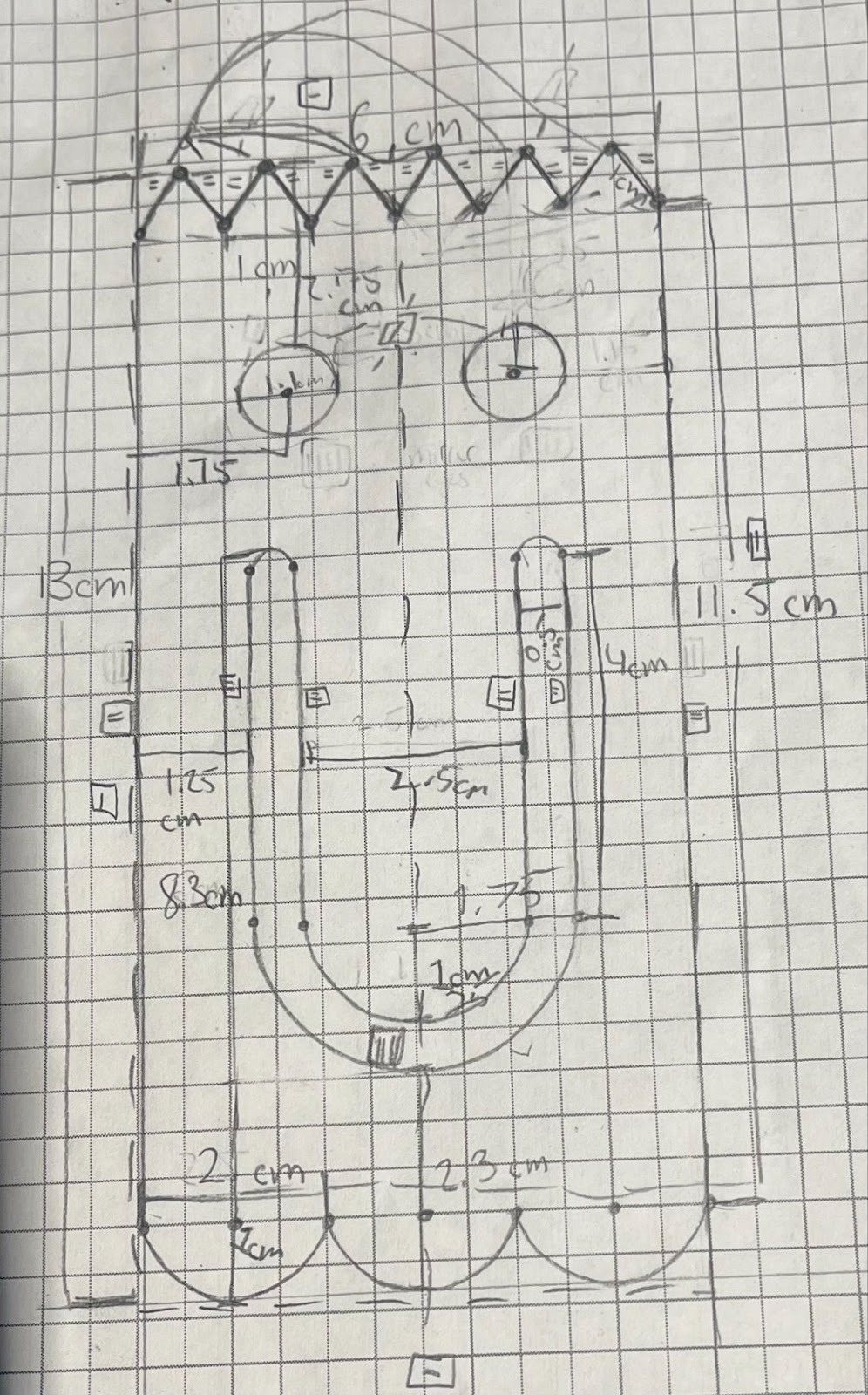
(a singular dashed line connecting the triangles)
Instead of a singular construction line connecting the bottoms of the triangles, we wanted it to be 6 consecutive horizontal lines that are all 1 cm. But when adding the dimensions to these 6 consecutive lines, we encountered an error.
The sketch was overdefined, and with consultancy from our teacher we discovered the issue was that we did not need to specify the length of each line segment. This is because the program already knew the line segments added up to 6cm and if they were all equal, they would all be 1cm. So only adding the equal relation between them did the trick.
With that out of the way, the triangles and eyes were done easily. Using the mirror utility was helpful.
The mouth was also easy. We used the offset entities tool and made the caps round.
When looking at the final model and comparing it with the figure we had in hand, we discovered that the position of the eyes were offset.
To fix this major issue that would cost us points, we compared the model and the figure in hand side by side. When doing this, we could adjust the vertical and horizontal lengths to the edges of the constraint box to the center of the eyes.
We adjusted the horizontal distance between the center of the circle to the side of the constraint box 0.05 cm smaller and we changed the diameter of the circle to 1.25 cm. Which made the eyes fit perfectly behind the figure we had next to the screen.
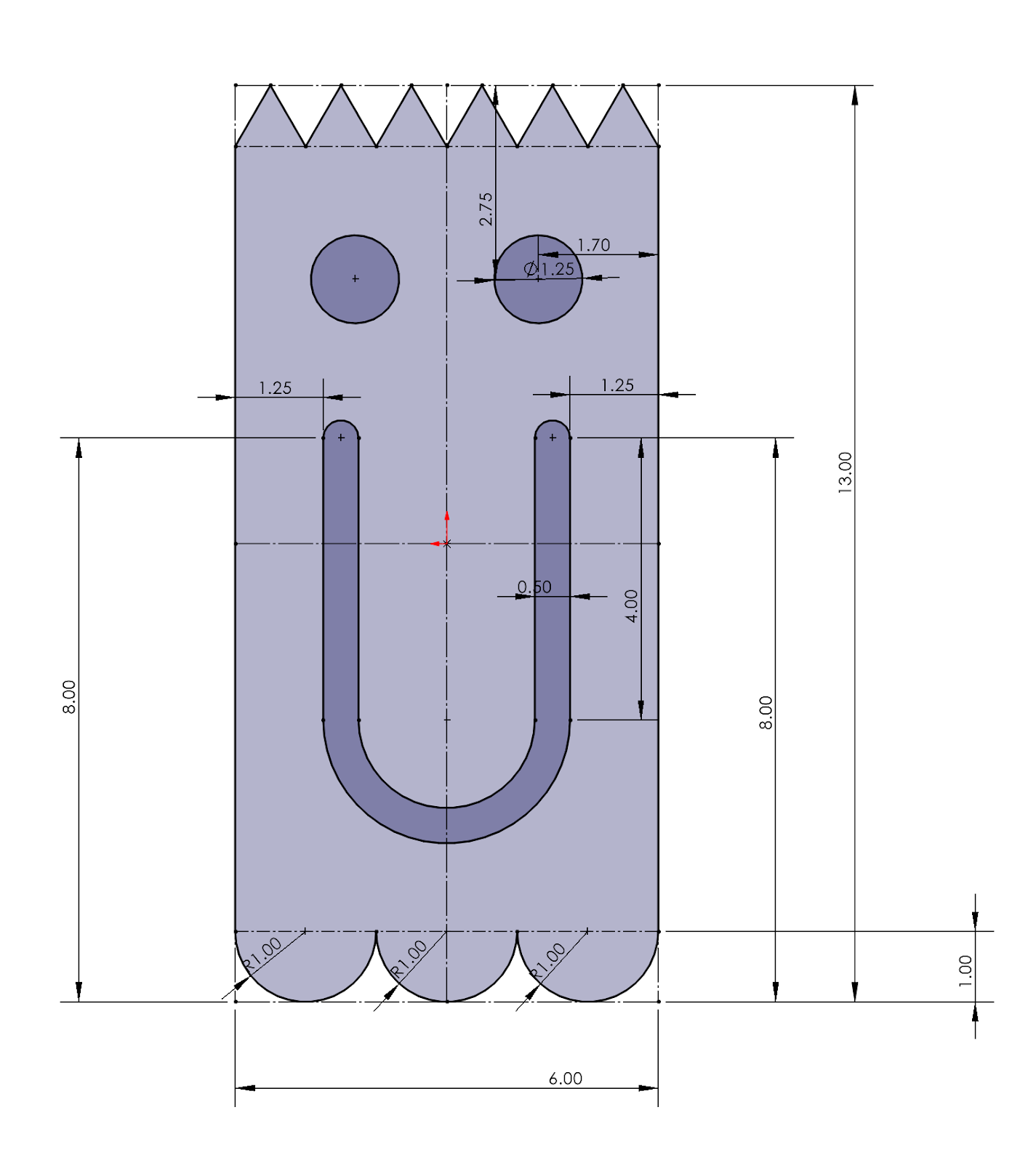
Overall, the process went smoothly but we still encountered obstacles that forced us to change the way we approached this. One being the triangles’ construction line(s), which was a necessary functional edit that we made so the program would work. The other being the change in the position of the eyes, this only being an aesthetical change that would simply make the model look more similar to the base ghostclip.