
Appliance Wheel Generator
Obliczymy ostateczną cenę na podstawie wybranego pliku. Sprawdzisz ją i zaakceptujesz przed płatnością.
Zapisane na tym urządzeniu.

Customiser script for creating strong wheels for fridges and appliances
- Ocena
- 0 / 5
- Polubienia
- 4
- Pobrania
- 13
- Wydruki
- 0
- Wyświetlenia
- 88
- Oceny
- 0
Aktualizacja u źródła:
Informacje o modelu
- Źródło
- Printables
- Kategoria
- Other House Equipment
- Licencja
- Creative Commons — Attribution
Appliance Wheels - Custom Replacement Rollers
A customizable OpenSCAD model for creating replacement wheels/rollers for fridges and other appliances.
Overview
This model allows you to create custom wheels with separate front and back roller configurations. The design includes advanced features like rounded edges with integrated chamfers for support-free printing and slotted layers for enhanced strength.
Key Features
Dual Wheel Configuration
- Front Wheels: Customizable outer/inner diameter, length, and extensions
- Back Wheels: Independent sizing and configuration from front wheels
- Flexible Layout: Generates 2 front wheels and 2 back wheels in optimal printing arrangement
Advanced Printing Features
- Rounded Edges: Optional filleting with integrated chamfer design
- Support-Free Printing: Chamfers eliminate the need for support material on rounded edges
- Slotted Layers: Internal slotted geometry forces slicers to create solid infill layers above and below slots
Customization Options
- Outer and inner diameters (independent for front/back)
- Wheel length/thickness
- Inner bore diameter for axle fitment
- Extension cylinders for specific mounting requirements
- Adjustable fillet radius with support reduction
Slotted Layers Feature
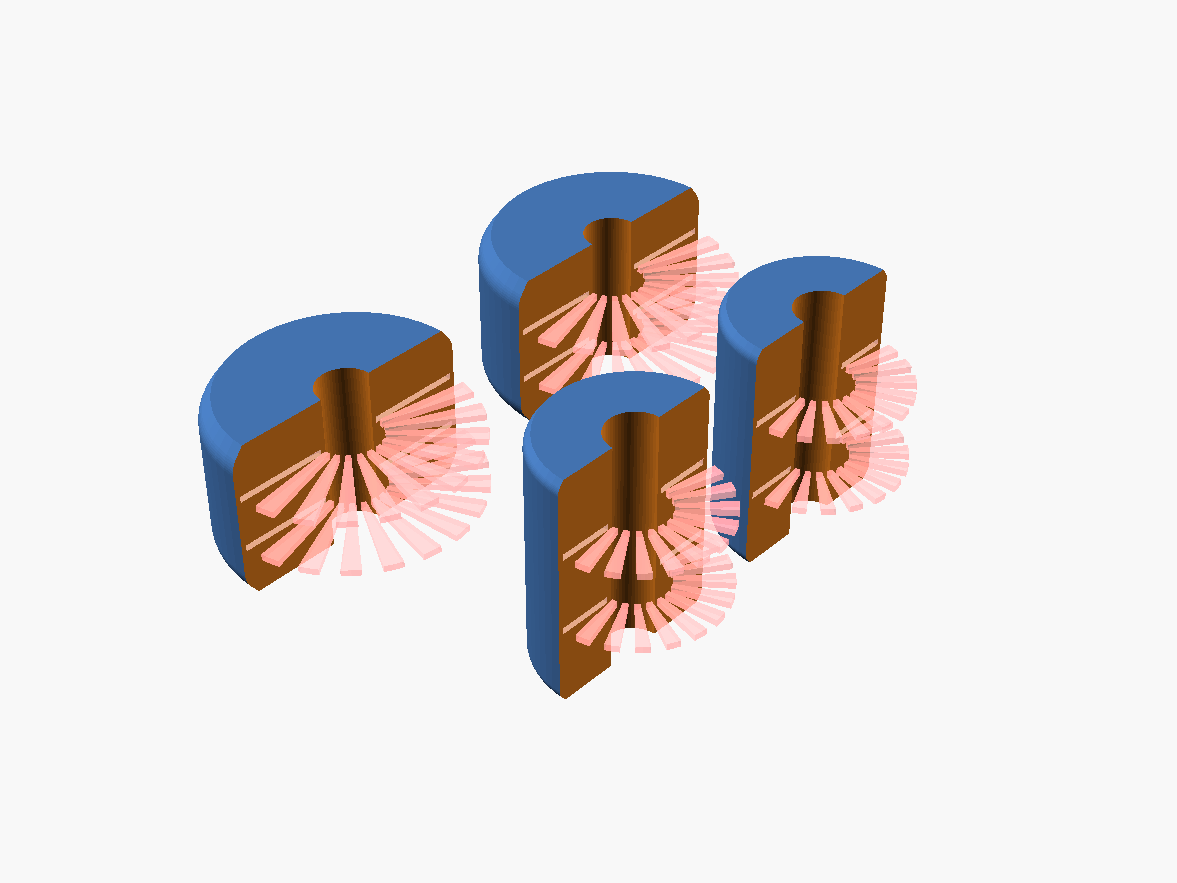 | 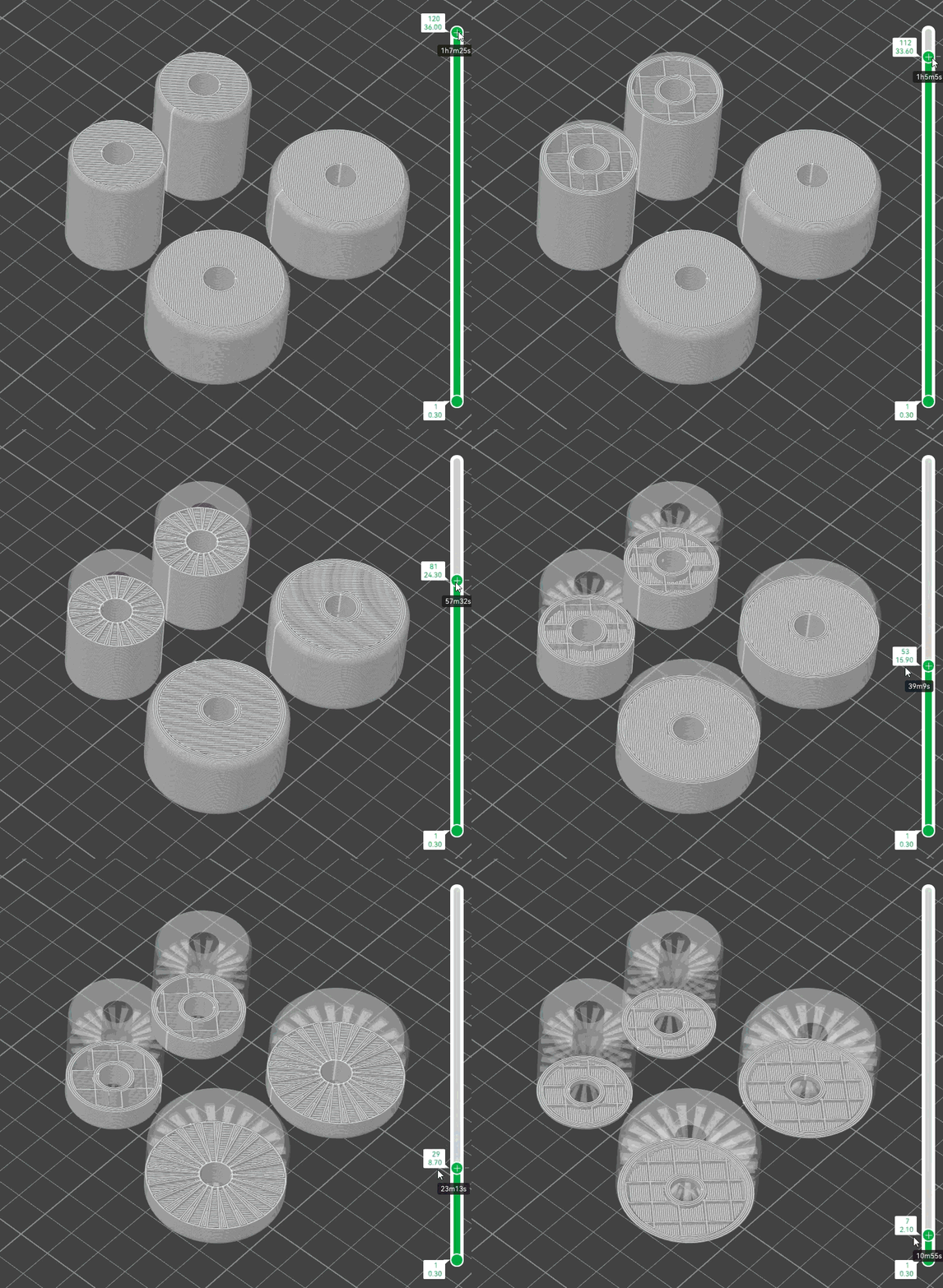 |
The slotted layers feature creates internal voids that force the slicer to generate solid horizontal layers above and below each slot. This results in:
- Enhanced Strength: Solid layers provide structural reinforcement
- Material Efficiency: Reduces material usage while maintaining strength
- Improved Layer Adhesion: Forces solid layers at regular intervals
Configure slotted layers using:
front_slotted_layers/back_slotted_layers: Number of slotted layers (0 to disable)front_slotted_wall_thickness/back_slotted_wall_thickness: Minimum wall thickness (recommended 1.5mm)
Usage Instructions
Basic Configuration
- Measure your existing fridge wheels or axle requirements
- Set the
front_inner_diameterandback_inner_diameterto match your axle - Adjust
front_outer_diameterandback_outer_diameterfor desired wheel size - Set appropriate
front_lengthandback_lengthfor wheel thickness
Advanced Features
- Rounded Edges: Set
front_fillet_radius> 0 and enablefront_fillet_support_reduction - Extensions: Use
front_extention_diameterandfront_extrusion_lengthfor mounting requirements - Strength Enhancement: Add 2-3 slotted layers with 1.5mm wall thickness
Debug Mode
Enable cut_enabled = true to see cross-sections during design phase. Adjust cut_position to view different areas of the model.
Printing Recommendations
Filament Selection
Use strong, durable filaments for best results:
- PETG - Excellent chemical resistance and durability
- ABS - High temperature resistance and toughness
- ASA - UV resistant, great for appliances
- Nylon - Maximum strength and wear resistance
- PC (Polycarbonate) - Industrial strength applications
Print Settings
- Walls: Minimum 4 walls (5-6 walls recommended for heavy duty use)
- Infill: 40-60% infill density
- Layer Height: 0.2mm for good surface finish
- Supports: Not required when using rounded edges with support reduction
Troubleshooting
Wheels too loose/tight: Adjust the inner_diameter parameters in 0.1mm increments Poor surface finish: Increase $fn value (default 64) or reduce layer height Weak wheels: Increase wall count, add slotted layers, or use stronger filament Printing failures: Enable support reduction for rounded edges, check bed adhesion
This model is part of the OpenSCAD Projects collection. For more parametric designs and documentation, visit the project repository.
Project Information
- License: CC BY-SA 4.0
- Author: Chris Heazlewood 2025
- Documentation: https://docs.ostat.com/docs/openscad
- Repository: https://github.com/ostat/OpenSCAD-Projects