
Project INFIN_IT: A Framework 12 Based Modular Workstation with Repurposed Components
Obliczymy ostateczną cenę na podstawie wybranego pliku. Sprawdzisz ją i zaakceptujesz przed płatnością.
Zapisane na tym urządzeniu.

Framework 12 retro workstation reusing salvaged iPad & webcam parts and a new modular component system on the back
- Ocena
- 5 / 5
- Polubienia
- 57
- Pobrania
- 34
- Wydruki
- 0
- Wyświetlenia
- 1340
- Oceny
- 1
Aktualizacja u źródła:
Informacje o modelu
- Źródło
- Printables
- Kategoria
- Computers
- Licencja
- Creative Commons — Attribution — Noncommercial — Share Alike
What if your obsolete hardware didn't have to become e-waste? What if you could give your discarded tech an infinite afterlife?
Project INFIN_IT is a fully modular, all-in-one luggable workstation engineered around the Framework Laptop 12 Mainboard and official battery. Drawing aesthetic inspiration from 1980s boomboxes and classic portable computers, it reimagines repairability and component reuse as an open, modular ecosystem.
Instead of letting functional electronics turn into e-waste, INFIN_IT turns abandonware into abADD-ONware. In this working build, that philosophy is put straight into practice by salvaging a Retina display from a broken iPad and a discarded Logitech webcam, giving them a completely new lease on life.
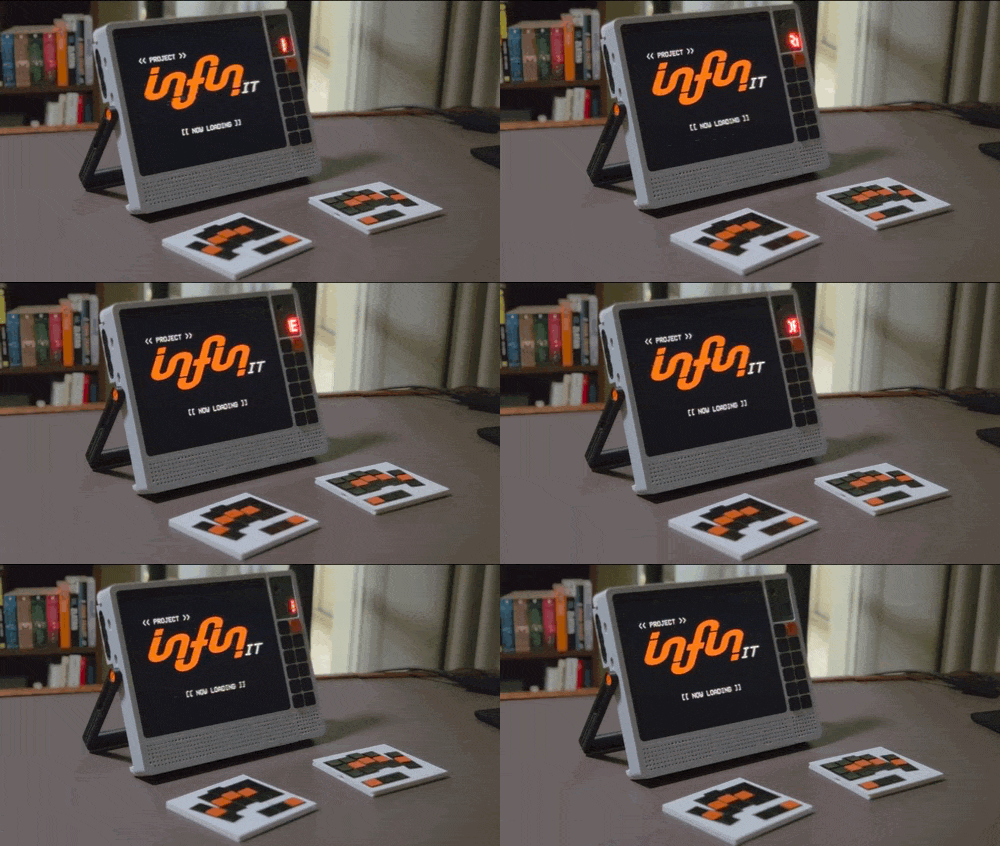
Key Features
Boombox Meets Cyberdeck: A dual-purpose carry handle rotates on friction torque hinges to double as an infinitely adjustable kickstand.
The "Speaker" Split Keyboard: Disguised as retro boombox speaker grilles on the back, two ultra-thin, wireless split keyboard halves slide out horizontally when it's time to set up and work.
Cassette Drive SSD Housing: That nostalgic cassette tape on the rear isn't just aesthetic—it’s a custom sleeve enclosure designed so a Samsung T7 Shield portable SSD simply slides right inside.
Integrated AV & Status Column: Positioned directly above the macropad to the right of the display:
Salvaged Logitech Webcam & Mic: Embedded neatly for video calls and voice command input via the integrated microphone.
LED Matrix Display: Flanking the right side of the webcam module to deliver glanceable system telemetry, status icons, or visual feedback.
Tactical 12-Key Side Macropad: Stacked beneath the webcam and status array, 12 quick-access keys running KMK firmware provide instant controls for media playback, app switching, or push-to-talk.
The "XLpansion" Modular Rail System: A direct evolution of the standard Framework Expansion Card ecosystem, breaking open slot boundaries to mount larger hardware.
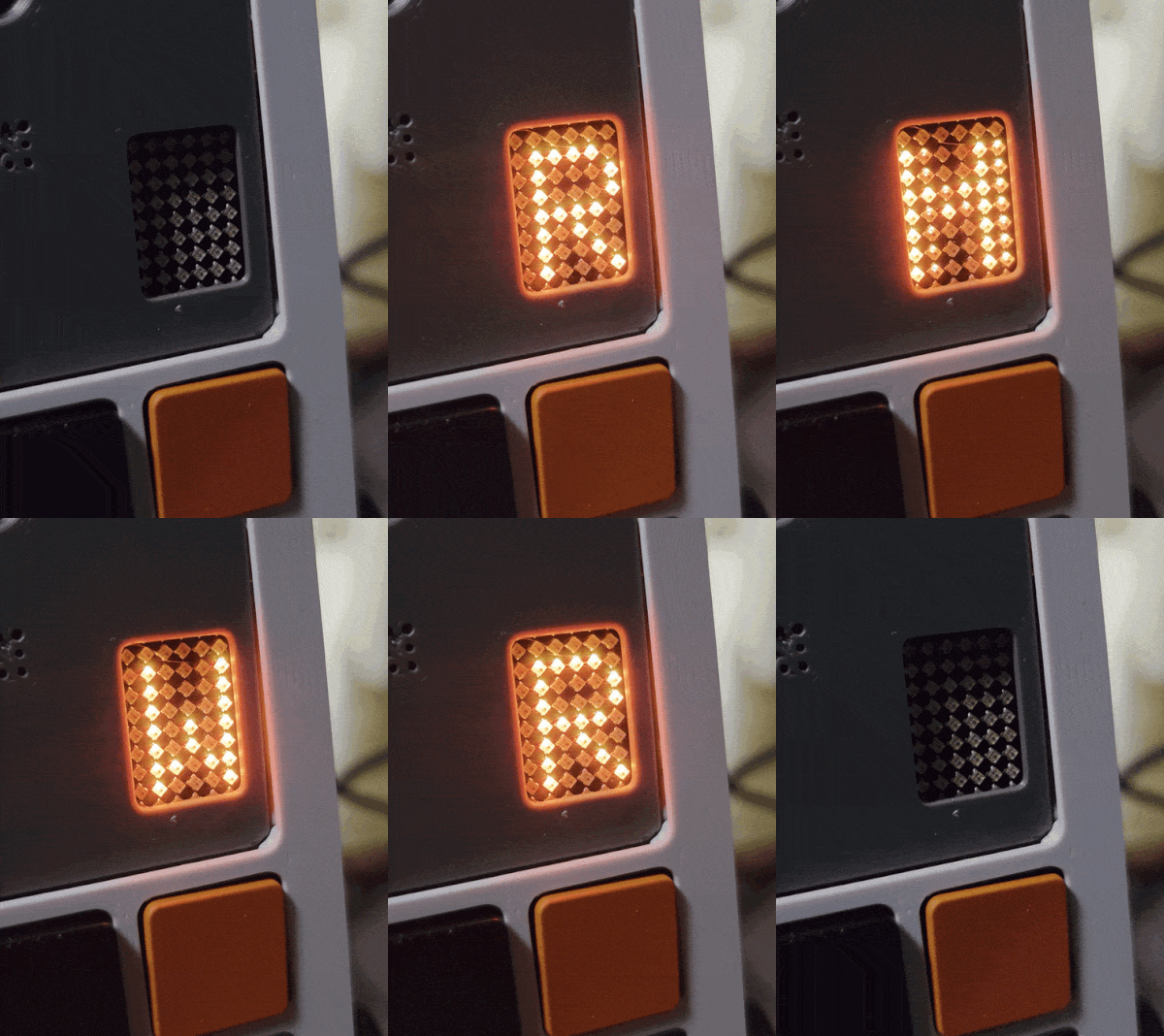
Evolving the Framework Ecosystem: From Expansion to XLpansion
Framework revolutionized consumer hardware repairability with their interchangeable Expansion Card standard. INFIN_IT builds directly on top of that philosophy. Rather than keeping every single port locked into an isolated, single-width perimeter, the modular rear backplane keeps Framework’s familiar card pitch and spacing while removing the rigid physical dividers between slots.
Customizable Grid: Moveable rail dividers let you configure bay widths anywhere from single-card size up to 5 slots wide.
Central Spine & Electrical Vision: The chassis is engineered with a central internal routing channel designed to house a dedicated interconnect spine. In the current prototype, the rear bays act as mechanical docking and transport slots. Conceptually, something like the Satechi 4-in-1 USB-C Hub comes close with ports positioned on both sides, but an ideal implementation would expand that concept to provide up to 10 symmetrically spaced USB-C ports to make every single bay plug-and-play straight to the Framework Mainboard.
Future Possibilities for abADD-ONware: This build demonstrates the concept with the slide-in cassette-housed T7 Shield, but the open rail design means you or the community can design modules for virtually anything:
Full-size 2.5” SATA/SSD drive caddies
High-capacity USB-C PD power banks
Optical disc drives
Custom breadboard development fixtures or sensor arrays
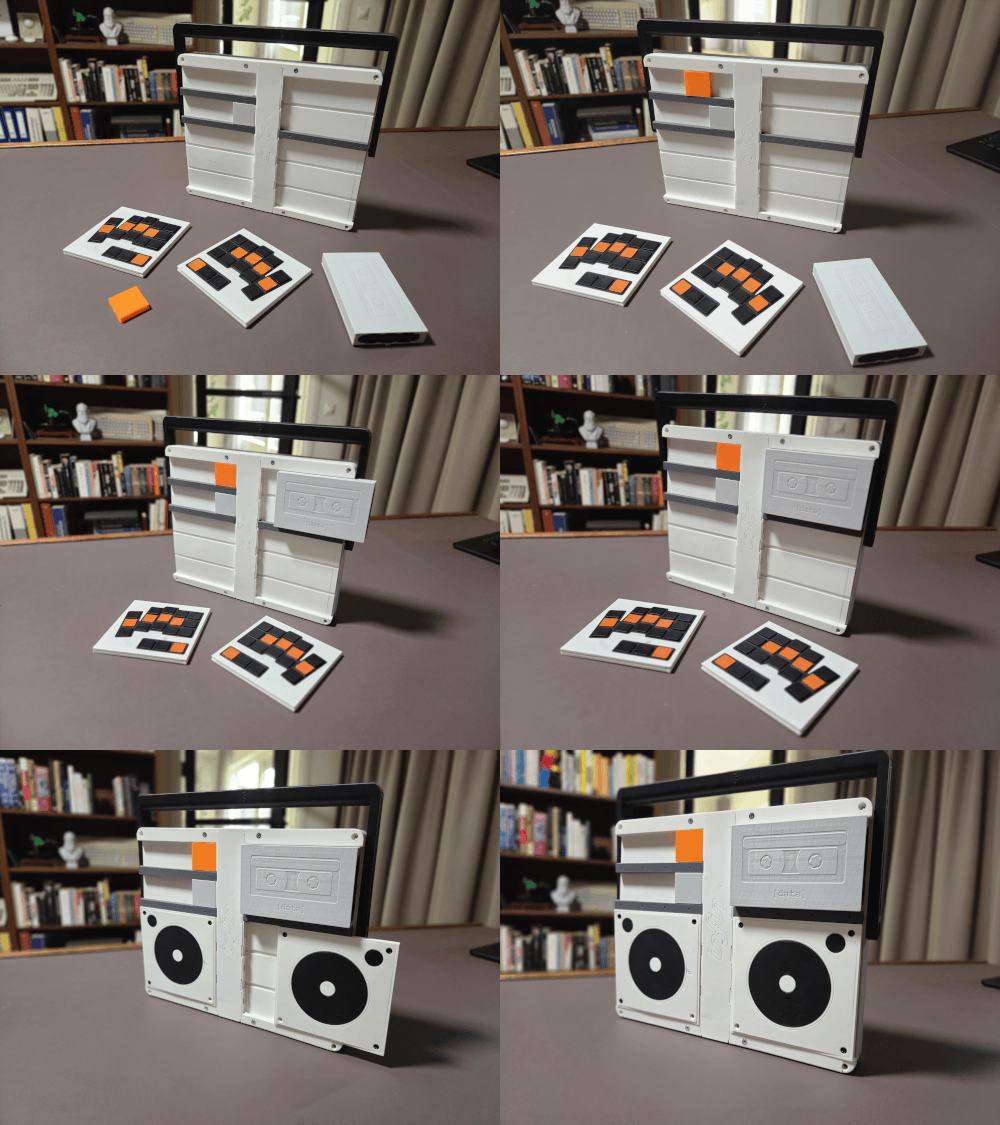
Internal Architecture & Power
Framework 12 Mainboard Integration: Internal chassis mounting points and port alignment are modeled directly around the official Framework Laptop 12 CAD files.
Internal Battery Bay: Dedicated mounting points are designed directly into the chassis to house the official Framework Laptop 12 battery, making the rig a true self-contained portable workstation.
(Note: The working prototype currently runs externally while awaiting final mainboard hardware).
Bill of Materials & Sourced Components
Component | Sourced From / Hardware Used |
Mainboard | Framework Laptop 12 Mainboard (integrated mounts) |
Battery | Framework Laptop 12 Battery (integrated mounts) |
Display | Salvaged 9.7” Retina Display (from an iPad 4) + EDP driver board [link] |
Webcam & Mic | Salvaged USB webcam module with built-in mic (Logitech) |
Status Display | ESP32-driven LED matrix display (Seeed XIAO ESP-S3) |
Storage | Samsung T7 Shield SSD (slides into 3D-printed cassette sleeve) |
Hinges | Miniature constant-torque / friction positioning hinges CL1127-0.3N.m (go for the 0.1N.m ones if you want less friction) [link] |
Fasteners | M3 heat-set threaded brass inserts + flathead screws |
Keyboard & Macropad Build Notes
The split keyboard shown in the build leverages an ultra-low-profile form factor designed to slip flush into the rear "speaker" channels:
Wireless Connectivity & Firmware: The keyboard halves are completely wireless, powered by Seeed Studio XIAO nRF52840 microcontrollers running ZMK Firmware over Bluetooth Low Energy.
The 12-key front macropad runs KMK Firmware and is powered by the same ESP32 that controls the LED matrix
Switch Compatibility: The prototype pictured utilises Framework One Key modules, but these unfortunately never made it to production, however a similar keyboard could also be build using switches like the Kailh PG1316. For example a modified version of the awesome mikefives split is slim enough to slide directly into the rear docking slots.
Print, Slicing & File Availability
Print Bed Requirements: Minimum 256 × 256 mm build volume.
Recommended Filament: Matte PLA in black, light grey and dark grey. Orange PLA is used for the accents (power lever, screws etc.)
Layer Height: 0.20 mm
Infill: 25–30% Gyroid/Grid for the primary frame; 15% for aesthetic front covers.
Supports: Supports are not needed, but may be used for extra stability when printed the backplates
STEP Files & Community Modules: Complete print-ready STLs are provided. Once I can validate tolerances against physical Framework Laptop 12 mainboard hardware, parametric STEP files for the blank rail sleds and cassette sleeves will be released to let everyone design custom abADD-ONware modules.
Assembly
Parts are made to tightly connect to each other and assembly should be relatively straightforward. In some places a piece of filament can be used to lock things in place (e.g. connecting the two halves of the handle). For the power lever, a piece of filament is used to serve as a hinge (see close-up picture with bright green filament). Additional step-by-step images are added in the 'other files'-section below the print files.
Chassis geometry was designed around Framework's official 3D CAD references. Visual documentation demonstrates mechanical action, slide-out keyboard mechanics, and display clearance using auxiliary input hardware while final Framework 12 mainboard integration is completed.