
Minion Kevin multi color
Obliczymy ostateczną cenę na podstawie wybranego pliku. Sprawdzisz ją i zaakceptujesz przed płatnością.
Zapisane na tym urządzeniu.
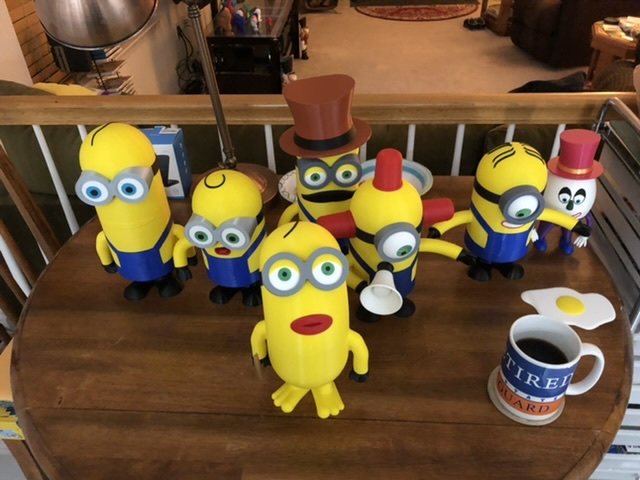
Inspired by the awesome art of reddadsteve ( https://www.thingiverse.com/reddadsteve/designs ) I set out to learn how…
- Ocena
- 4,857 / 5
- Polubienia
- 132
- Pobrania
- 759
- Wydruki
- 11
- Wyświetlenia
- 5926
- Oceny
- 7
Aktualizacja u źródła:
Informacje o modelu
- Źródło
- Printables
- Kategoria
- Sculptures
- Licencja
- Creative Commons — Attribution — Noncommercial
Inspired by the awesome art of reddadsteve ( https://www.thingiverse.com/reddadsteve/designs ) I set out to learn how to model Kevin in separate parts to assemble. Here it is.
All of the parts are already oriented for proper printing with no supports. Everything is friction fit for MY PRINTER.
Enjoy
UPDATE: he has a total of 5 brothers as of 22 Mar 2021
Follow me - Minion Bob is close to being done with design and I will start to print and then post
Minion Bob is here! https://www.thingiverse.com/thing:4722509
Stuart has also arrived. https://www.thingiverse.com/thing:4729619
Print Settings
Printer Brand:
Creality
Printer:
CR-10
Rafts:
No
Supports:
No
Resolution:
0.12
Infill:
25%
Filament: Hatchbox and ESun PLA Multiple
Notes:
See colors in photos.
Assembly tips
Assemble the goggle to the skull, aligning it so you can insert the key. Then slide the band portion over they key. Once you do that, the whole assembly can be attached to the neck portion. This is the only place where order of assembly is important. The slight curve that keeps the goggle close the the skull makes it difficult to do in any other order.
This whole model was designed with interference fit assembly. Of course - that was with my printer dialed in the way it was that day. In theory you should not need any glue. You may need to do a small bit of sanding.Category: Sculptures