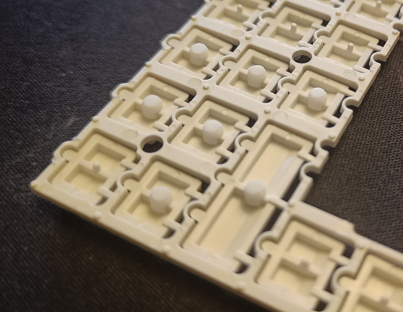
Broken button fix for HP Prime Graphing Calculator
Obliczymy ostateczną cenę na podstawie wybranego pliku. Sprawdzisz ją i zaakceptujesz przed płatnością.
Zapisane na tym urządzeniu.
Broken button fix for HP Prime Graphing Calculator
- Ocena
- 0 / 5
- Polubienia
- 9
- Pobrania
- 33
- Wydruki
- 0
- Wyświetlenia
- 705
- Oceny
- 0
Aktualizacja u źródła:
Informacje o modelu
- Źródło
- Printables
- Kategoria
- Portable Devices
- Licencja
- Creative Commons — Attribution — Share Alike
HP Prime Graphing Calculator uses buttons which contact the pressure domes with a very flimsy plastic post. 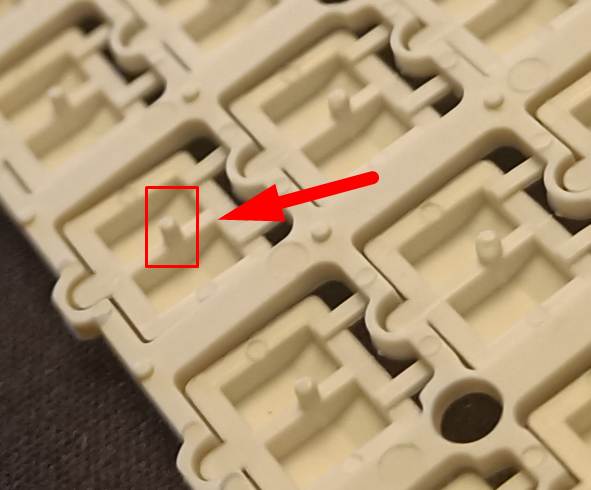
These posts will easily break or deform when the keyboard gets hit or pressed really hard. This will result in a button that feels wrong, “mushy” or doesn't work at all.
If you don't know how to open this calculator then reference this excellent iFixit tutorial:
https://www.ifixit.com/Guide/HP+Prime+Graphing+Calculator+G8X92A+Button+Panel+Replacement/137052
These 3D printed distancers will fit in their place. Just cut the damaged distancer, making sure to leave 0.3-0.5mm stump, and then press 3D printed distancers on them until they align and sit flat. No glue should be required. If you leave too long stump then the button will stick upward too much and feel very stiff to press.
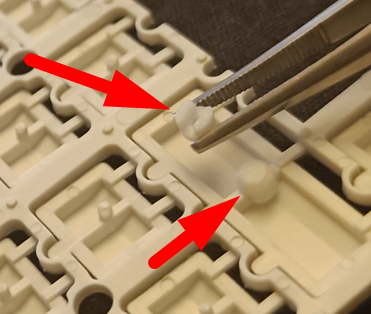
You should end up with a more rugged keyboard feeling just as good as it did before the damage :)