
Infill pattern customizable cookie cutters
Obliczymy ostateczną cenę na podstawie wybranego pliku. Sprawdzisz ją i zaakceptujesz przed płatnością.
Zapisane na tym urządzeniu.

The infill patterns look too cool to be kept inside your 3D prints. Eat them!
- Ocena
- 0 / 5
- Polubienia
- 135
- Pobrania
- 233
- Wydruki
- 0
- Wyświetlenia
- 2091
- Oceny
- 0
Aktualizacja u źródła:
Informacje o modelu
- Źródło
- Printables
- Kategoria
- Kitchen
- Licencja
- Creative Commons — Attribution — Noncommercial
Parts
- Hexagonal cookie cutters for optimal tray distribution
- Embossers with FDM infill pattern designs—PrusaSlicer and Cura included, choose your fighter
- Pressing tool to apply uniform pressure on the embosser
The embossers require minimal supports, a no-supports version is also included (without a slot for the pressing tool).
Print settings
I used 0.2 layer height and ABS, other materials should work well too, PLA would be more recommendable for safety.
Customization
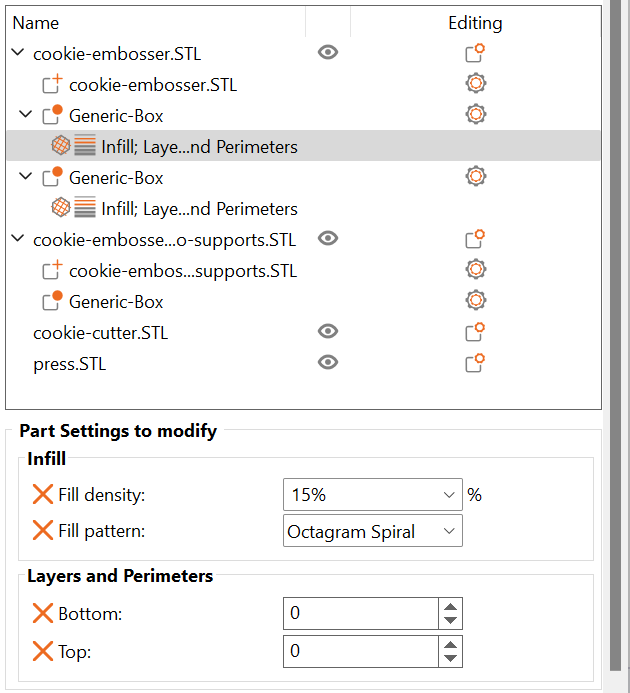
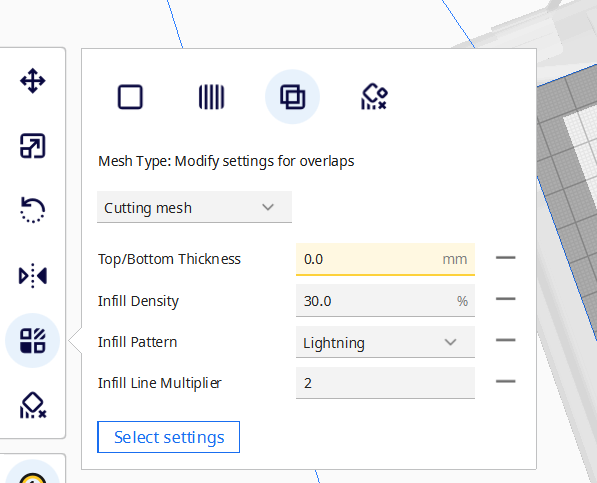
The infill patterns are made using modifiers (PrusaSlicer) or cutting meshes (Cura) so they are fully customizable. Printing files for both slicers are available, apart from the original STL files.
You can customize these settings:
- Pattern
- Density
- Thickness
Some settings work differently depending on the slicer you are using:
PrusaSlicer
- Top/Bottom layers: make sure at least the number of top layers is set to 0
- Infill thickness: set it in Print settings > Advanced > Extrusion width > Infill
Cura
- Top/Bottom thickness: make sure at least top layer thickness is set to 0 so the infill is visible
- Line multiplier: default is 1, increase the number of lines to have a thicker infill
- To make sure the cutting mesh is in the right position, go to Preferences > Configure Cura > General > Viewport behavior > Automatically drop models to the build plate (uncheck it)
tip: rotate the embosser model to change the pattern alignment
Comment if you have any question or problem!