
Valve Index Cable Redirector
Obliczymy ostateczną cenę na podstawie wybranego pliku. Sprawdzisz ją i zaakceptujesz przed płatnością.
Zapisane na tym urządzeniu.
Informacje o modelu
- Źródło
- Printables
- Kategoria
- Virtual Reality
- Licencja
- Creative Commons — Attribution — Noncommercial — Share Alike
This ridiculous looking and over-engineered Printable exists because the Valve Index cable, as shipped, exits more or less toward the right side of the headset. For my setup, it would be much better if it exited toward the left, so I needed to redirect the cable 180 degrees without making too tight of a curve (to avoid damaging it) and without putting even more strain on the area where it dips under the face gasket (a location that already causes too many cable failures**)
NOTE: This part requires minor modification of your Valve Index (i.e. removing the rear clip) and manhandling of the HMD and its cable. FOLLOW THESE INSTRUCTIONS AT YOUR OWN RISK. Don't blame me if you break the cable clip, muck up your cable's notoriously fragile internal wires, get made fun of by your cat, scratch your lenses because you don't have a lens cover and your dropped the printed part or your cat onto them, etc. I am also writing these instructions months after I originally made this part and may have forgotten something, so do a sanity check.
You'll need to secure the cable at roughly 10-12 points by some method. I strongly suggest you use ¼" to ½" wide Velcro (aka Hook-and-Loop) strips for this purpose … rather than zip ties, wire ties, or similar. Over-tightening such items could easily damage your cable. That is less likely to happen with Velcro. Each strip should be at least long enough to go around wherever it is attaching to roughly 1.5 to 2 times.
INSTALLATION:
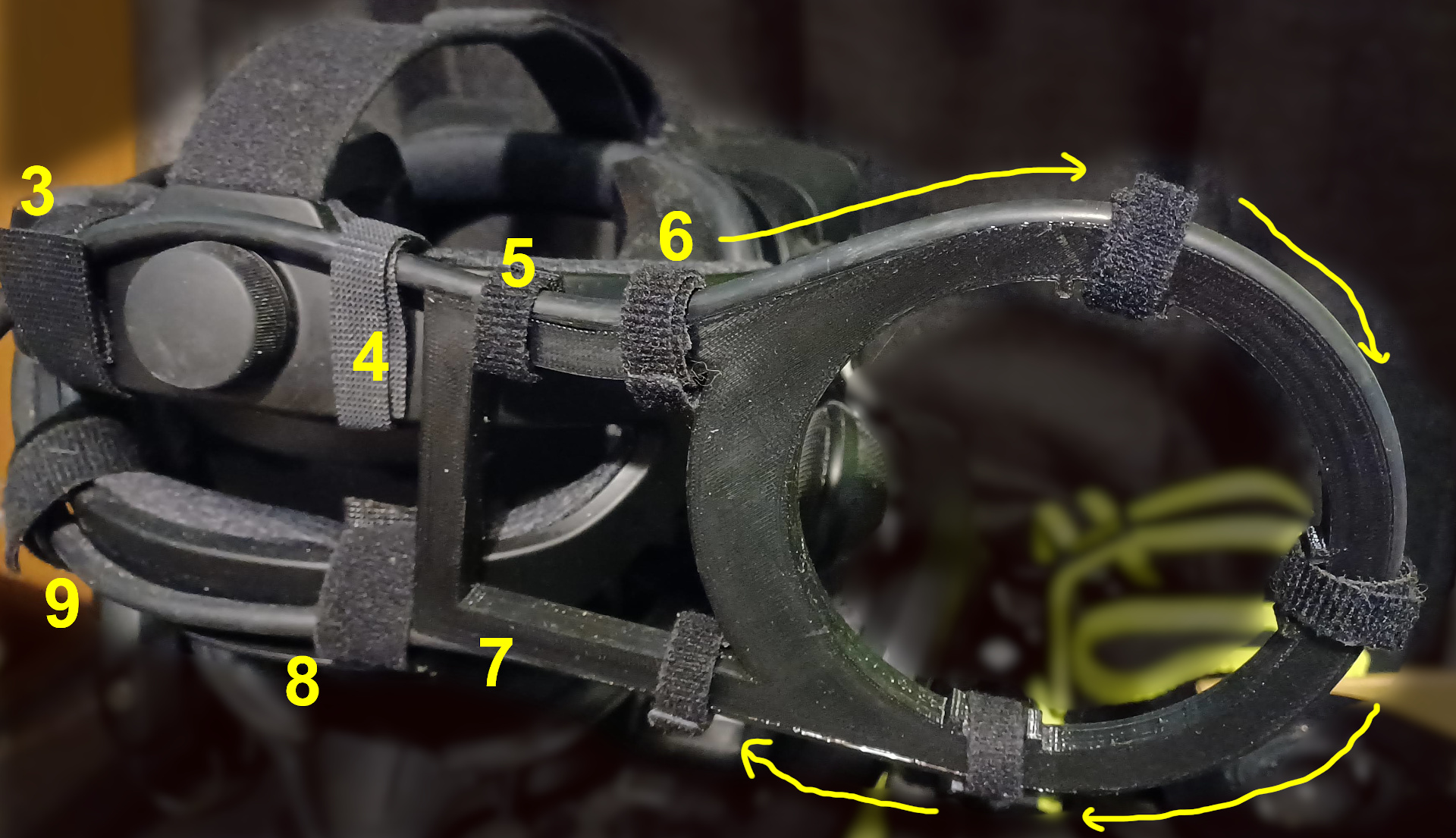
- Place the headset in front of you so it is reasonably secure from mishaps while you work on it (you can do it on a table, in your lap, or whatever is comfortable). You should be looking roughly at the rear head strap adjustment knob, as shown in the photo below.
- In order to free the cable, remove the rear cable clip from the lower left head strap (be careful, otherwise you might break the clip). IFixit currently has instructions on clip removal in the Index Tether and Trident Cable guide at Step 2 You don't actually need a “spudger”; a smallish flat screwdriver or decent tweezers will probably also work.
- Hold the cable against the upper rear head strap of the Index to the left of the adjustment knob, and place a loop of Velcro around the two, ideally with the fuzzier Loop" side facing outward. As you can see, my cable is on the outside, above the knob; putting it entirely inside the head strap would require either disconnecting the HMD end, removing the top head strap, or feeding the entire length of cable through from the PC end.
- Repeat step 3 with Velcro on the right side of the knob.
- Route the cable onto the top track at the narrow end of the Redirector, and Velcro the cable to the top left corner there.
- Continue routing the cable across the top of the Redirector and gradually looping it around to the bottom, adding strips of Velcro at roughly the positions shown.
- There should be a strip of Velcro in the lower left corner, but it was not present when I took this photo.
- Velcro the cable to the bottom Index strap on the right of the adjustment knob
- Repeat step 8 with a strip to the left of the adjustment knob. In the photo it looks like the cable continues around the strap after this, but it actually is free of the headset beyond this strip.
- Enjoy the idea of your Valve Index having an "antenna” worthy of Forbidden Planet's Robby the Robot.
Consult the photo below for a visual guide to steps 3 through 9:
** In addition to the mod shown here, I have also performed the cable loop mod on the left front of the Index, as described by Reddit user Any-Spite-7839 on the /r/ValveIndex subreddit. This serves to remove the strain caused by a narrow portion of the cable flexing constantly in this location due to the headset pivoting relative to the head strap.
In summary, I detached the front clip from the head strap (see step 3 of the iFixIt page). Instead of the cable being attached directly to the top headstrap, it now curves downward from the face gasket, loops around toward the front of the Index, then up to the upper head strap where it is finally held in place with a strip of Velcro and is routed toward the Velcro strip shown in step 3 of this Printable.
The result is a loose circle around the strap pivot point, a little smaller in diameter than the Redirector makes, but not by a lot. You don't need a support structure for the cable loop mod because the loop is unlikely to get pulled any tighter if the cable is also constrained in the back.
I don't have a photo handy and the front cable loop mod is beyond the scope of this Printable, so read the linked reddit post if you need more info.
If you plan to do both mods, I would suggest doing the cable loop mod in between steps 2 and 3 of this Printable.