
1 / 4
Guest WiFi-QR-Code Stand
Zamów wydruk tego modelu
Obliczymy ostateczną cenę na podstawie wybranego pliku. Sprawdzisz ją i zaakceptujesz przed płatnością.
Zapisane na tym urządzeniu.
Most models on Printables are made with software I do not use. So I created a stand by myself with FreeCAD.
- Ocena
- 5 / 5
- Polubienia
- 33
- Pobrania
- 392
- Wydruki
- 2
- Wyświetlenia
- 3140
- Oceny
- 1
Aktualizacja u źródła:
Informacje o modelu
- Źródło
- Printables
- Kategoria
- Home Decor
- Licencja
- Creative Commons — Public Domain
SzczegółyPliki (5)Wydruki i komentarze (Wydruki: 2) (Komentarze: 4)Remiksy (0)Kolekcje (68)Powiązane
For the model with magnets, you need five round 10mm x 1mm strong magnets (neodymium). The model I printed is the one with magnets, so I can use it as a stand or as a fridge magnet.
To create your own qr-code
- visit https://www.qrcode-monkey.com/#wifi or any other online generator, where you can create a WiFi code and save it as SVG
- visit https://imagetostl.com/convert/file/svg/to/stl and upload your SVG and use exactly the following settings:
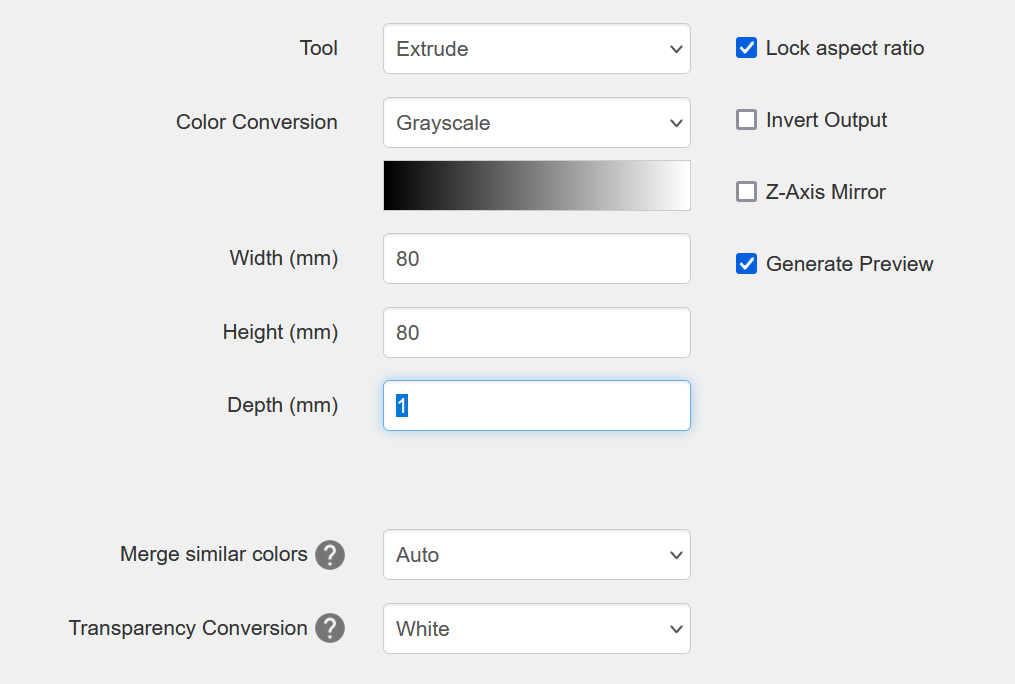
- Now save your STL
- You can import the STL directly into the slicer and arrange it on the sign model (might need a NetFabb repair).
or
Import it into FreeCAD with the provided FCStd-File. It should be at the right position without any further transformation, convert it to shape in Part Workbench, and make Refine Shape. Export it togehter with the other parts as 3MF. - In the slicer, add a pause for the insertion of the magnets on height 1.6mm (layer 8 with 0.2 layer height)
- Add a color change on height 3.2mm (layer 16 with 0.2 layer height).