Customizable Dual Message Illusion (OpenSCAD)
Obliczymy ostateczną cenę na podstawie wybranego pliku. Sprawdzisz ją i zaakceptujesz przed płatnością.
Zapisane na tym urządzeniu.
Informacje o modelu
- Źródło
- Printables
- Kategoria
- Sculptures
- Licencja
- Creative Commons — Attribution
Customizable dual message illusion for OpenSCAD. A different customizable message will be visible depending on the viewing angle. The message orientation may also be customized (i.e. horizontal, vertical, diagonal). As for the base plate, it may either be placed on the bottom, on back for wall mounting, or completely removed altogether.
I saw roboticide's model and really liked the concept, so I decided to make a parametric version in OpenSCAD. The original concept comes from LLOYDHOPANDA's I LOVE YOU FOREVER in Thingiverse.
Instructions
OpenSCAD is a free software that facilitates parametric 3D modeling. If you are unfamiliar with OpenSCAD, I really encourage you to try it out. Just follow these steps to start generating your own custom models:
- Download and install OpenSCAD (its free!): https://openscad.org/downloads.html
- Open the model file with OpenSCAD. These typically use the “.scad” extension.
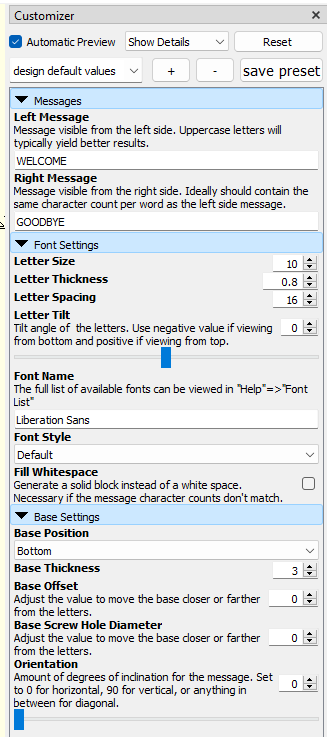
- Adjust the model parameters in the “Customizer” section as desired.
- The “Customizer” section will be visible by default on right side of the window. If not, it can be toggled through the top menu (Window=>Customizer)
- Press F5 (or the “Preview” button at the top menu) to preview the model.
- Press F6 (or the “Render” button at the top menu) to generate the model.
- Press F7 (or the “Export to STL” button at the top menu) to save the exported STL to your computer.
OpenSCAD Customizer Preview