
Hardcase v1.0
Obliczymy ostateczną cenę na podstawie wybranego pliku. Sprawdzisz ją i zaakceptujesz przed płatnością.
Zapisane na tym urządzeniu.
Informacje o modelu
- Źródło
- Printables
- Kategoria
- Other Gadgets
- Licencja
- Creative Commons — Attribution — Noncommercial
>>>>>>>>>>>> NEW Version 2.0 is available here. <<<<<<<<<<<<
-------
This is the older version 1.x. Click here to get new model.
This hardcase lets you scale it to suit you needs.
Model is free. Please consider uploading a photo of a make and make a rating.
Recommended materials is ABS, stainless steel for hinges etc. and TPU for the seal. You may use ASA as replacement for ABS. PLA was used for prototyping, but this only recommended for use in normal tempered environment. You may try PETG for a slightly better temperature tolerance compared to PLA, but ABS is the recommended material.
If you print and make the case, uploading pictures of the make will be very much appreciated. When doing so, please specify your choice of scale and choice of filament type/brand/colour.
Cylindric material/pins/dowels/rods for locks, hinges and handle are recommended to be in stainless steel although less tronger material can be used.
This is a link to some pins in stainless steel as example https://www.aliexpress.com/item/4000473863693.html
When scaling the model, you need to scale uniformly in X, Y and Z. The approximate sizes in scale 100%, 75% and 50% are as listed below. You will need 2 pins of each of the 3 types listed:
100% Scaled Variant
- Dimensions: approx. 270x240x122mm (wall typical 4mm).
- Pins for locks: 41 x 4mm Ø. Be precise for nice result.
- Pins for hinges: 75-85 x 4mm Ø.
- Pins for handle: 22 x 6mm Ø.
75% Scaled Variant
- Dimensions: approx. 203x180x92mm (wall typical 3mm).
- Pins for locks: 30.75 x 3 mm Ø. Be precise for nice result.
- Pins for hinges: 56-63 x 3 mm Ø.
- Pins for handle: 16.5 x 4.5 mm Ø.
50% Scaled Variant
- Dimensions: approx. 135x120x61mm (wall typical 2mm).
- Pins for locks: 20.5 x 2 mm Ø.
- Pins for hinges: 37-42 x 2mm Ø.
- Pins for handle: 11 x 3 mm Ø. You can use a M3x12 hex bolt and remove 1mm.
I used for the hinges nails with a head slightly larger diameter of the head compared to the rest of the nail. I then used heat from soldering iron to push the head in which sort of glue it in place.
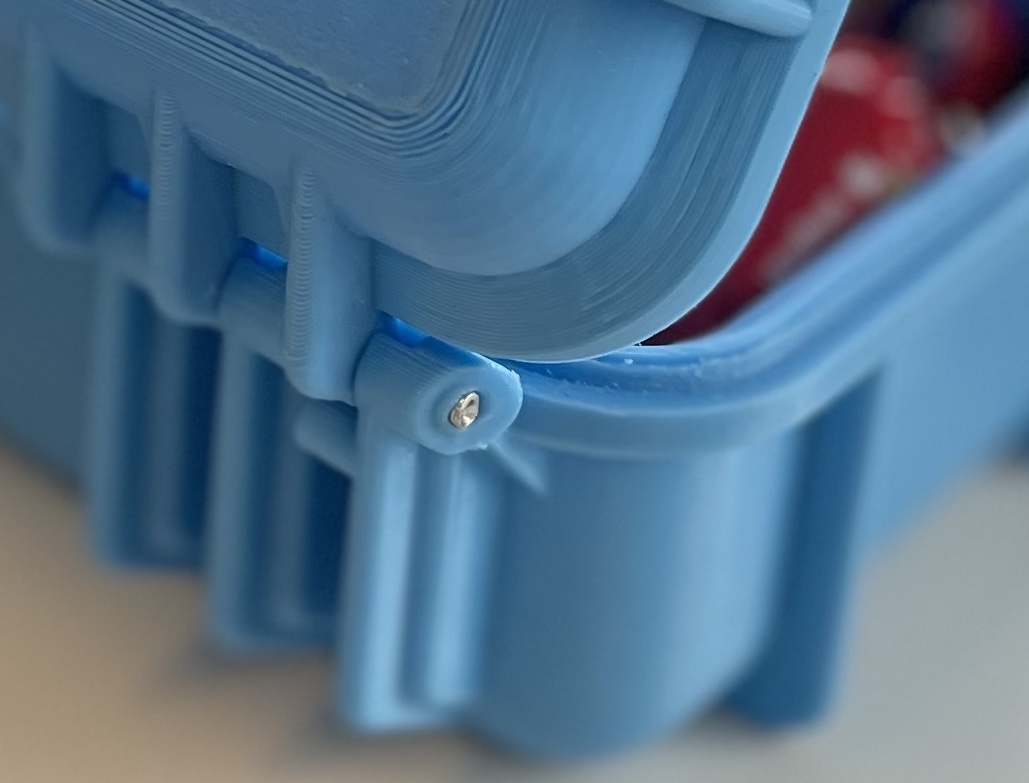
The 50% scaled variant can use 1.75mm filament for pin/dowel/cylinder pins for the 2mm diameter unless extra strength is required.
Depending on scale variant and hardness of case desired/required, you can print with many walls, many top/bottom layers and 100% infill weakening down to a few walls, a few top and bottom layers and perhaps 30% infill.
The 50% scaled prototype model on the photo was printed (in PLA) with a fixed layer height of 0.2mm. Test prints with variable/dynamic layer height ranging from 0.1-0.3 was tried with mixed results. Theoretically the roundings on the bottom, the top lid and the handle should get to look a lot nicer with dynamic layer height. Also printing with especially scale 70% and up would gain a lot in total print time, if dynamic layer height with higher layer height than 0.2mm can be used. The KLM-blue hardcase on photo was printed with dynamic layer height, and the first prototype did not come out very nice, as can be seen on photo of roundings.
The original models was printed in 50% scale in PLA while developing the prototype, but this material will soften at temperature at 45C and above and is in many cases not suited for a hardcase.
The top and bottom part of the case are recommended to be printed with the top and bottom facing the print bed. The prototypes was printed with support for parts with an angle greater the 60 degrees (not including 60 degrees) and the support was assisted with a brim for the support.
The holes in the locks, the hinges and the handle as well as the holes in top part for lock and hinges and holes in bottom part for hinges and handle are all exact size. Depending on how well you have calibrated your printer and depending on how exact you printer prints, you may have to clean up the holes with drills in the right sizes for your selected scale variant.
If your seal is to tight or too loose, you may adjust the height (Z scale) of the seal in your slicer. While you need to scale uniformly in X, Y and Z, the Z scale for seal can be slightly additionally adjusted. You can in Cura adjust the thickness of this seal by changing the horizontal expansion parameter under Walls. PrusaSlicer has same ability with then name “XY Size Compensation”. Please note that you in slicer settings may want to set a negative value for first layer horizontal expansion to avoid elephant foot. In PrusaSlicer this is called “Elephant foot compensation”. That said in some cases, an elephant foot is making the seal tighter.
For the locks (print twice), you should avoid elephant foot and select a negative value of first layer horizontal expansion (Elephant foot compensation in PrusaSlicer). Value will depend on your printer and calibration, but somewhere between -0.1 to -0.35mm may be a good start.
The model on the pictures printed in florescent yellow, is printed in scale 50%.