G4 RF1 Gaszähler Gas Meter Readout Adapter with Electronics Space
Obliczymy ostateczną cenę na podstawie wybranego pliku. Sprawdzisz ją i zaakceptujesz przed płatnością.
Zapisane na tym urządzeniu.

Adapter to attach a SS49 hall sensor to the Pipersberg G4 RF1. This is a gas meter (gaszähler) used in germany.
- Ocena
- 5 / 5
- Polubienia
- 8
- Pobrania
- 123
- Wydruki
- 1
- Wyświetlenia
- 1885
- Oceny
- 1
Aktualizacja u źródła:
Informacje o modelu
- Źródło
- Printables
- Kategoria
- Other House Equipment
- Licencja
- Creative Commons — Attribution — Share Alike
This is a model that allows clipping an SS49E/49E/OH49 hall sensor onto the Pipersberg G4 RF1. It has a lot of blank space inside to put e.g. a Wemos D1 Mini, and a hole for a USB power cable.
Props to the author of the model this is based on, who found good positions for the hall sensor. If you want to edit this model, check the tinkercad source.
Putting that sensor into the appropriate slot (pipersberg made variants where each impulse is 0.1 m3, and another variant where each impulse is 0.01 m3) allows you to get a voltage curve similar to the following one. Note that the voltage curve needs to be multiplied by 3.3 to get the actual voltage, since the Wemos D1 Mini used for measuring has a voltage divider.

With something like the following ESPHome script, you can import the data. Note that you need two input_number helpers in HA: spannungsschwelle_gas_sensor and spannungsschwelle_gas_sensor_reset.
esphome:
name: gashallsensord1 mini pro but only with 4MB -> d1_mini
esp8266:
board: d1_mini
Enable Home Assistant API
api:
wifi:
ap: {}
networks:
- ssid: "secret"
password: "secret"
captive_portal:
logger:
level: INFO
globals:
- id: total_pulses
type: int
restore_value: false
initial_value: '0' # hier kann der Gaszählerstand initialisiert werden
sensor:
platform: homeassistant
name: spannungsschwelle_gas_sensor
entity_id: input_number.spannungsschwelle_gas_sensor
id: spannungsschwelle_gas_sensor
platform: homeassistant
name: spannungsschwelle_gas_sensor_reset
entity_id: input_number.spannungsschwelle_gas_sensor_reset
id: spannungsschwelle_gas_sensor_reset
platform: adc
internal: false
name: "Hall readout"
pin: A0
id: analog_hall_read
update_interval: 0.1s
accuracy_decimals: 5
filters:
- median:
window_size: 13
send_every: 13
send_first_at: 13
platform: template
internal: false
update_interval: 0.1s
id: digital_hall_read
name: "Currently detecting measurement valley"
lambda: |-
static int has_counted_up = 0;
int mV = id(analog_hall_read).state * 1000;
bool pulse_threshold_condition = mV < id(spannungsschwelle_gas_sensor).state;
bool reset_threshold_condition = mV > id(spannungsschwelle_gas_sensor_reset).state;
if (pulse_threshold_condition && has_counted_up == 0) {
id(total_pulses) += 1;
ESP_LOGI("gas", "just counted up! %d", id(total_pulses));
has_counted_up = 1;
}
if (reset_threshold_condition == 1 && has_counted_up == 1) {
ESP_LOGI("gas", "reset countup");
has_counted_up = 0;
}
return has_counted_up == 1;
platform: template
name: "Gasverbrauch"
device_class: gas
unit_of_measurement: "m³"
state_class: "total_increasing"
icon: "mdi:fire"
accuracy_decimals: 3
lambda: |-
return id(total_pulses) * 0.01;
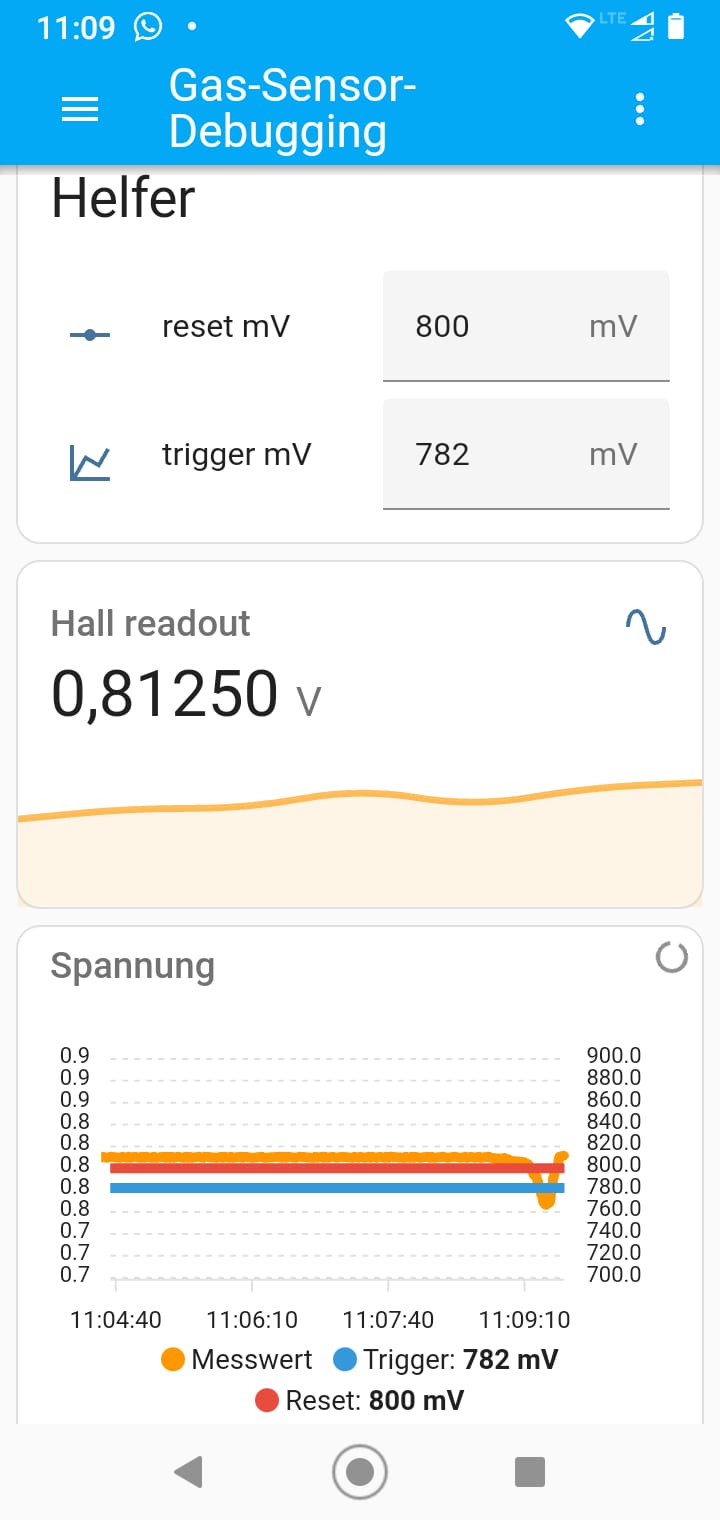
To understand what these values do, look at the following screenshot: The orange line is the measured value. Each time a gas impulse comes by, the voltage drops a little. A gas impulse is counted when the orange line goes below the blue spannungsschwelle_gas_sensor line. The next impulse can only be counted when the orange line went above the red spannungsschwelle_gas_sensor_reset line.