
Automated Tea Steeper
Obliczymy ostateczną cenę na podstawie wybranego pliku. Sprawdzisz ją i zaakceptujesz przed płatnością.
Zapisane na tym urządzeniu.

This is an automated tea steeper robot, for those who need a little help making tea. Uses Arduinos and a couple servos.
- Ocena
- 0 / 5
- Polubienia
- 7
- Pobrania
- 67
- Wydruki
- 0
- Wyświetlenia
- 636
- Oceny
- 0
Aktualizacja u źródła:
Informacje o modelu
- Źródło
- Printables
- Kategoria
- Other Gadgets
- Licencja
- Creative Commons — Attribution — Noncommercial
Istvan Matuz (https://www.instagram.com/istimat.g00/) wrote an extensive blog post on creating a tea steeping robot: https://solderchips.wordpress.com/2016/01/07/3d-printed-arduino-powered-lazy-mans-tea-steeper/
My remix modifies the original in the following ways:
- combines several parts, as they are printable as a whole
- added a groove to help with placing a couple pieces
- added a hook to make tying on a tea bag easier
- provides Arduino control code to do the dunking
Printing
The STL provided includes all the parts in a printable orientation. 0.2mm layers with 15% infill and 2-4 perimeters. No supports are needed. You may want to add a brim to the small rectangles, depending on how sticky your build plate is.
Components
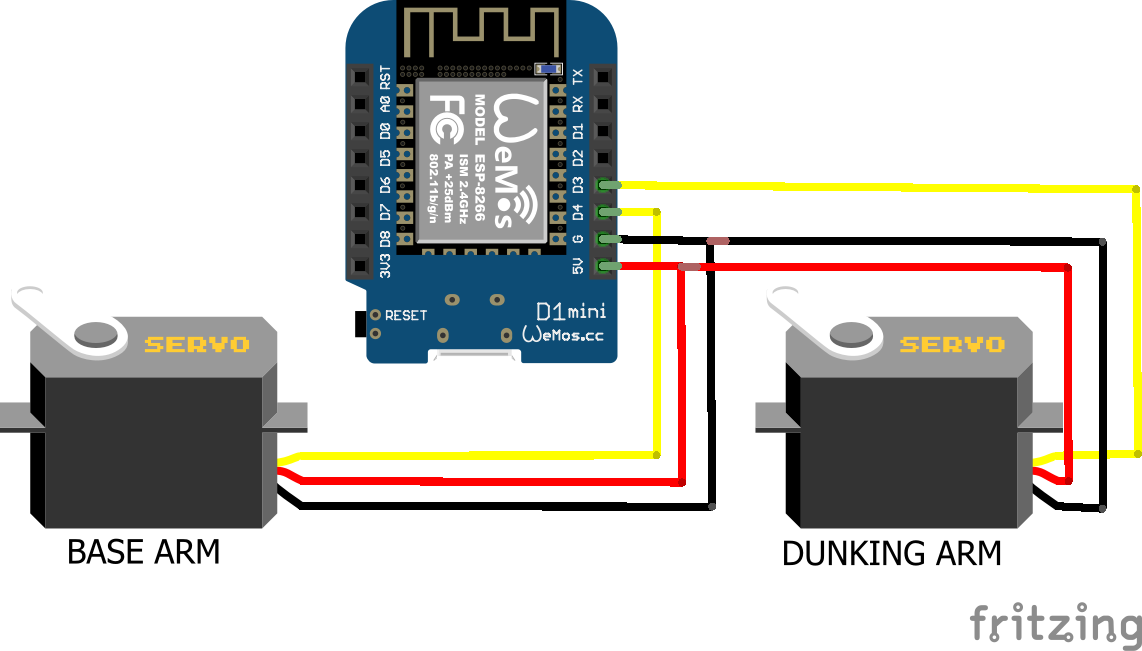
- 2x SG90 (or similar) servos
- ESP12e or ESP8266 (provided code is for this)
- 4x M2x5 screws (optional)
- 4x M2x3x3.5 brass insert (optional)
- 4x M2x5 screws (for the cover)
Wiring Diagram
Assembly
Begin by attaching the dunking arm to the first servo using kit screws or metal screws. If you find the holes in the arm too large, then brass inserts work nicely.
Next, glue the first small rectangle to the base, in the groove, and position the 2nd servo so you know where to glue the 2nd post. Also, from the first set of holes you'll know if you need to put brass inserts in them, too.
Connect the two servos with the thicker arm; it should tension fit.
Last, glue the housing onto the base plate, wire the components into the board and attach the cover.
Programming
The only dependency for this project is the servo library, which ought to be part of a default Arduino IDE installation. Load the *.ino file included in this project and flash it to the hardware.