
Digit Info Board
Obliczymy ostateczną cenę na podstawie wybranego pliku. Sprawdzisz ją i zaakceptujesz przed płatnością.
Zapisane na tym urządzeniu.

Manual information board that mimics the 16-segment. I think this makes truly beautiful information and decorative item.
- Ocena
- 5 / 5
- Polubienia
- 109
- Pobrania
- 215
- Wydruki
- 2
- Wyświetlenia
- 2926
- Oceny
- 2
Aktualizacja u źródła:
Informacje o modelu
- Źródło
- Printables
- Kategoria
- Other Art & Designs
- Licencja
- Creative Commons — Attribution — NoDerivatives
This design is free for the benefit of the community, but If you like my designs and want to contribute, you can make a donation to buymeacoffee or paypal, that will be greatly appreciated.
If everyone contributes even with a small amount, that can make the difference to allocate more time doing this (PayPal and buymeacoffee). But the best and more reliable way to support is with a regular contribution, like patreon or ko-fi.
———
Introduction and context
This item was something I particularly like, not just by is aesthetic and function, but particularly because is something you have to spend time putting all pieces together. this creating an intention and forcing concentration on the doing.
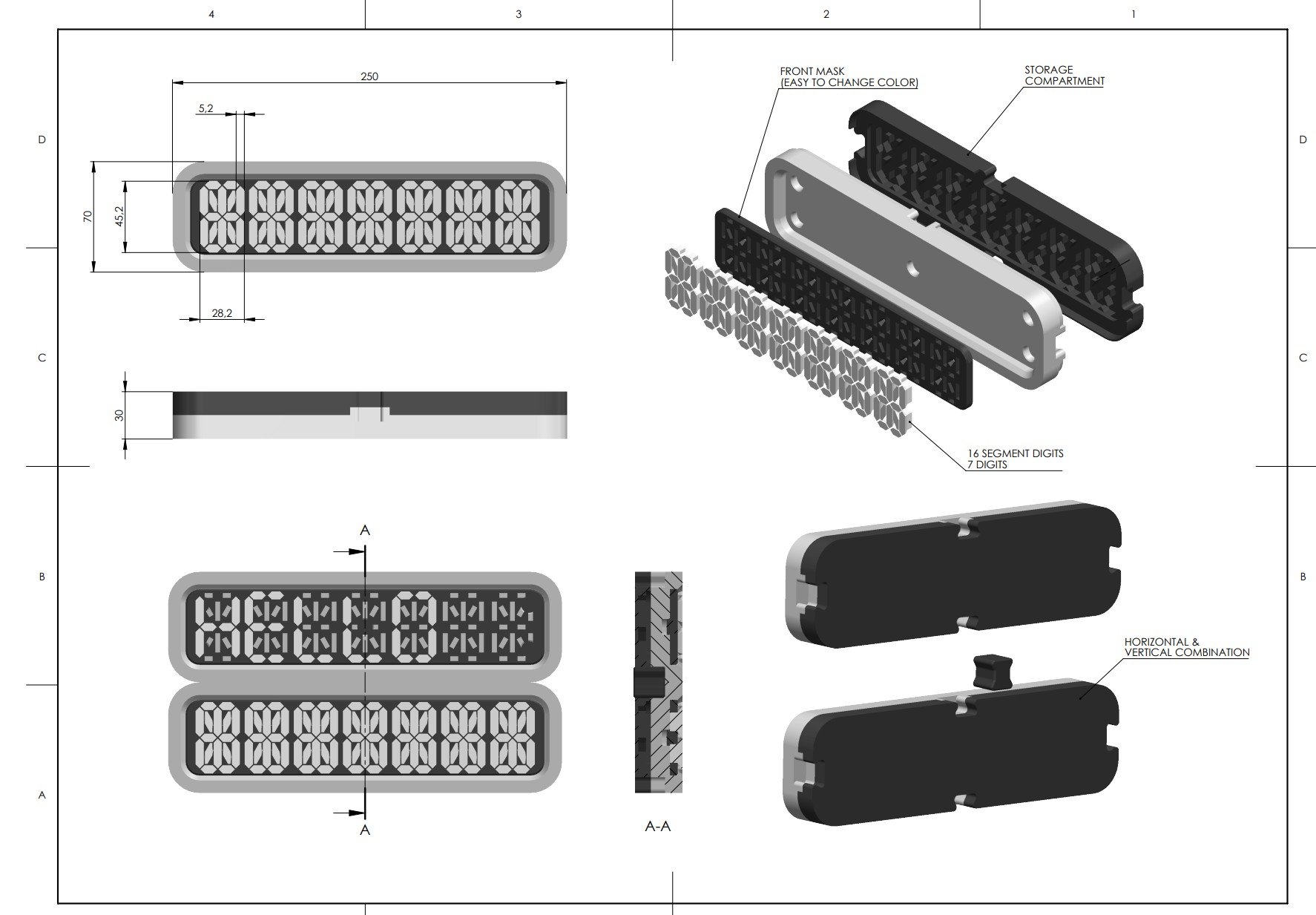
Still regarding the design, it holds a storage compartment on the back (see photo), where the digit segment stay together without mixing. You can make any combination you like when using more than one. With large digits and easy to read, is a nice item for office or even a guesthouse. you can complement with a QRcode or something else, like a Logo.
https://youtube.com/shorts/dH0y_9QP6FQ
Assembly instructions
the assembly is quite simple, but it takes time. Time to train focus. For more information, see drawing

Print instructions
This assembly uses tight fits, precision on print is required. the Elephant foot problem can be an issue. I’ve designed it to circumvent this, but remember to make a test of a small portion (use Boolean operations in slicer for that).
Particularly in the digit segments , if you find the fit not perfect, and your printer does not want to cooperate (elephant foot, input-shaping and others) the scale command is your friend. I know this will be a problem for some, does who read the instructions will have solutions, and life will be easy :)
Encores
(forgive me, I’m finishing writing this on my holidays, and have to much spare time… Btw, I’m sketching some nice things. So, don’t forget to “support the designer“.