
Ayyam-i-Ha Gift - Nine Pointed Star Ornament with Gift Box
Obliczymy ostateczną cenę na podstawie wybranego pliku. Sprawdzisz ją i zaakceptujesz przed płatnością.
Zapisane na tym urządzeniu.

Ayyam-i-Ha, or the Intercalary Days, is a period dedicated to socializing, being hospitable, giving generously [...]
- Ocena
- 5 / 5
- Polubienia
- 5
- Pobrania
- 27
- Wydruki
- 1
- Wyświetlenia
- 323
- Oceny
- 1
Aktualizacja u źródła:
Informacje o modelu
- Źródło
- Printables
- Kategoria
- Home Decor
- Licencja
- Creative Commons — Attribution — Share Alike
”My God, my Fire and my Light! The days which Thou hast named the Ayyam-i-Ha (the Days of Ha, Intercalary days) in Thy Book have begun, O Thou Who art the King of names, and the fast which Thy most exalted Pen hath enjoined unto all who are in the kingdom of Thy creation to observe is approaching."
–Bahá'u'lláh, The Kitab-i-Aqdas
Ayyam-i-Ha, or the Intercalary Days, is a period dedicated to socializing, being hospitable, giving generously to the poor and needy, and preparing for the upcoming month of fasting. Depending on the year, Ayyam-i-Ha will vary in its duration and it is composed of the excess of days that fall outside of the 19 months of 19 days. Baha'i Blog
Instructions
Print one ornament, and one box insert (if using) in PLA or the material of your choice. 10% infill. Then follow the instructions below to make the decorative packaging.
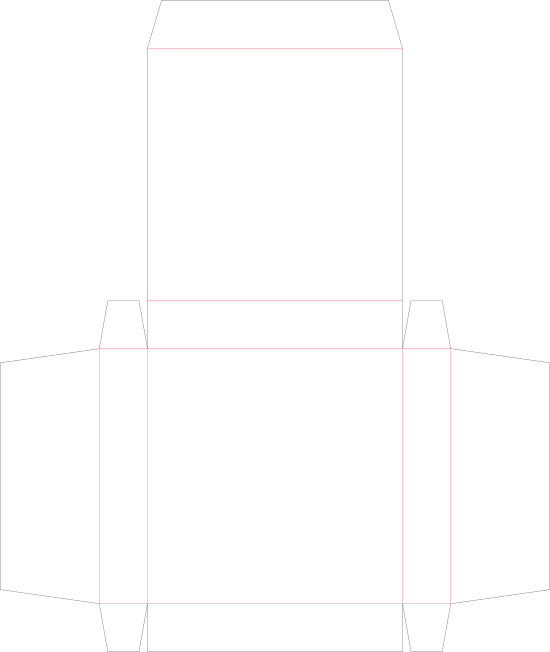
The Gift Box Design is included here as a PNG file. To import into Cricut or similar software size it to 19.1cm or use this link to Cricut Design Space.
Please note that while this design is setup for print and cut, itrequires 11"x17" (tabloid) cardstock. A basic cut of the box with no printing can be done on standard 12"x"12" Cricut cardstock.
Equipment
- Large format ink jet or color laser printer,must be capable of printing tabloid sheets
- Cricut Maker or Explore (or really good skills with an x-acto knife...)
- 12"x24" Cricut cutting mat
Materials
Ornament, Box, and Liner
- PLA (or your choice of filament)
- 11"x17" Cardstock, heavy weight (100lb+)
- Inkjet or laser sticker paper
Outer Packaging for Gift Wrapping or Shipping
- 8.5" x 11" Cardstock, medium weight (80lb)
- 11"x17" Printer paper, light weight (20lb)
Cricut Setup for 2-up Print and Cut (Tabloid)
To set up the Cricut for 2-up print and cut, rotate one of the images 180 degrees and place it as far to the right as you can. Then drag it to the top until it stops. Move the other image as far to the bottom left as it will go. Use the following image as a guide.
Sticker
Import the PNG into Cricut Design Space as a print and cut design, or use this link for a pre-made project in Cricut Design Space. Size the sticker to 6.93cm x 6.82cm (2.728" x 2.685"). Print 6-up on sticker paper and cut. Sticker fits on the back of the ornament.
Sticker Design
Apply the Sticker
Folding Instructions
Step 1. Print and cut the design. Carefully fold and crease along all score lines.
Step 2. Flip the printed box design to blank side.
Step 3. Fold and glue the L-shaped flap first, being careful to line up the two star shaped cutouts
Step 4. Place the 3D printed ornament box insert to line up with the large star shaped cutout, and glue to secure it.
Step 5. Fold around the ornament to create the box shape.
Step 6. Secure the remaining flaps by pushing them underneath the box insert.
Step 7. Allow the box to dry and place the ornament inside!
Finished!
Gift Wrap
Print on thin paper at either 11"x17" (tabloid) or 8.5"x11" (letter) or any size in between, making sure to select "Fill Entire Paper" in your printer options. The gift wrap is included in this archive, and a download link for only the gift wrap in all colors is below.
Cricut Design Space Links
- Main Project
- Ornament Sticker
- Outer Packaging
Download SVGs:
All art files are included here except for the SVG files which are available below.
- Gift Box (svg)
- Outer Packaging (svg)
- Baha'i Gift Wrap, All Colors (zip)
Category: Decor