
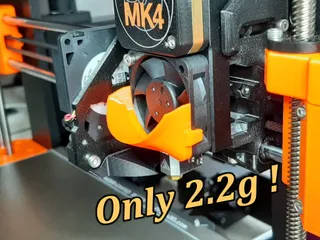
Mk4 heatbreak exhaust duct
Obliczymy ostateczną cenę na podstawie wybranego pliku. Sprawdzisz ją i zaakceptujesz przed płatnością.
Zapisane na tym urządzeniu.

Lightweight heatbreak exhaust duct, adding only 0.7g to the printhead and snap-on mounting.
- Ocena
- 4,889 / 5
- Polubienia
- 39
- Pobrania
- 186
- Wydruki
- 10
- Wyświetlenia
- 920
- Oceny
- 9
Aktualizacja u źródła:
Informacje o modelu
- Źródło
- Printables
- Kategoria
- Prusa Parts & Upgrades
- Licencja
- Creative Commons — Attribution — Noncommercial
Following the discussion here,
the heatbreak fan might be causing issues due to airflow around the model.
Since the influence on the Input Shaper by adding weight to the x-axis is not clear, I decided to design it as lightweight as possible, ending up with a calculated weight of 0.74g PETG.
Wall thickness is 0.87mm, following the recommendation of PrusaSlicer for thin walls with 2 lines at 0.15mm layer height.
The design can simply be snapped onto the extruder, no need to disassemble anything!
Compared to other designes, with this model the cross section of the air outlet is only reduced by a few square millimeters. Therfore impact on the airflow at the heatbreak should be negligible.
I recommend to move the X-carriage to the rightmost position by hand after mounting the part, to make sure it is not colliding with the threaded rod!
PrusaSlicer Settings:
Part is printed with front side down.
Plater
Supports: Everywhere
Infill: 15%
Print Settings
Profile: 0.15mm QUALITY @MK4 0.4 with:
- Layers and perimeters / Extra perimeters on overhang: yes (*)
- Support material / Generate support material: yes
- Support material / Syle: Organic
- Support material / XY separation btw. object and support: 50%
- Advanced: Bridge flow ratio: 1.05 (**)
(*) switch to Expert mode to get this option.
(**) 1st layers placed on supports do not look perfect so I tried this.
Filament Settings
Prusament PETG
Printer Settings
Original Prusa MK4 0.4 nozzle (no IS for max. quality)
Setup:
Material: Prusament PETG
Printedbed: Satin powder-coated sheet
Have a close look at the model before cutting off supports to avoid accidentally removing details requried for the snap-on mounting!
1st layers placed on support do not look perfect so I tried to change params related to bridging. If you find better settings, please share it by adding a comment.
May be you are also interested in my MK4 heatbreak fan duct - https://www.printables.com/de/model/843352-mk4-heatbreak-fan-duct - channeling the airflow at the intake side: