
Cardboard Gridfinity Bins
Obliczymy ostateczną cenę na podstawie wybranego pliku. Sprawdzisz ją i zaakceptujesz przed płatnością.
Zapisane na tym urządzeniu.

Lightweight Gridfinity compatible bins mostly made out of cardboard.
- Ocena
- 4,93 / 5
- Polubienia
- 1905
- Pobrania
- 3057
- Wydruki
- 53
- Wyświetlenia
- 41 441
- Oceny
- 43
Aktualizacja u źródła:
Informacje o modelu
- Źródło
- Printables
- Kategoria
- Organizers
- Licencja
- Creative Commons — Attribution
Hey,
Gridfinity is great, but for big projects, they take a long time to print and use quite a bit of filament.I designed these bins that use cardboard boxes to reduce both.
Cereal boxes, frozen pizza boxes, Tetra Pak, and the likes work really great for this and should be present in any household.
The cardboard is simply press-fitted into the 3D-printed parts. Glue is not required, but a few drops of superglue can ensure the boxes stay together forever without wearing out.
Especially the bigger sizes save a lot of print time and filament compared to the standard Gridfinity bins and even the ultra-light variants.
The assembly can be a little bit fiddly at first, but I provided detailed instructions below with some important tips. Once you get the hang of it, assembly becomes quite fun.
Project Origin
This project was first meant as a joke on Reddit. My original design used toilet paper rolls, and I posted them under the pun "shitfinity". It somehow went viral in the 3D printing subreddit, with many people asking for the files. It even got featured in one of Zack Freedman's videos (creator of Gridfinity).
OG-Post: https://www.reddit.com/r/3Dprinting/comments/1crwgp8/shitfinity
Release-Post: https://www.reddit.com/r/3Dprinting/comments/1cte0dv/shitfinity_released
Updates:
I just released the V5 version. Since there are lots of variants, I am unfortunately not able to print every single one of them. If there are any problems with a specific model, please let me know so I can fix it. Thanks!
v5
!!!BREAKING CHANGE!!!: V5 bins can't be stacked on V4 bins. The other way around is possible
Gridfinity lid and base are easier to print (more surface on first layer)
Tighter tolerances with the Gridfinity base (less wobble)
Tighter tolerances for stacking
The slots for overlapping cardboard have been removed. This is not longer necessary with the new version
New sizes up to 8x8
Upgrade project file now works in FreeCAD 1.1.3
Project file is now fully parameterized for bin sizes
v4.1:
Updated some wrong dimensions on the gridfinity lids.
v4 :
Now version 4 is online. This will have a few improvements compared to v3.:
Gridfinity bins stack better.
Gridfinty bins mesh better with the base plate
Gridfinity bin base is easier to print
Roughly same print times and filament used.
The Basic bins and the template stayed the same.
v3 can still be downloaded as zip in the “other files” section
Printing:
I printed these with a 0.4mm nozzle and 0.2mm Layer height.
No support needed.
The gridfinity base plates can be a bit tricky to print. If you have troubles with them, there exists an easy print version.
Models:
For a complete bin you need to print a pair of lid and base of the same dimension.
You also need the template to cut the cardboard into the right size.
Basic Bin
Not compatible with Gridfinity and not stackable.
They have a lower print time and use less filament compared to the Gridfinity variants.
Gridfinity Bin:
These are compatible with Gridfinity and can stack.
There are 3 variants of the base:
"_base" Files: Print faster and use a little bit less filament, but they are more challenging to print. Your printer needs good bed adhesion and be able to bridge well.
"base_easy_print" Files: These have a larger contact area with the bed, but take longer to print and use up more filament. I'd recommend trying the normal base files first and seeing if your printer can handle them.
"base_magnets" Files: These can be used if you have a magnetic base plate. They are a variant of the standard Gridfinity base with standoffs for gluing in magnets.
Template:
This is used to mark where the cardboard needs to be cut. The different bin sized need differently spaced cutouts. The template contains marking holes for each bin size.
It allows different heights. These are also in Gridfinity units (7mm increments).
If you want to use a ruler instead. Here is the spacing of the holes:
Template Hole | Spacing |
1x1 | 80 mm (3.14 inch) |
2x2 | 110mm (4.33 inch) |
1x2 | 120mm (4.7 inch) |
Template Small:
Small version of the template. Can only be used to mark the length of the cutouts.
You need to draw two parallel lines in the desired height yourself.
Assembly:
Here is a small guide how to assemble the bins. It's a little bit tricky but when you get the hang of it, they assemble quite fast.
I would recommend starting with a 1x1 bin, because the smaller ones are easier to assemble than the bigger ones.
What you need for this example:
1x1 base (it doesn't matter if you use basic or gridfinity)
1x1 lid (it doesn't matter if you use basic or gridfinity)
the template (or a rules, if you use the dimensions from the section above)
scissors or other means to cut the cardboard.
(Optional) A little bit of superglue
Step 1: Prepare the Cardboard boxes
Carefully disassemble the cardboard boxes. For the strips you don't want to have any kinks or folds.
Ideally use boxes that have a lot of clean flat surfaces
Step 2: Mark the size
Use the template to mark where the cardboard should be cut.
Depending on the container size you need a different holes on the template and a different amount of cardboard strips.
The template holes are labeled accordingly on the print.
Size | Number Strips | Template Holes |
1x1 | 2 | 1x1 |
1x2 | 2 | 1x2 |
1x3 | 3 | 2x2 |
1x4 | 4 | 2x2 |
2x2 | 3 | 2x2 |
2x3 | 4 | 2x2 |
2x4 | 5 | 2x2 |
3x3 | 4 | 1x2 |
3x4 | 5 | 1x2 |
4x4 | 6 | 1x2 |
In this example a 1x1 container with 21 mm height is built, therefore 2 cardboard strips are needed.
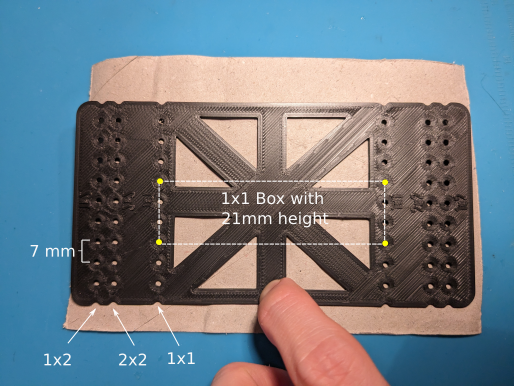
The yellow holes are marked using the template as shown in the picture to get the strips of the desired size.
Step 3: Cut
You can use the template as a ruler to connect the dots and start cutting out the shape.
I'd recommend using a box cutter (for adults) or scissors (for kids) to cut the cardboard.
It's important to be precise here otherwise the assembly might not be as easy.
Step 4: Assembly Base
Start by assembling the cardboard strips into the base plate.
There are wider pockets in the walls where two strips will overlap (removed in V5. Now it doesn't matter where the cardboard overlaps)
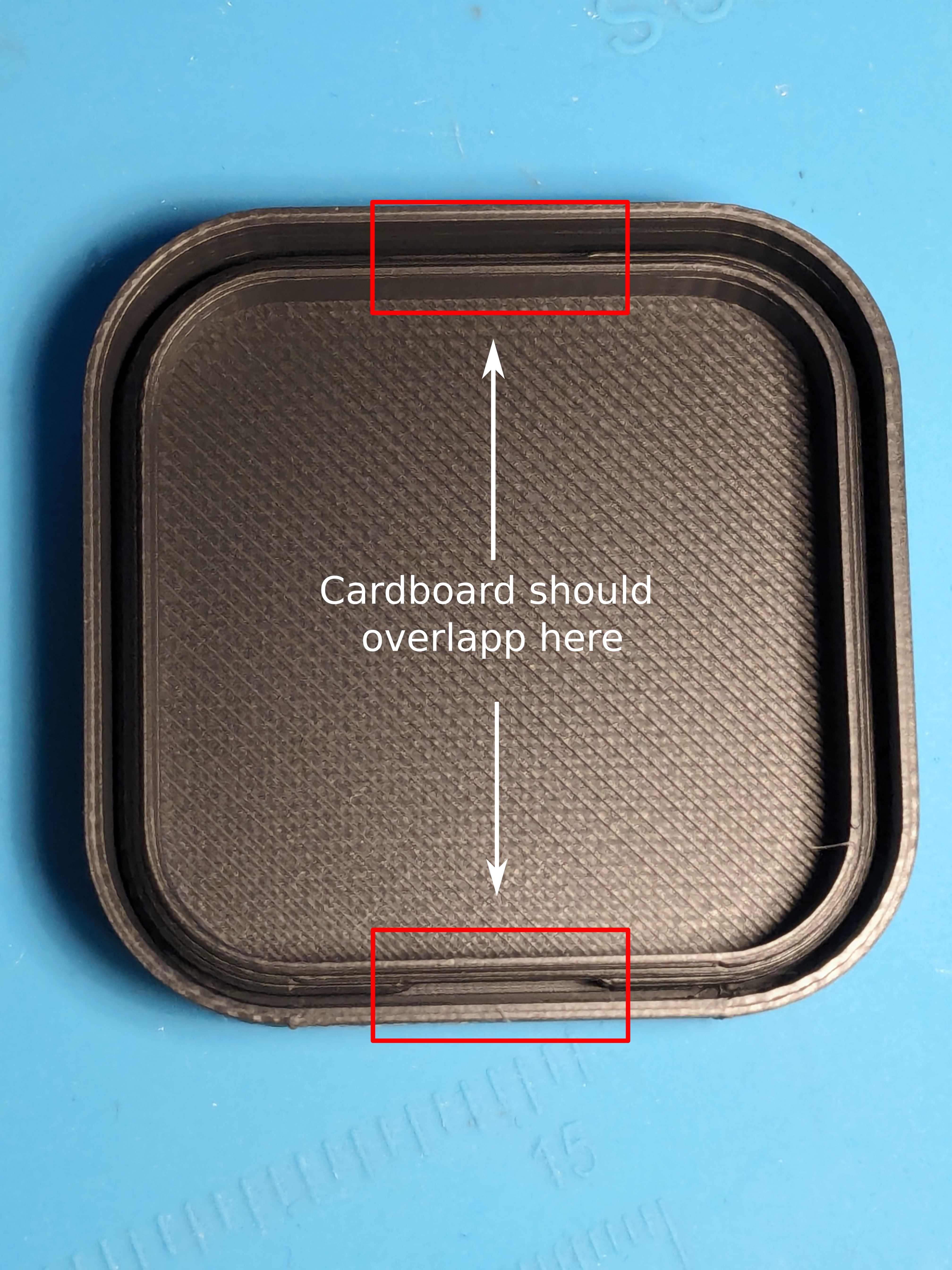
Tuck on end of the cardboard strip into the pocket. Hold it down with your thumb like shown in the picture. This way it can't pop out again.
Keep holding it like this until the entry strip is press fitted.
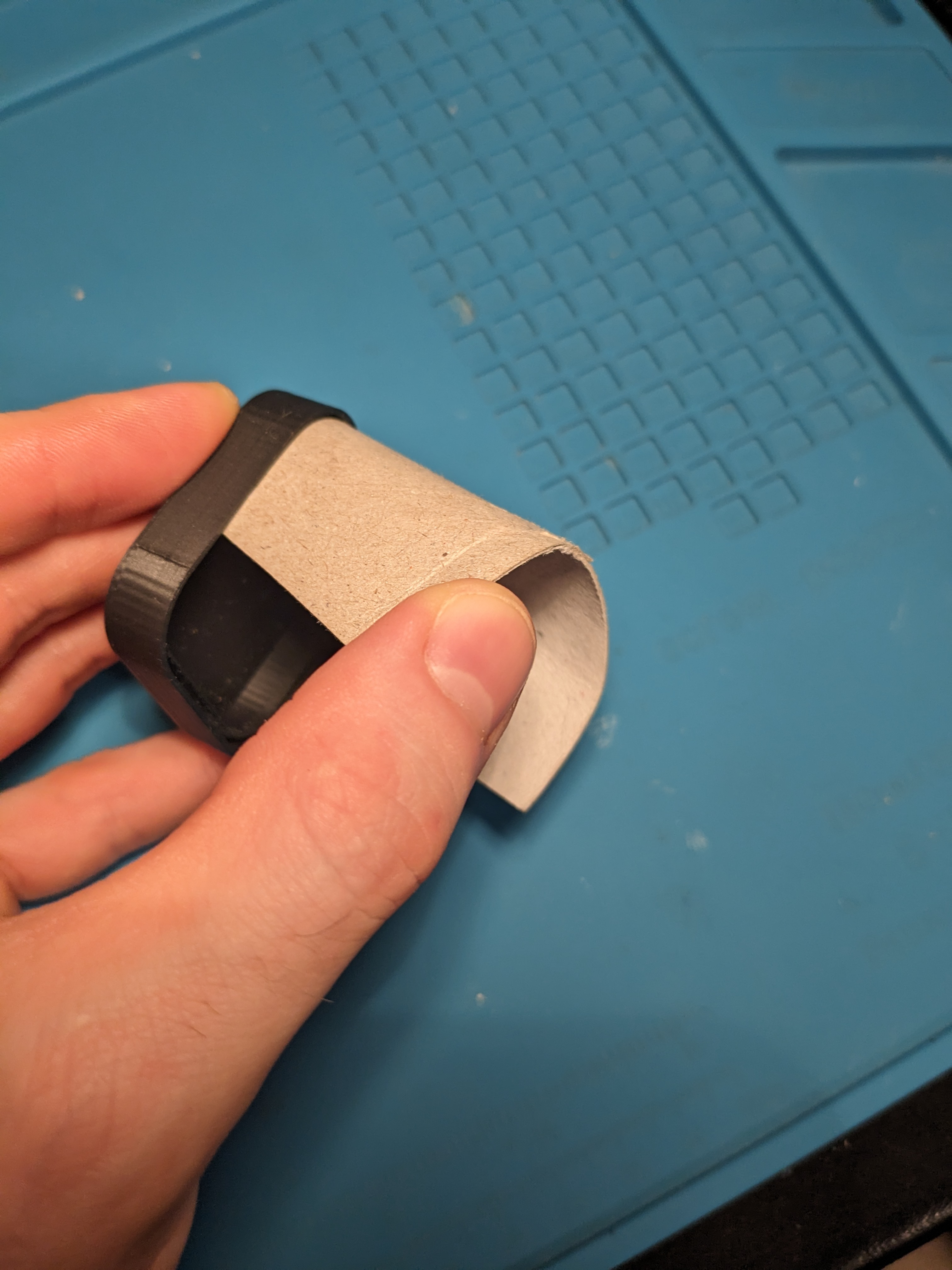
Use your remaining hand to slowly tuck in the rest of the cardboard.
Once all of the strip is submerged gently press it deeper in. Don't use a lot of force, the final press fit will be done once everything is assembled, but it should be firmly enough so it won't pop out again.
Repeat the same for the second strip.
Tips::
Always have all of the cardboard inside the bin (not hanging outside). Especially when assembling the lid, this helps a lot.
The outside wall is higher, so you should first press the cardboard from the inside towards the outside wall. After that, gently press it down to secure it in the groove.
It is important that the edges are clean. Especially toilet paper rolls can fray and get soft, making them progressively harder to assemble. If that's the case, you need to cut them again or use new strips.
Don't give up; it gets a lot easier after a few bins.
Step 5: Prepare for lid
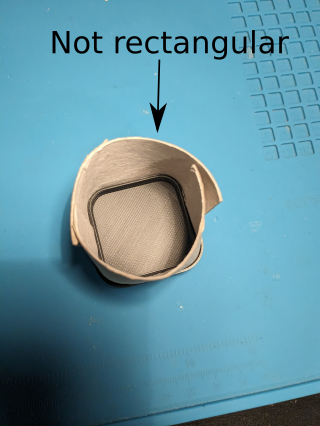
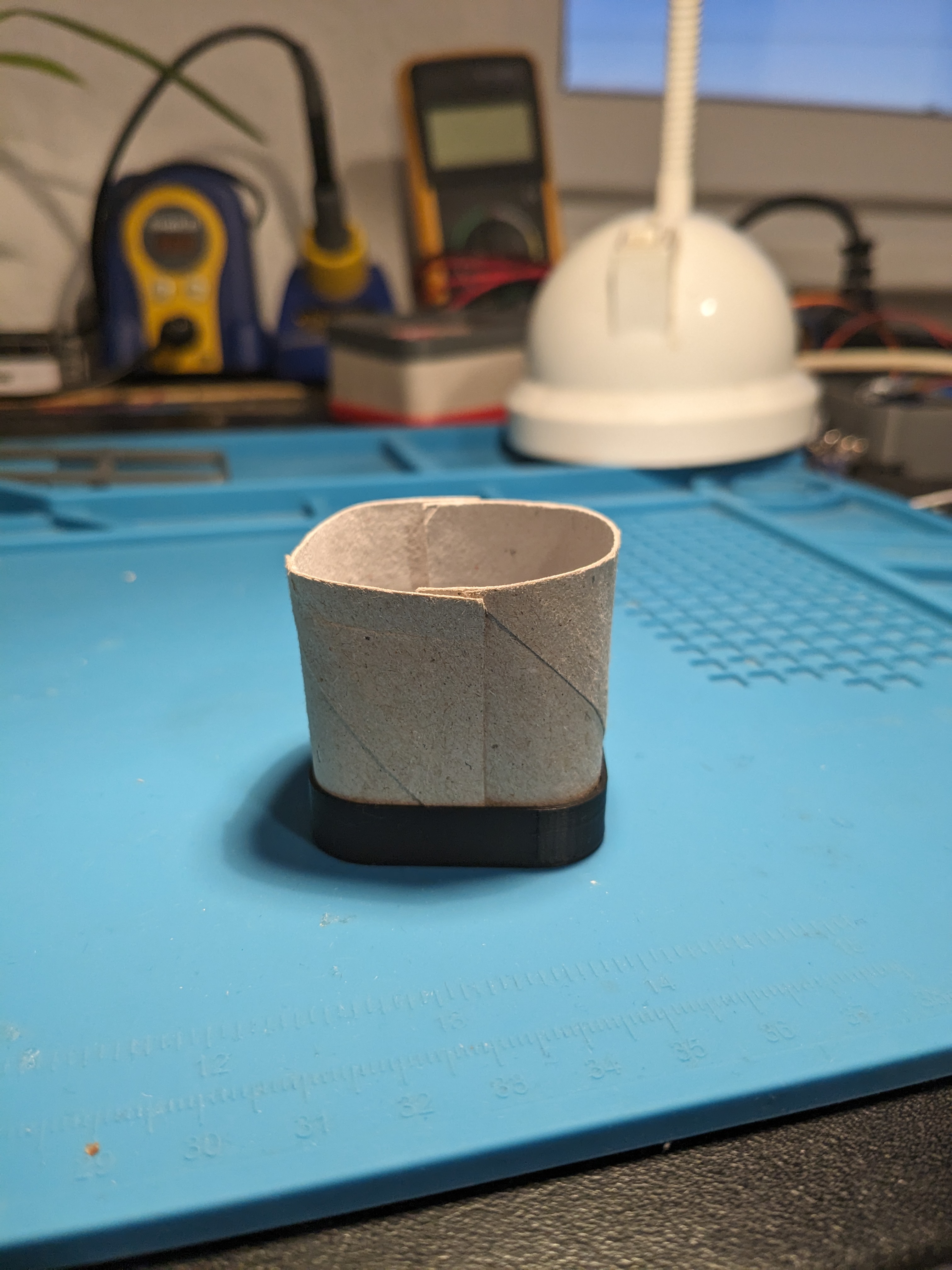
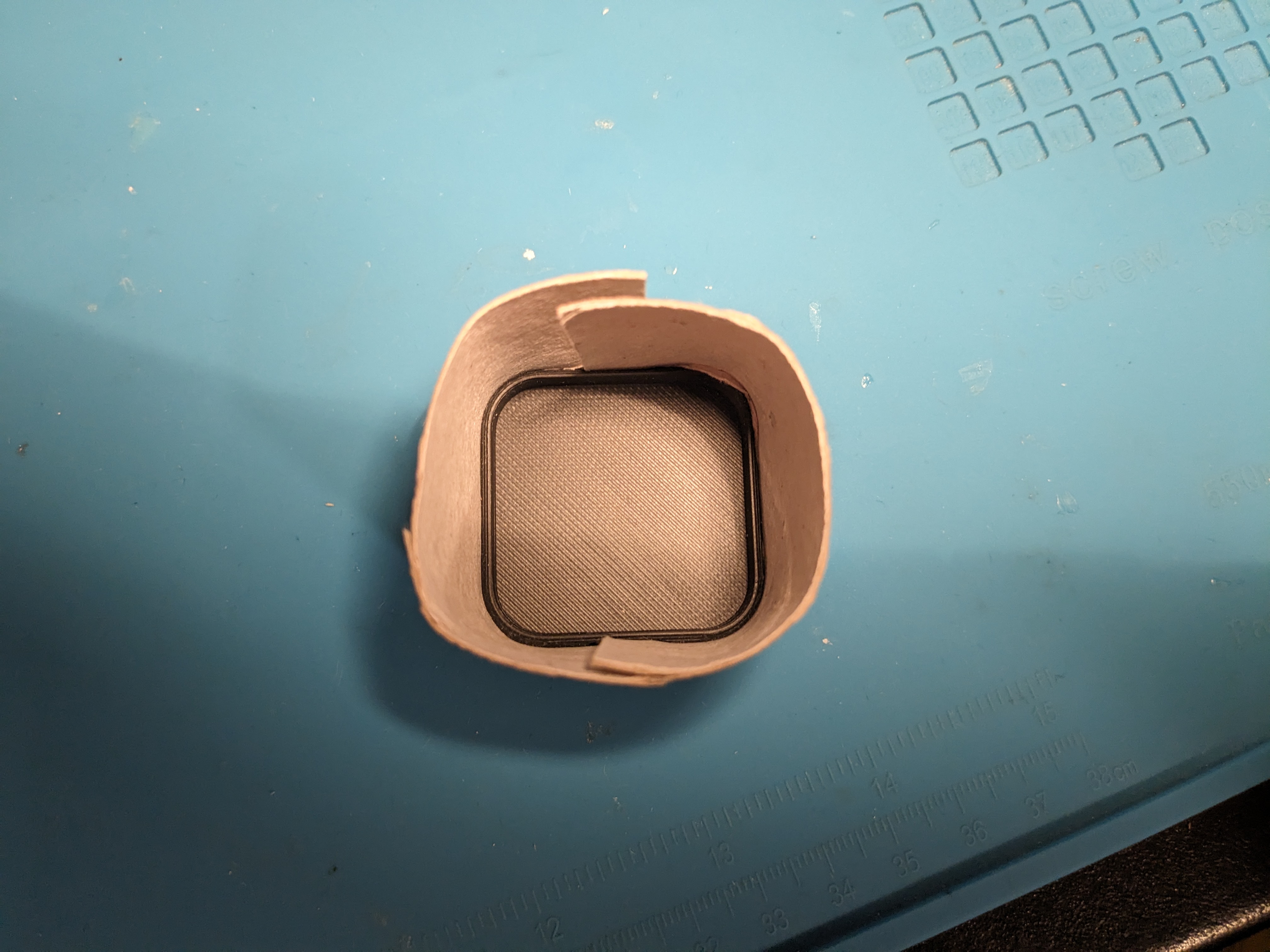
Prepare the assembly of the lid. Try to make the shape of the cardboard as similar to the lid as possible. Than means straighten the straight parts and bending the corners.
You should also make sure the face where the lid will be is is as level as possible.
The ends of the strips should also be vertical not at an angle.
To prevent the strips from popping out, use one hand to press it down and the other to do the cleanup.
Having the cardboard shaped makes it a lot easier to assemble the lid.
This is how it should not look:
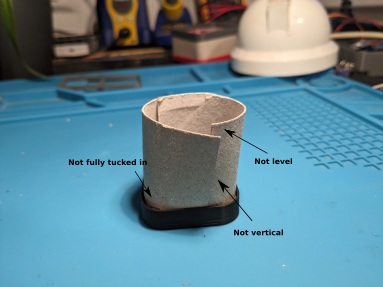
This is how it should look:
Step 6: Assemble lid
Put the top lid on.
Make sure the pockets for the overlapping cardboard matches the overlapping cardboard (See Step 4).
First try to get all cardboard inside of the lid. Work your way around the circumference. Always press the cardboard on the outside wall then press it down.
Make sure that every piece of cardboard is inside the groove.
Step 7: Finish
Press fit everything together. You can use quite the amount of force, It's surprising how rigid these boxes are.
If they somehow don't hold together you can add some CA glue on the chamfer to fix that.
But this was never a problem for me.
Congratulations on assembling your first bin.
If you like the project an want to support me feel free to like, comment and/or add a make of your bins :)
Customize Bins:
I provided my FreeCad project (FreeCad Version 1.1.3). The model is parameterized.
By changing the variables X and Y in the "cardboardBins" Part you can generate Bins of different sizes.
For remixing I also provided all the files as step