
Versatile Snap-On Holder for Power Banks, Remote Controls and others.
Obliczymy ostateczną cenę na podstawie wybranego pliku. Sprawdzisz ją i zaakceptujesz przed płatnością.
Orientacyjna cena wydruku pliku
1,20 € – 1,47 € netto (bez VAT)
Dla pliku: 16mm_0.15mm_PLA_MK2.5_1h34m.gcode
To wstępna wycena jednego pliku. Dokładną cenę poznasz przed zamówieniem.
Plik i założenia wyceny
Plik użyty do wyceny
Średnia wycena orientacyjna: 1,33 € netto (środek widełek).
- Masa podana przez autora
- 12 g
- Czas druku podany przez autora
- 1,56 godz.
- Materiał u źródła
- PLA
- Materiał wyceny
- PLA
- Drukarka wyceny
- Bambu Lab P1S - 0.4 nozzle
- Proces wyceny
- 0.20mm Standard
Orientacyjna wycena wyłącznie wybranego pliku, oparta na masie i czasie druku podanych przez autora. Warianty plików nie są sumowane. Ostateczna cena zostanie obliczona po analizie pliku.
Zapisane na tym urządzeniu.

Universal mount snap on tripod or any other vertical tube. Fully parametric, to print in vase mode or fake vase mode.
- Ocena
- 0 / 5
- Polubienia
- 4
- Pobrania
- 16
- Wydruki
- 0
- Wyświetlenia
- 120
- Oceny
- 0
Aktualizacja u źródła:
Informacje o modelu
- Źródło
- Printables
- Kategoria
- Photo & Video
- Licencja
- Creative Commons — Attribution — Noncommercial
While shooting extended time-lapses with my phone, I often need to connect a power bank. To address this, I've designed a customizable, parametric mount that easily snaps onto any vertical rod or shaft. This model is specifically optimized for printing in spiral or vase mode to ensure durability and ease of printing.
Key Features:
- Ease of Use: Simply clip it onto any vertical rod or shaft. E.g. Remote Control holder mounted on a floor lamp!
- Printability: Must be printed in vase/spiral mode, an option found under the ‘Layers and Perimeters’ section in PrusaSlicer’s ‘Print Settings’.
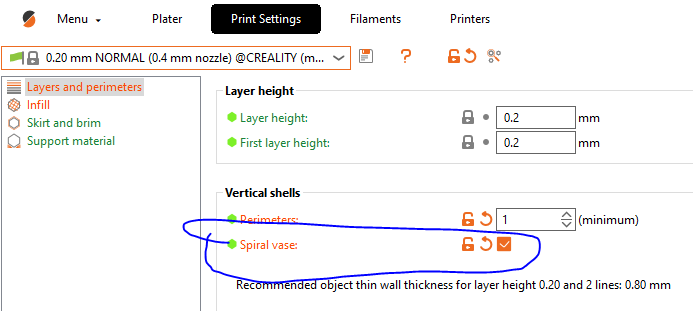
Pro-tip - you can also print it in so called fake vase mode if you want thicker walls. Just set your infill to 0% and 0 top solid layers.
Customization Options in FreeCAD:
- Diameter: Adjust according to the rod/shaft diameter. I typically set this to 97% of the actual size for a snug fit.
- Depth: Customize the depth of the basket to suit your power bank.
- Front Width: Set the width at the front (side furthest from the rod/shaft) of the basket.
- Back Width: Set this width at the back of the basket (the side closer to the rod/shaft); ensure it is more than 16mm.
- Height: Adjust the height of the basket to accommodate your power bank.
- Angle: The clip’s openness can be adjusted here. An angle of 280 degrees works well generally, but you might want to tweak this if the mount is too loose or tight.
Feel free to customize the mount to fit your needs, and do not hesitate to reach out with any questions or issues you might encounter. Happy printing!