Anycubic ACE Pro Filament Label + Holder
Obliczymy ostateczną cenę na podstawie wybranego pliku. Sprawdzisz ją i zaakceptujesz przed płatnością.
Zapisane na tym urządzeniu.

System for classifying filaments within the ACE Pro module of the Anycubic Kobra 3 printer
- Ocena
- 0 / 5
- Polubienia
- 18
- Pobrania
- 114
- Wydruki
- 0
- Wyświetlenia
- 1117
- Oceny
- 0
Aktualizacja u źródła:
Informacje o modelu
- Źródło
- Printables
- Kategoria
- Anycubic Parts & Upgrades
- Licencja
- Creative Commons — Attribution
Modular and fully interchangeable filament labeling system in Anycubic's ACE Pro.
Do you have lots of different filaments? Do you never remember which filaments and materials are inside the ACE Pro?
From today it will no longer be a problem, in fact with this system you will be able to keep track of the filaments inside the ACE Pro
Everything can be printed easily and quickly, the label support system does not need to be fixed by screws or double-sided tape, it will fit inside the ACE Pro system.
The labels are printed in two colors so you can easily read them. They feature a dovetail system for hooking them onto the backing system, allowing you to replace labels alone on the fly.
No backings of any kind are required. The labels are printed with the plane where the lettering is facing the printing plate to ensure an excellent surface.
The labels are created using the Orca Slicer/Anycubic Slicer Next modifier; you must open the .3mf with Anycubic Slicer Next in order to modify them.
Editing Labels
To edit labels go to the objects tab of Anycubic Slicer Next
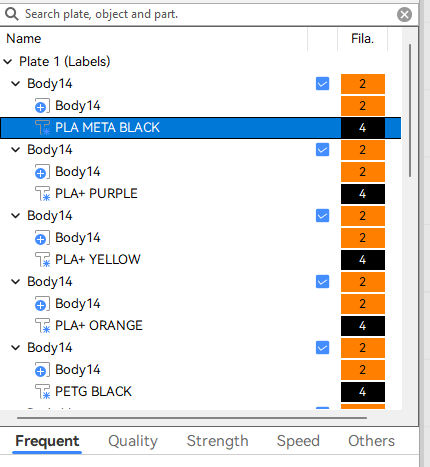
Select the label you want to edit and right-click over the text and click on Edit Text.

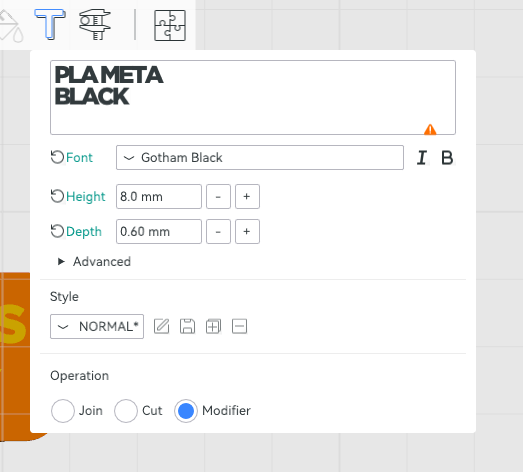
Open the editor and you can edit the text. I used the Gotham Black font because I think it is the most suitable for printing in small areas. If you want to change the font type, I do not guarantee successful printing