
Input Shaping Sensor Shell
We calculate the final price from your selected file. You review and accept it before payment.
Saved on this device.

Use a RP2040 Zero + ADXL345 to do an USB Input Shaping Sensor for Klipper.
- Rating
- 0 / 5
- Likes
- 2
- Downloads
- 9
- Makes
- 0
- Views
- 125
- Reviews
- 0
Updated at source:
Model information
- Source
- Printables
- Category
- Other Printer Parts & Upgrades
- License
- Creative Commons — Attribution — Noncommercial — Share Alike
Tiny funcional shell for input shaping sensor using RP2040 Zero + ADXL345.
Files already in correct position to print, no need support screw holes have self-support, you only need remove this self-support with a screwdriver.
Hardware:
- 1x RP2040 Zero
- 1x ADXL345
- 1x Binder Clips
- 6x M2.5 Screw 6mm
- 4x M2.5 Heat Insert Nut
Wiring:
| RP2040 | ADXL345 |
| 3.3V | VCC |
| GND | GND |
| GPIO 0 | SDO |
| GPIO 1 | CS |
| GPIO 2 | SCL |
| GPIO 3 | SDA |
Flash Firmware:
On your Raspberry Pi Host with Klipper, compile the firmware for the RP2040Zero.
cd ~/klipper
make clean
make menuconfig
Now, while holding down the BOOTSEL button on the RP2040 Zero, connect the RP2040 Zero to the Raspberry Pi Host with Klipper via USB. Compile and flash the firmware.
make flash FLASH_DEVICE=firstIf that fails, you will be told which FLASH_DEVICE to use. In this example, that's make flash FLASH_DEVICE=2e8a:0003.
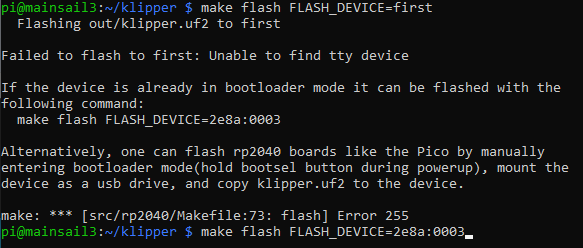
Configure Conection:
The RP2040 Zero will now reboot with the new firmware and should show up as a serial device. Find the RP2040 Zero serial device with ls /dev/serial/by-id/*. You can now add an adxl.cfg file with the following settings:
[mcu adxl]
serial: /dev/serial/by-id/usb-Klipper_rp2040_<mySerial>[adxl345]
cs_pin: adxl:gpio1
spi_bus: spi0a
axes_map: x,z,y
[resonance_tester]
accel_chip: adxl345
probe_points:
    117.5, 10, 10
[output_pin power_mode]
pin: adxl:gpio23
If setting up the ADXL345 configuration in a separate file, as shown above, you'll also want to modify your printer.cfg file to include this:
[include adxl.cfg] # Comment this out when you disconnect the accelerometerRestart Klipper via the RESTART command.
More Info:
See more details in official page of Klipper: https://www.klipper3d.org/Measuring_Resonances.html