
Compact and clean ITX case
We calculate the final price from your selected file. You review and accept it before payment.
Saved on this device.
Model information
- Source
- Printables
- Category
- Computers
- License
- Standard Digital File License
Check out the full build video on YouTube!
UPDATE: After some minor adjustments the case is now printable within a 250 x 210 mm print volume (height 185mm). This means it can also be printed on the MK4 or Core One! |
Compact and clean looking ITX case capable of holding some powerful components with loads of cooling options. The case supports 3 different layouts depending on your needs and the front of the case is “LED-strip-ready” to allow for adding personal lighting effects.
The front panel is available in two options, one using 2x USB 3.0 ports, and one without.
Print size requirement: 250 x 210 millimeters (185mm height)
Case size including feet: L: 380mm - W: 200mm - H: 255mm
Estimated filament use: 2.0 to 2.5 kg.
Filament used in build shown in photos: FormFutura's CarbonFil CF03
The orange part is printed in generic unbranded PLA, most filament colors will work here, just make sure it's somewhat transparent to allow light to pass through if using the optional LED solution.
PC Part compatibility:
Motherboard form factor: Mini ITX
GPU: 2.5-slot thickness, 275 or 330 mm depending on layout. (See examples further down)
Power supply: SFX
CPU cooler: 3 options (see example layouts further down)
Storage: Motherboard's M.2 slots + one 2.5" SSD mount
Optional: 2x Front panel USB PORTS
As an Amazon Associate I earn from qualifying purchases. All product links below are Amazon affiliate links.
Computer components used in build shown:
Motherboard: ASUS ROG B850 AM5 Mini ITX Motherboard
CPU: Ryzen 9 9950x3D
Fans: Noctua NF-F12 and Noctua NF-F14.
CPU Cooler: Thermalright Peerless Assassin (157mm)
Other parts required to build this case:
40x M3 (Ø4.6) threaded brass inserts (varies slightly depending on layout choices)
40x M3 x 10mm screws
16x Neodymium magnets size 8x3mm
12mm Power button (must be long enough to mount through a 8mm deep hole)
RGB LED STRIP (Optional for the LED lighting effect)
Front panel USB ports (2x) (Optional)
Plexiglass panel 3mm thick, cut to size 255 x 188 mm (Optional)
Possible layouts:
Layout option 1: (Shorter GPU, Air cooled)
Front-mounted SFX PSU.
Graphics card up to 275mm length, 2.5 slots.
Air coolers up to 157mm.
120 / 140mm side intake fan.
120mm rear exhaust fan.
Layout option 2: (Longer GPU, Air cooled)
Rear-mounted SFX PSU.
Graphics card up to 330mm length, 2.5 slots.
Air cooler up to 80mm (95mm actual clearance, space needed for airflow)
120 / 140mm side intake fan.
120mm front intake fan.
Layout option 3: (Longer GPU, 120mm AIO)
Rear-mounted SFX PSU.
Graphics card up to 330mm length, 2.5 slots.
Front mounted 120mm AIO liquid cooler.
120 / 140mm side intake fan.
Printing instructions:
Recommended settings for most parts:
Layer height: | 0.2 - 0.3 mm |
Walls: | 4 for 0.4mm nozzle and 3 for 0.6mm nozzle |
Bottom layers: | 4 |
Top layers: | 4 |
Infill density: | 15 - 20 % |
Infill type: | Not important. (I used cross-hatch) |
Layer height: 0.2 - 0.3mm
Walls: 4 - 5
Bottom Layers: 3 - 4
Top Layers: 3 - 4
Infill: 15 - 20 %
Special (optional) print settings:
The “top_middle_cover_panel” and “printable_glass_alternative” parts CAN be printed normally with a smooth finish, but if you want the look shown in the video you can use the following settings.
Layer height: | 0.2 - 0.3 mm |
Walls: | 4 for 0.4mm nozzle and 3 for 0.6mm nozzle |
Bottom layers: | 4 (This can also be 0 if you want full perforation in the panel.) |
Top layers: | 0 (zero layers to expose the infill for added texture.) |
Infill density: | 20 % |
Infill type: | HONEYCOMB (Alternative for Cura users; Triangles at 30%) |
MAKERUNIT's Discord server is now public:

Do you have questions about this project or want to discuss this, or other projects with other makers? TheMAKERUNIT Discord server is now open for everyone. Join by clicking here!
Preparing the printed parts:
Preparing the threaded inserts:
Prepare the following parts by inserting M3 threaded inserts into all the holes marked with a small triangle.
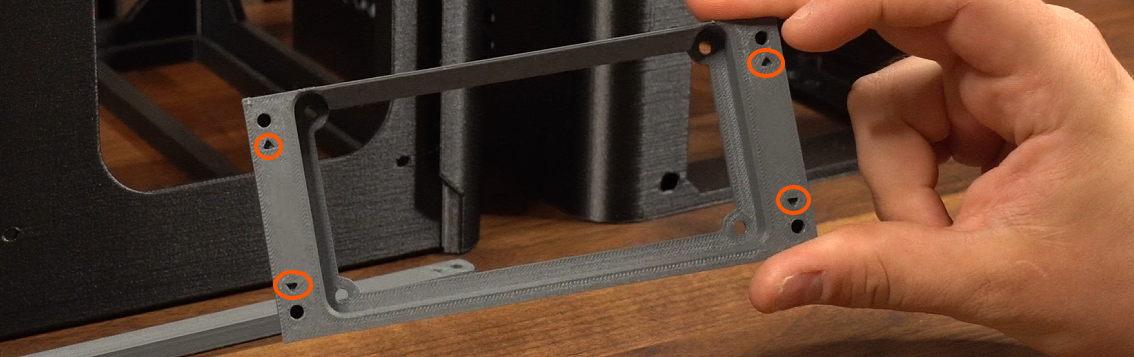
If there's no triangle right next to a hole, please do not add M3 inserts to that hole.
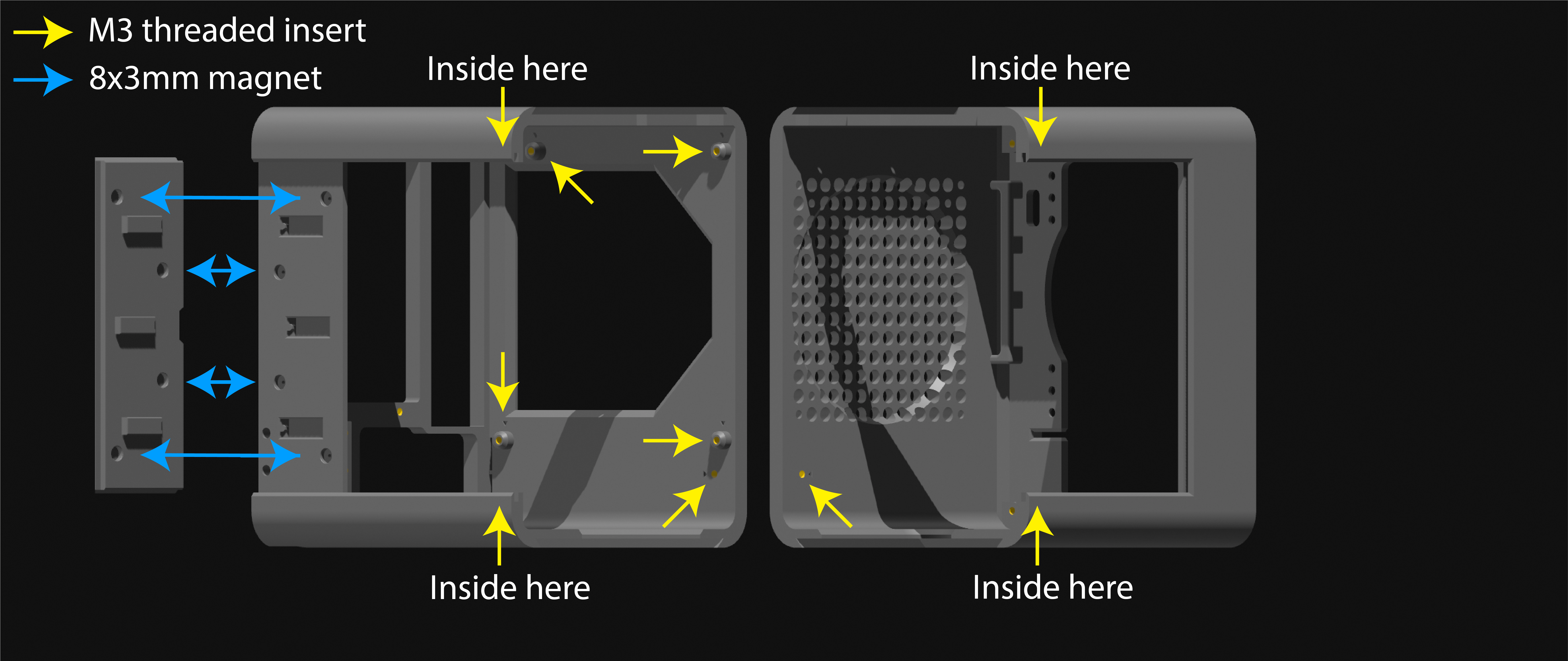
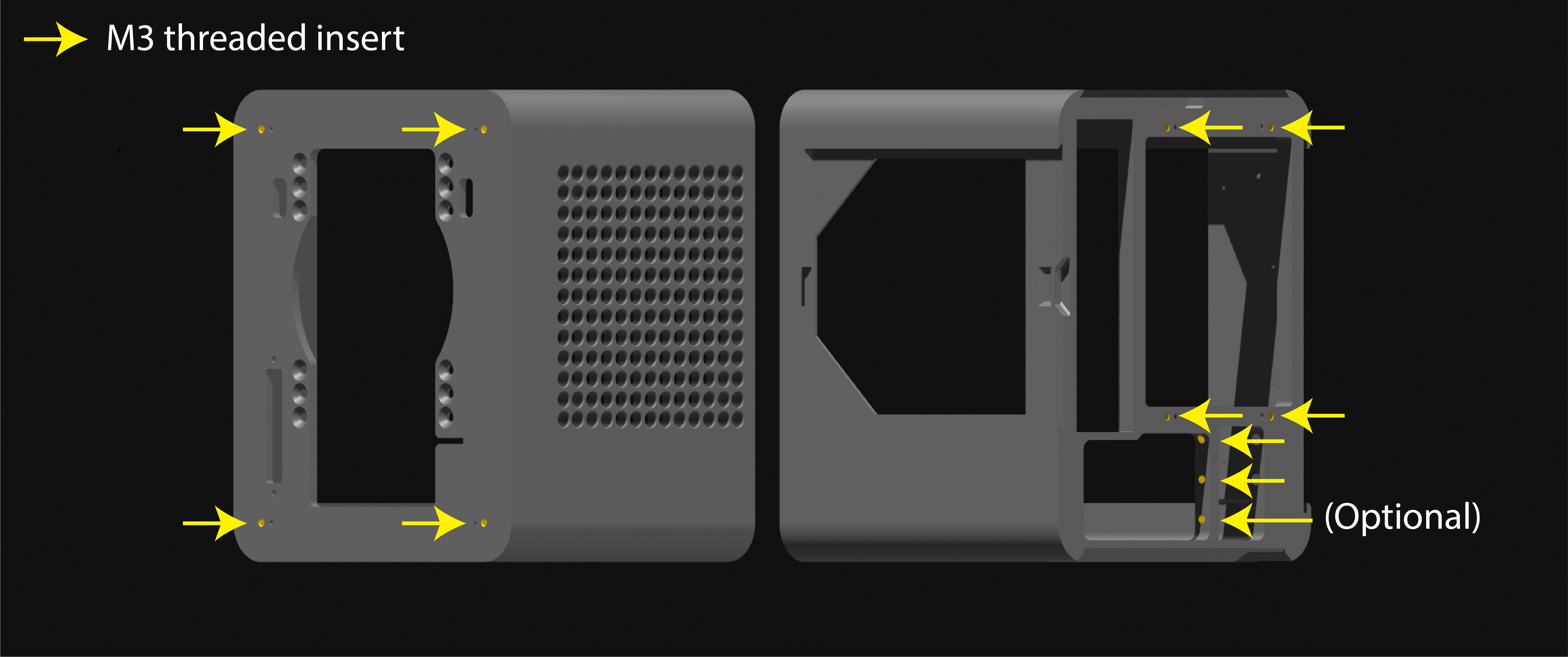
Model name: | Inserts required: (Yellow arrows) |
main_body_front | 7 |
main_body_rear | 13 |
bottom_panel_intake | 4 |
body_joining_brackets (large part only) | 9 |
sfx_front_mounting_bracket (only if using PSU in front position) | 4 |
Preparing the magnets:
Prepare the following parts by pushing in place 8x3mm Neodymium magnets into the holes. Use super glue if necessary to hold magnets in place. One part of each “pairs” of matching parts have tiny holes where you can poke out the magnets from the back if you insert the magnets in the wrong direction.
(See YouTube video for better visualization.)
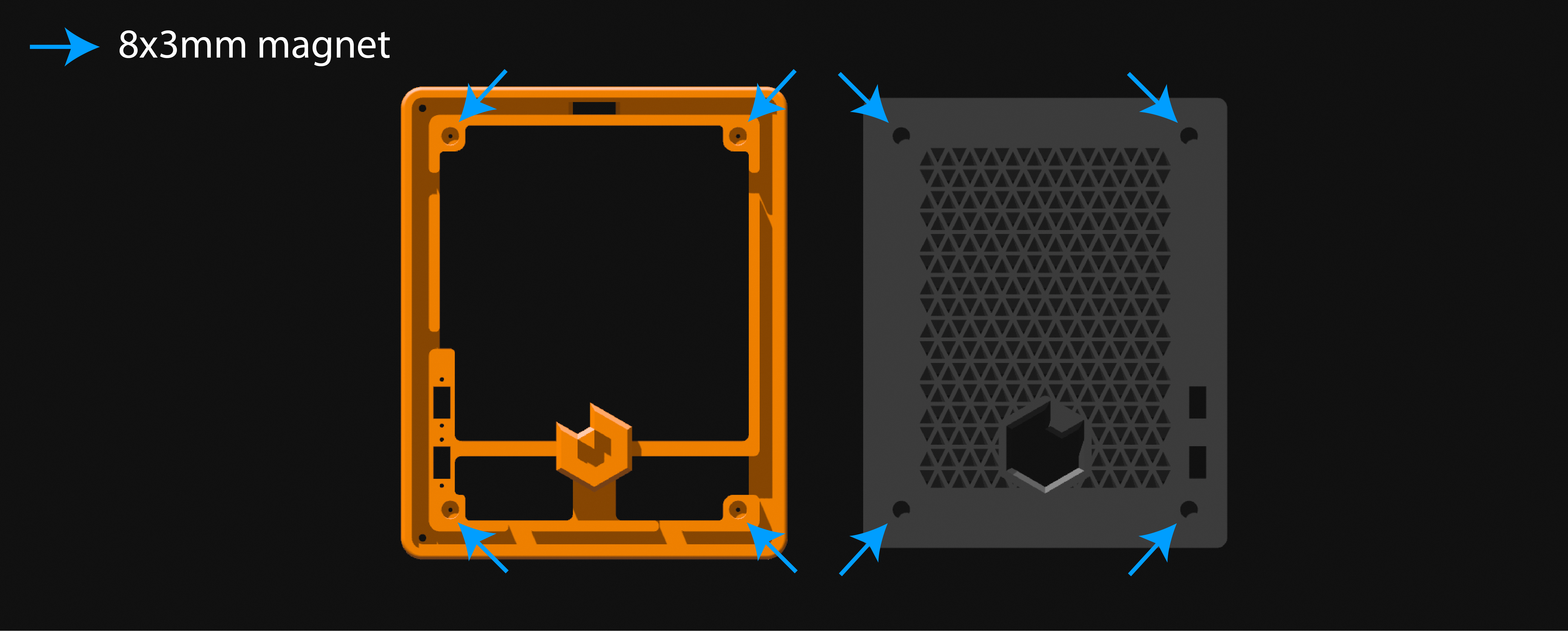
Model name: | Comment: | Magnets required: |
magnetic_side_top_locking | Remove the thin support, add magnets to the part with | 4 |
main_body_rear | Make sure the magnets match with the part above, “magnetic_side_top_locking_pieces”. | 4 |
LED_light_frame_ decorational_ panel | Magnets must match with the “magnetic_front_panel” | 4 |
magnetic_front_ panel | Magnets must match with the “LED_light_frame_ | 4 |
Placement of inserts and magnets (PICTURES):
View from the “open side".
View from the “backside”.
Magnet locations front panel. Remember to keep in mind the magnet polarity to ensure correct fitment.
Assembly instructions:
Combined with watching the YouTube video, this written instruction will give you a better understanding of the assembly process. Some steps may deviate slightly from what's shown in the video, especially for parts where changes have been made at a later time.
Slide the “main_body_front” and the “main_body_rear" onto the “bottom_intake_panel” from both sides and secure in place with two M3 screws on each side on the inside bottom of the case.
(See picture after step 2)
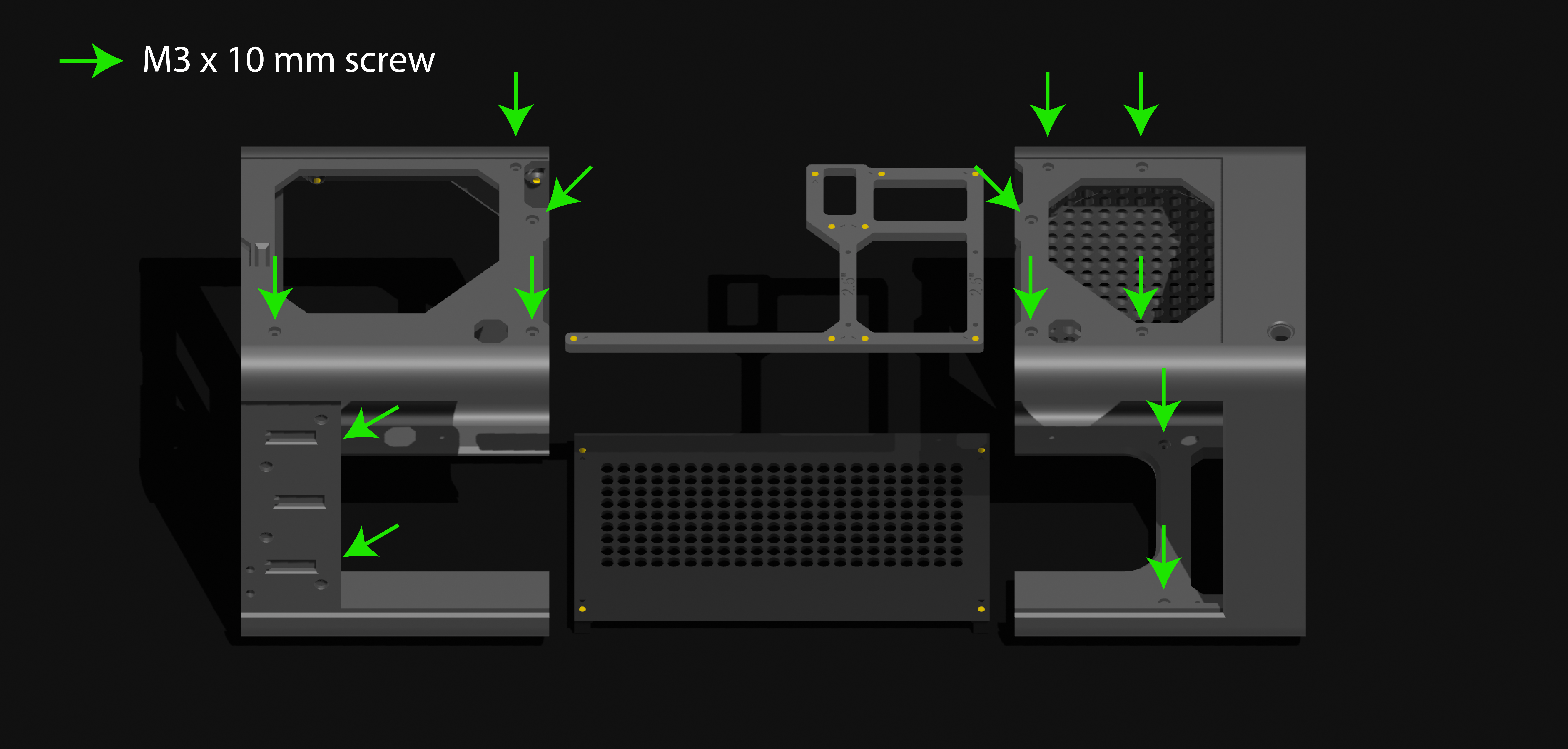
Secure in place the largest part of “body_joining_brackets” using nine M3 screws from the top of the case.
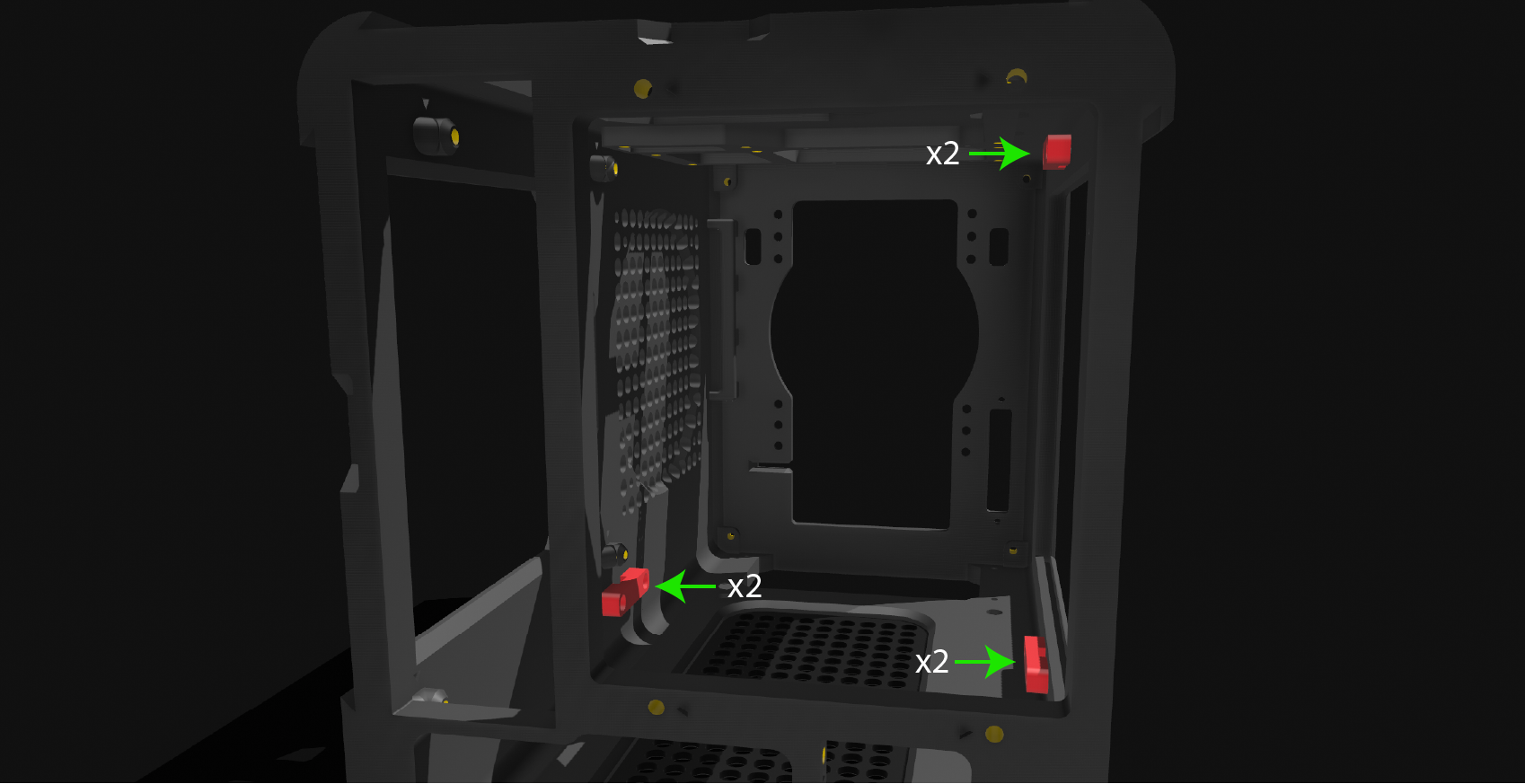
Add the three small parts of “body_joining_brackets” to the three locations maked on the inside of the main body. These secure in place with two M3 screws each.
If planning to have the SFX PSU mounted in the front location, the SFX mounting bracket can be secured in place using four M3 screws from the underside of the case, while the 120mm rear fan bracket can be secured to the back of the case using four M3 screws.
If planning to use the rear-mounted SFX power supply. The rear SFX mounting bracket can be secured to the back of the case using four M3 screws.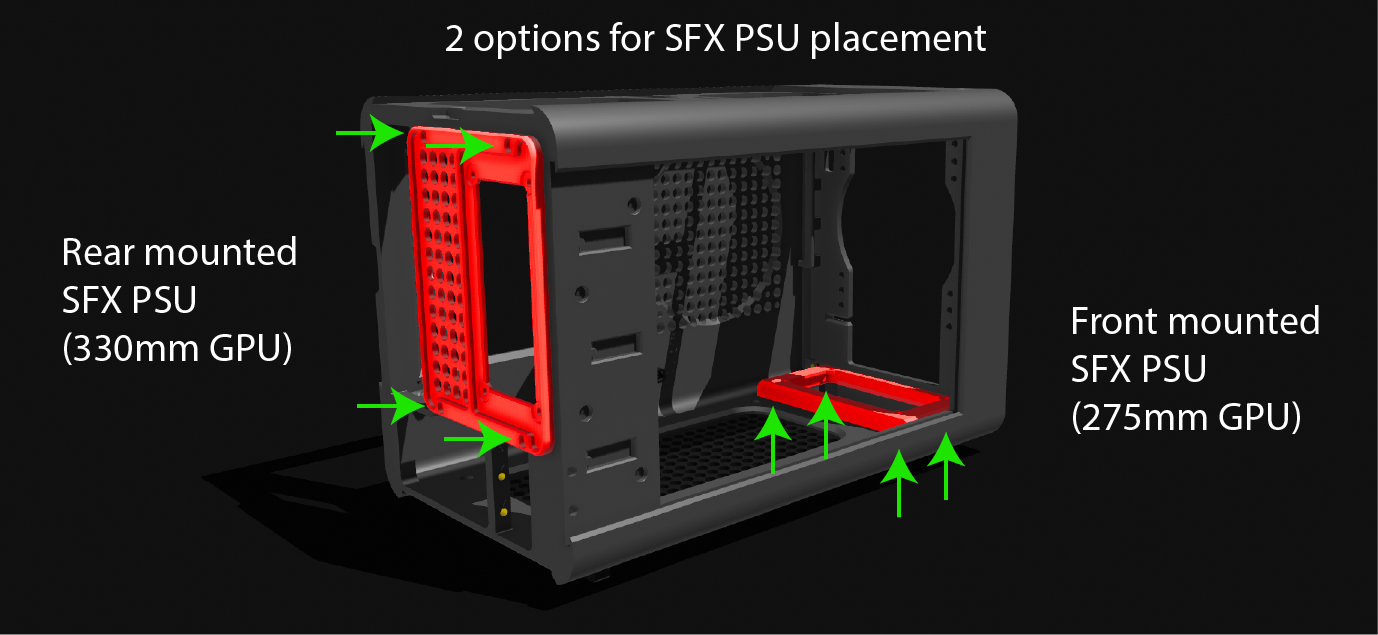
Install PC components. Recommended order of installation:
Motherboard → Chassis fans → Graphics card → CPU cooler → SFX power supply → Cable management
(Very long GPU's have to be installed through the opening in the front of the case)
Slide in place the cover for the backside of the motherboard.
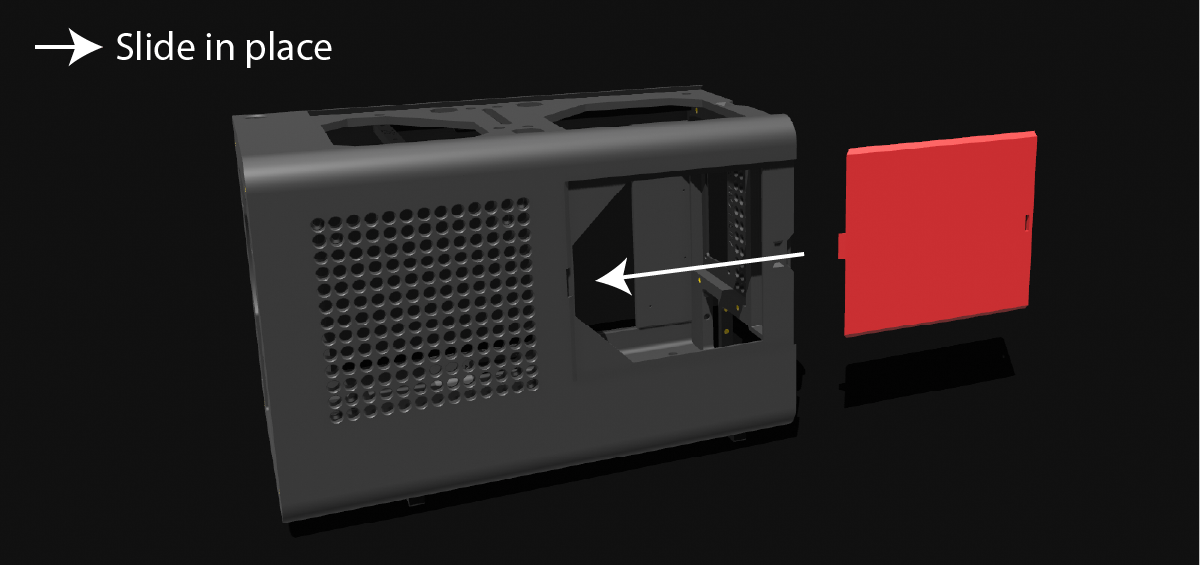
If using LED strips for lighting effect. Carefully tuck LED strip into track around the edge of the “LED_light_frame_decorational_panel”.
(Cutouts are made in various places around the inside of the LED_light_frame to allow for the power cables to hang out, position LED strip in a way that makes sense for the cables hanging out of it.)
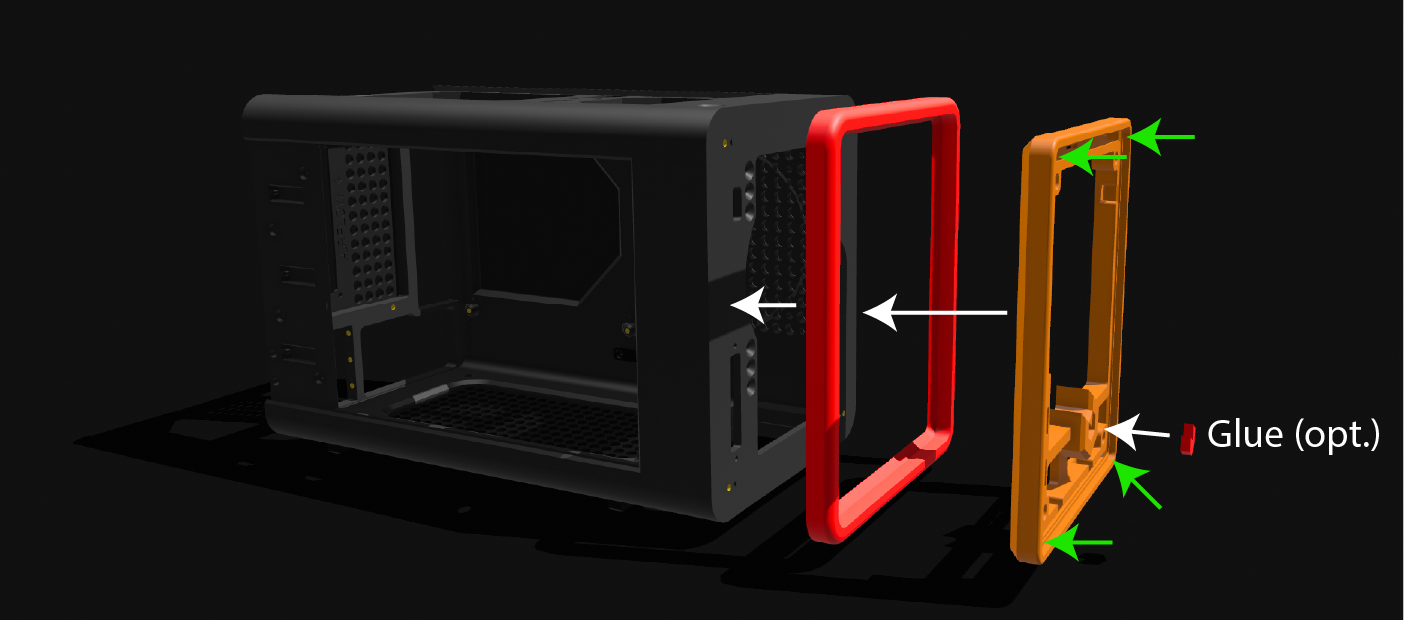
Place the LED_light_frame inside the “front_outer_frame” and secure them both to the front of the main body by using four M3 screws, one in each corner. Glue in place “logo_center_piece”.
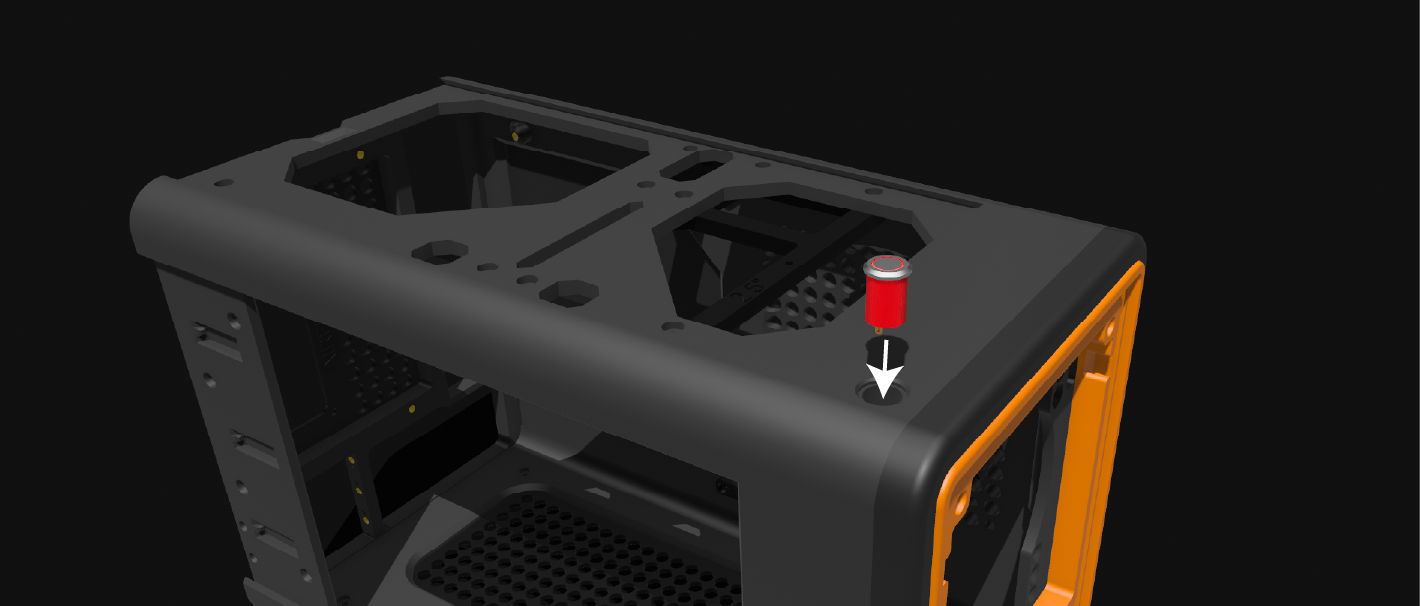
Add 12mm power button to the top left corner of the front of the case.
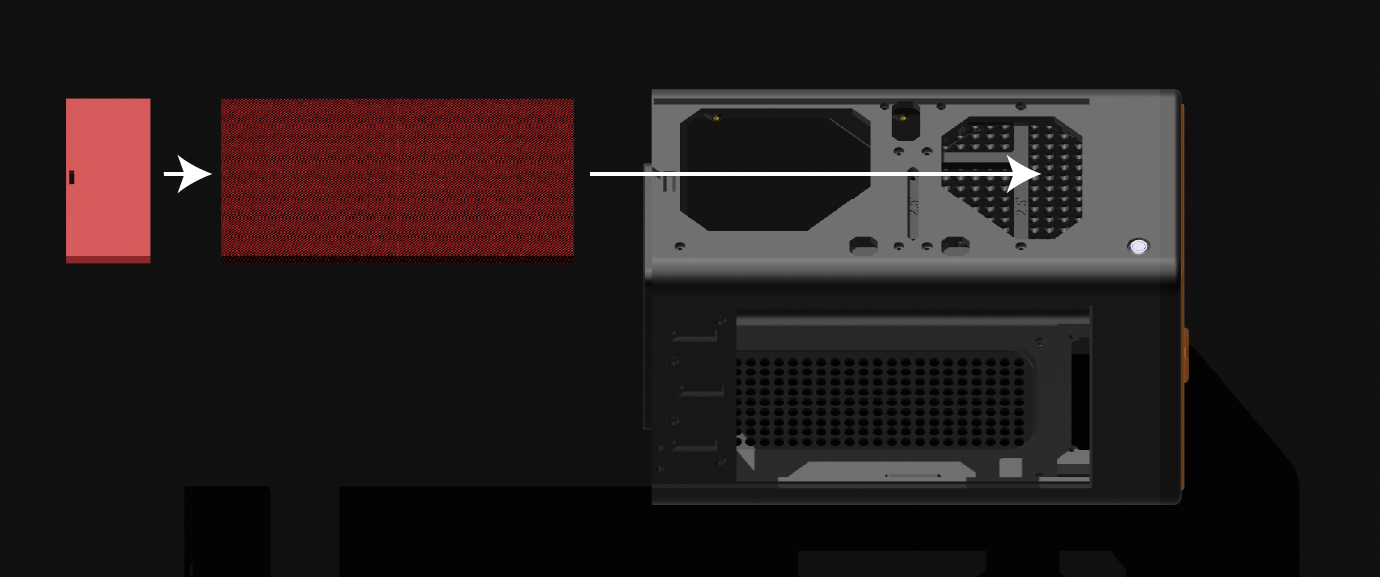
Slide in place top cover panel, followed by locking piece that latches into place.
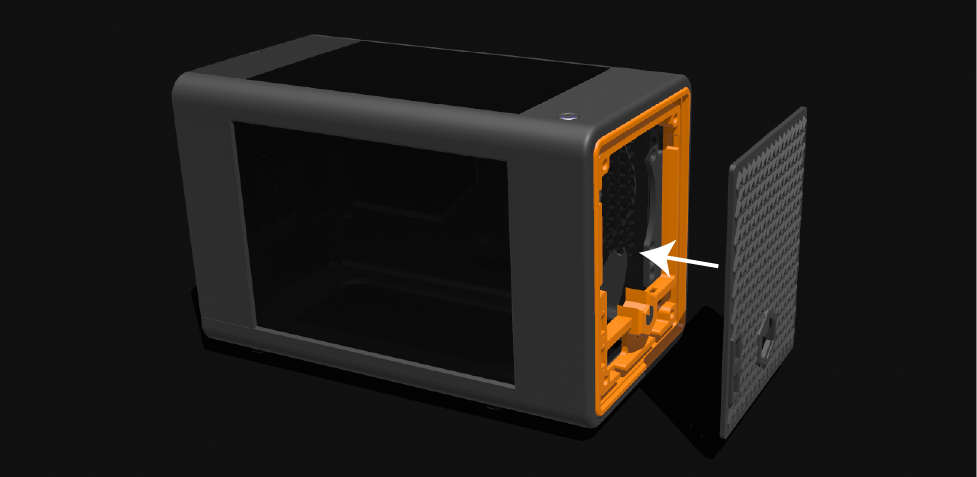
Slide in place plexiglass OR printed side panel into the open side of the case and drop in place the magnetic locking plate.
The size of the glass panel should be 255 x 188 millimeters, thickness 3mm.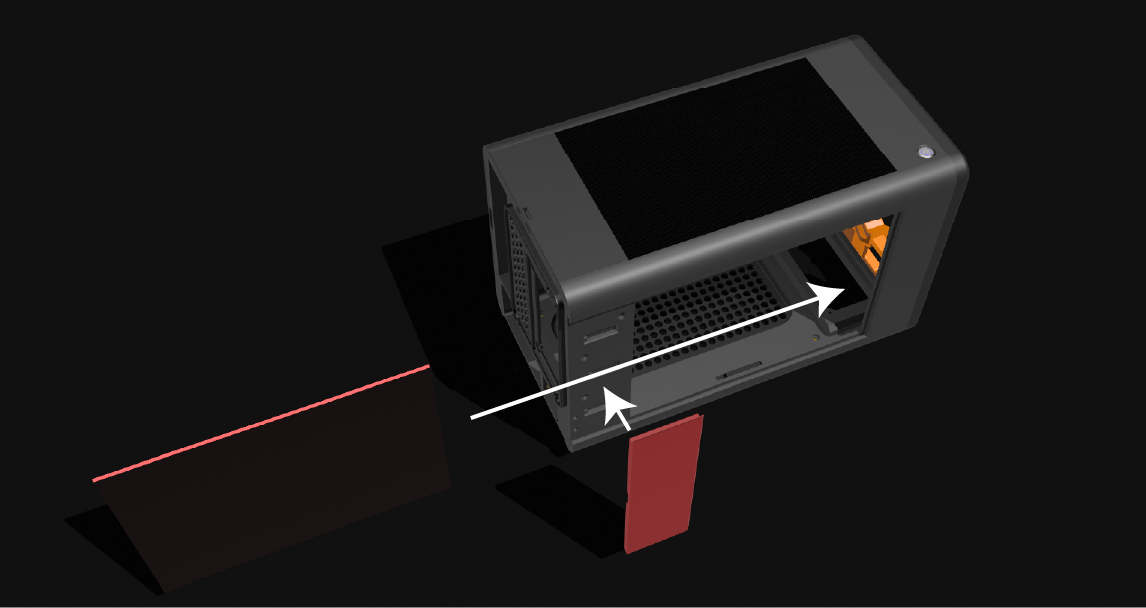
Drop in place the magnetic front panel.
(Optional) Add sticky rubber or foam feet to the bottom of the case for extra grip.
Enjoy new PC.
UPDATE LOG:
I appreciate your feedback if you encounter any issues during assembly!
13JAN26: Added locking bracket for front panel USB.