
Combined StreamDeck + MacroPad Controller
We calculate the final price from your selected file. You review and accept it before payment.
Saved on this device.
Model information
- Source
- Printables
- Category
- Computers
- License
- Creative Commons — Attribution — Noncommercial — Share Alike
This project combines a Raspberry Pi Zero 2W, a 15-key StreamDeck and hand-wired 6-key+rotary encoder macro pad into a single self-contained enclosure.
Intended for use as a home theatre controller but could be used for anything that can be controlled via WiFi.
Important Notes
This project covers the hardware side of things. I haven't published the software because it's very specific to my setup. If you build this you'll need to write your own software (see below for notes on what I'm using)
This does not plugin into a host PC as a USB device. The USB socket is for power only. All external interfacing is via WiFi from the Pi.
You need to be willing to disassemble and cut the USB cable on your StreamDeck.
I don't know if this works with the newer StreamDeck that has the USB-C socket in the case - you're on your own there. You'll probably need to solder a new (short) USB cable to the StreamDeck's main board.
Bill Of Materials
Besides the 3D printed parts, you'll need:
Raspberry Pi Zero 2W (with or without headers)
15-key StreamDeck
StreamDeck mounting bracket (3D printable, see here)
6x key switches (I used Gateron Milky Yellow)
6x key caps (your choice, I used blanks I had on hand)
1x rotary encoder (see here)
16x M2.5 heat set inserts (see here)
8x 12mm M2.5 screws (see here)
8x 6mm M2.5 screws (see here)
1x USB-C female socket (see here)
2x Micro-USB male plugs (see here)
10x female Dupont jumper wires (if using Pi with headers).
Hookup wire (28awg) (if using Pi without headers)
Hookup wire (22-24awg) for USB power socket to Pi.
Note:
You could use a Pi Zero 1 W, but I don't recommend it. It doesn't support 64-bit which means if you want to use Node.js, you'll need to manually build it yourself or find an old release package.
There's no point using a non-wireless enabled Pi - it won't be able to communicate with anything.
Print Settings
Each of the models has a note on print orientation
Supports are only needed for Case-top-rear
Print the two gaskets in TPU, everything else PLA
The parts shown in video and photos are printed in Elegoo Silk PLA Copper and eSUN PLA+ black.
Wiring
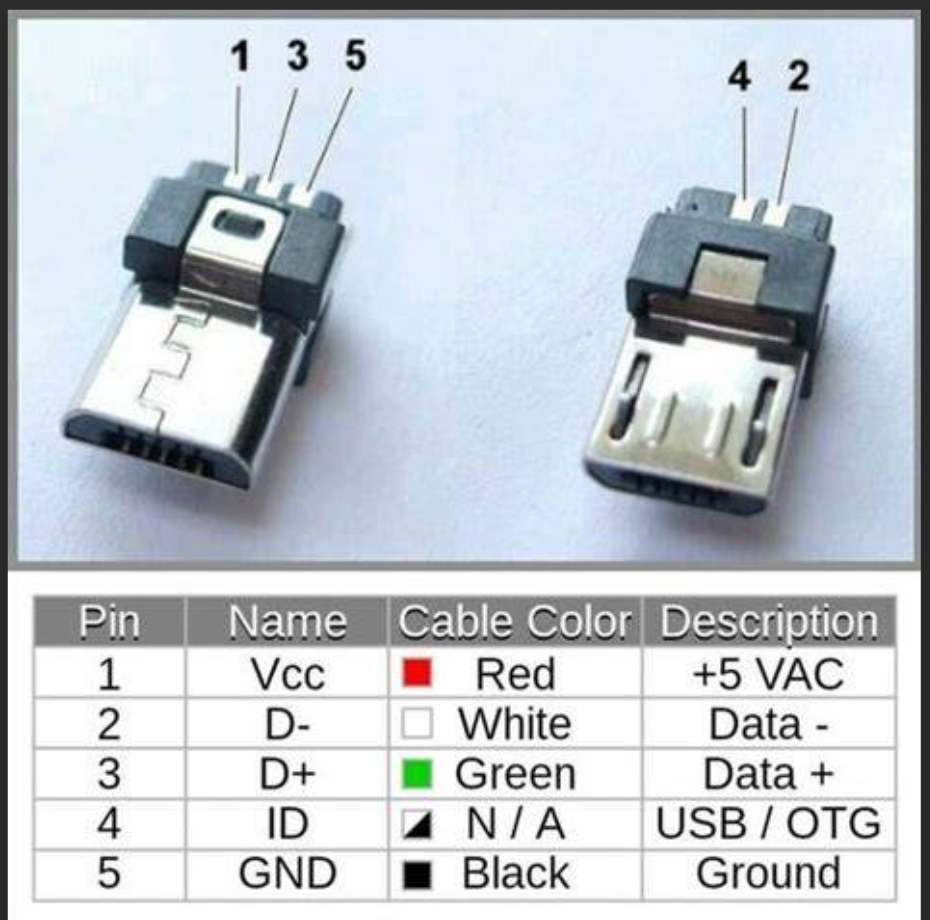
Power and GND from the rear socket go to pins 1 and 5 on the Micro-UBB male plug that powers the Pi.
The StreamDeck's USB cable should be cut and all 4 wires soldered to the Micro-USB male plug as shown in table below. (On my StreamDeck the wire colors in the USB cable matched but I recommend double-checking).
Note the Pi's USB port is OTG - that means you need to wire pin 4 to ground (ie: pin 5).
Connect the key switches to GPIO pins 17, 27, 22, 23, 24, 25
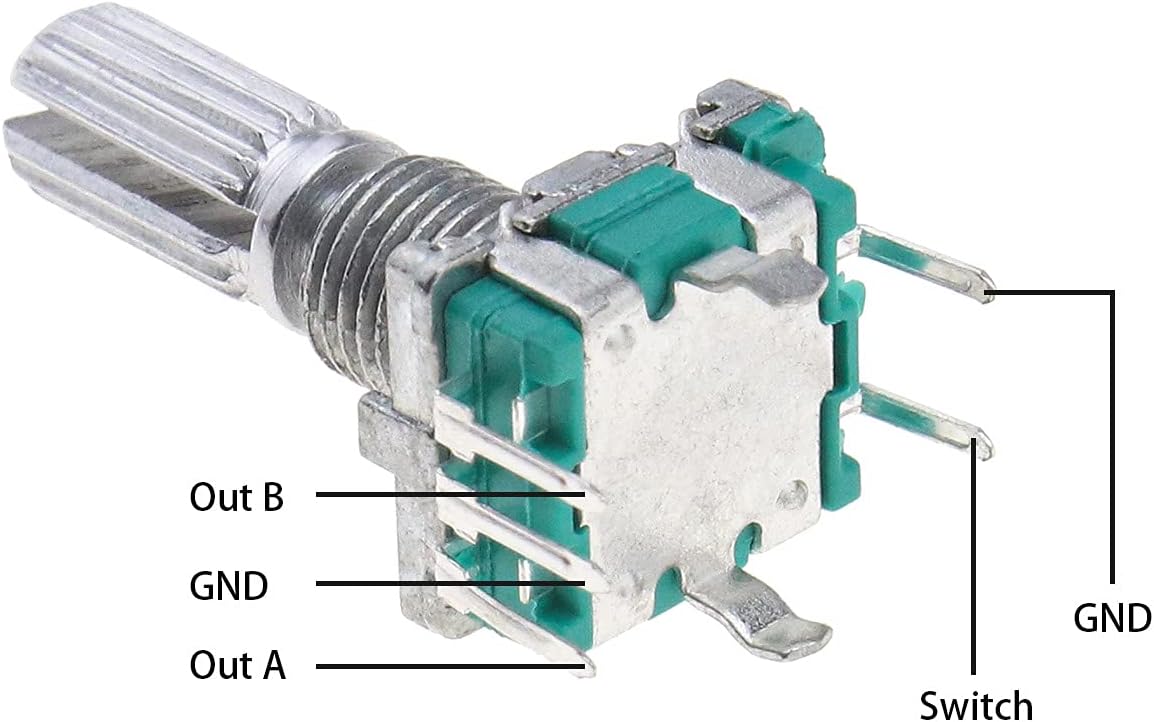
Connect the rotary encoder switch terminal to GPIO 16.
Connect the rotary encoder Out A/Out B terminals to GPIO 21 and 20.
The other side of each key switch goes to ground.
The rotary encoder has two pins that also need to be grounded.
Note: the macropad/encoder aren't connected as a keyboard matrix - you don't need matrix scanning software on the Pi, just regular interrupt driven GPIO using pigpio library works fine.
Software
Although I'm not providing software for this, here's some details on what I'm using:
Raspberry Pi OS Lite (64-bit)
NodeJS 24.14.0
elegato-stream-deck-node for controlling the StreamDeck
pigpio for the macro pad
irtx-node for controlling a remote IR blaster
pyatv for controlling Apple TV (+ IR to wake)
http for controlling Yamaha AV receiver
Wake on LAN (WoL) packets to wake LG TV