
Motorized Coffee Grinder
We calculate the final price from your selected file. You review and accept it before payment.
Saved on this device.
Model information
- Source
- Printables
- Category
- Kitchen
- License
- GNU General Public License v3.0
Motorized Coffee Grinder (1Zpresso K-Ultra)
A 3D-printed motorized housing for the 1Zpresso K-Ultra hand grinder, powered by a 12V universal car window motor and a 12V 30A LED power supply.
This project converts your 1Zpresso K-Ultra into a fully motorized grinder. The design is modular, consisting of 10 printed parts that assemble into a clean, sturdy enclosure. The car window motor provides more than enough torque to drive the K-Ultra's burr set at a consistent speed of ~70 RPM, and the whole setup runs off a standard mains-powered LED supply.
The hardest grind I've tested was medium roast beans at 28 clicks, and everything worked great.
The source file is mostly parametric. You should be able to tweak the design easily if you have different components or a different grinder.
Parts List
3D Printed Parts (10 pieces):
Motor House
Base (houses the switch and power socket)
Column (connects the base, motor house, and grinder holder clamp)
Column Cover (attaches to the column with magnets)
Motor Cover (attaches to the motor house with magnets)
Grinder Holder + Grinder Holder Bridge (clamps the grinder tightly to prevent it from spinning freely)
Hopper (directs beans into the grinder)
Shaft (one end fits onto the motor gear, the other connects to a hex bit extension)
Motor Holder Frame (used to support and screw the motor into the housing)
Off-the-Shelf Hardware:
Component | Specification |
|---|---|
Coffee grinder | 1Zpresso K-Ultra |
Motor | 12V car window motor with 3 screw holes in T orientation. 7-teeth involute gear |
Power supply | CATA CT-2578 (12V 30A LED power supply) |
Power switch | KCD4 illuminated latch switch (4-pin, on/off). Rated for high loads |
Power inlet | C14 3-pin IEC socket |
Screwdriver Bit Extension | ~5 cm, attaches to the grinder's hex head |
Magnets x 14 | 5x1,5mm |
M3 Nuts x 16 | |
M3 Screws x 20 | Varying lengths (didn't measure assembly), I suggest getting a set |
M5 Screws x 3 | 2-3 cm |
5 Fork Cable Crimp Connectors | I used insulated ones |
7 Female Spade Cable Crimp Connectors | I used insulated ones |
Cables | Rated for 220V |
Printed Files
All files are provided in .3mf format. You'll find:
Individual component files to print each part separately
Combined file (file name: "Motorized Grinder - All Plates") with all parts laid out together. I'd suggest using this file with OrcaSlicer because I have added some strength modifiers on critical areas.
The FreeCAD source file (.FCStd) is also included if you'd like to modify the design for a different grinder or motor.
Assembly
Slide the motor holder frame onto the motor
Screw the window motor into the motor housing using 2-3 cm M5 screws
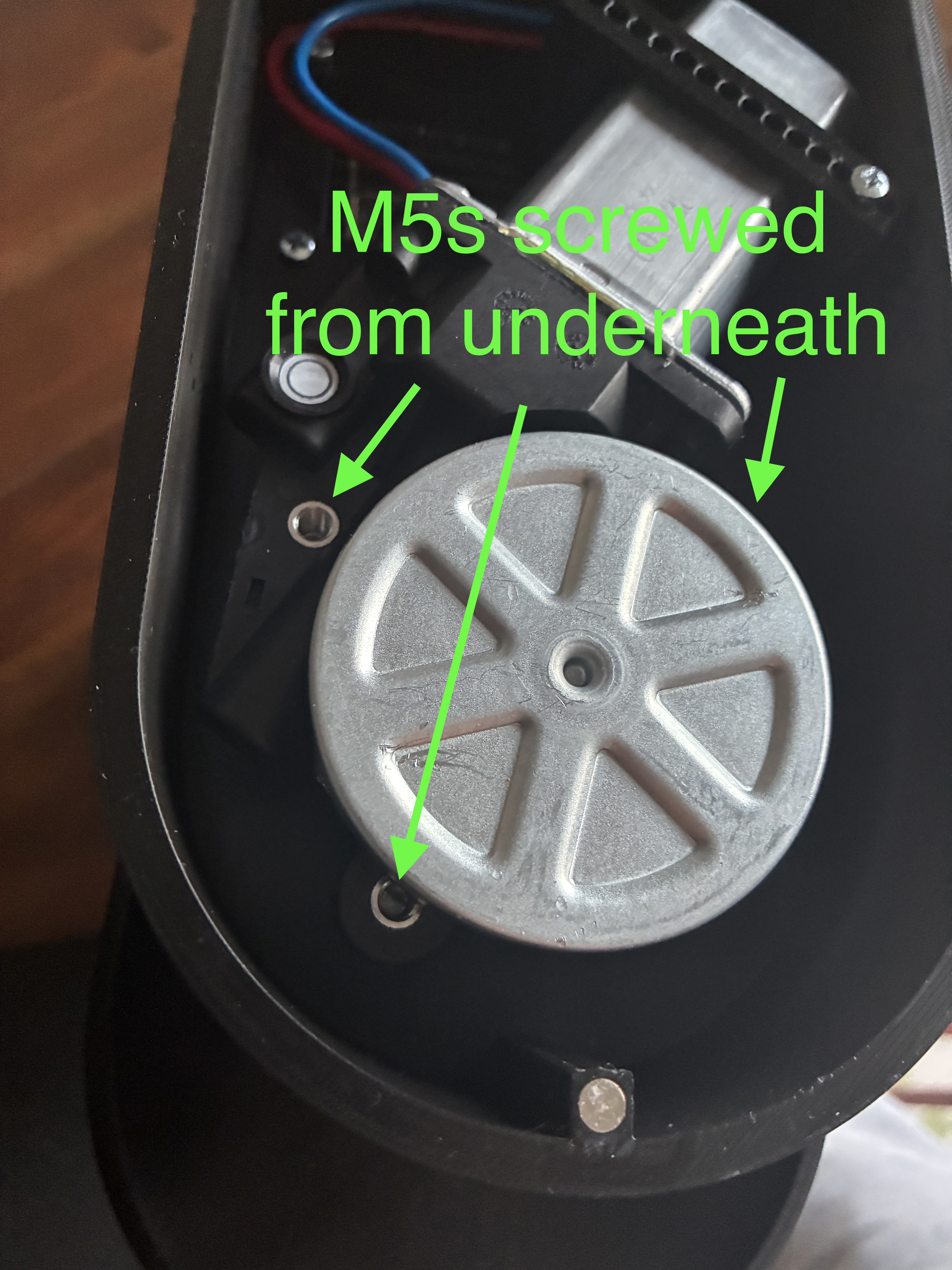
Attach the motor housing to the column with 3 shorter M3 screws and one longer screw that goes through the motor holder frame. The screws should poke through the supports in the column so you can use a nut on the other side to tighten everything securely.
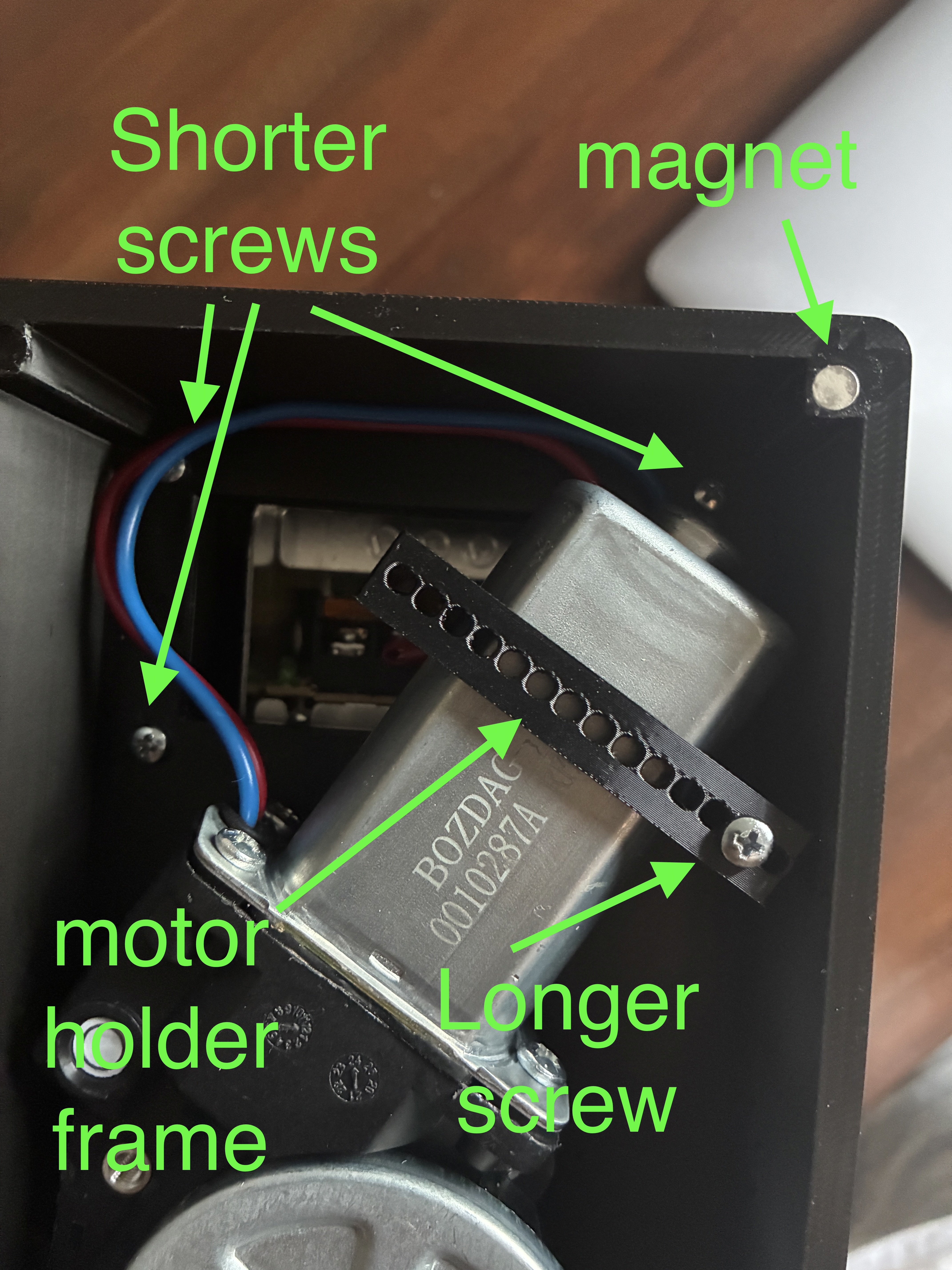
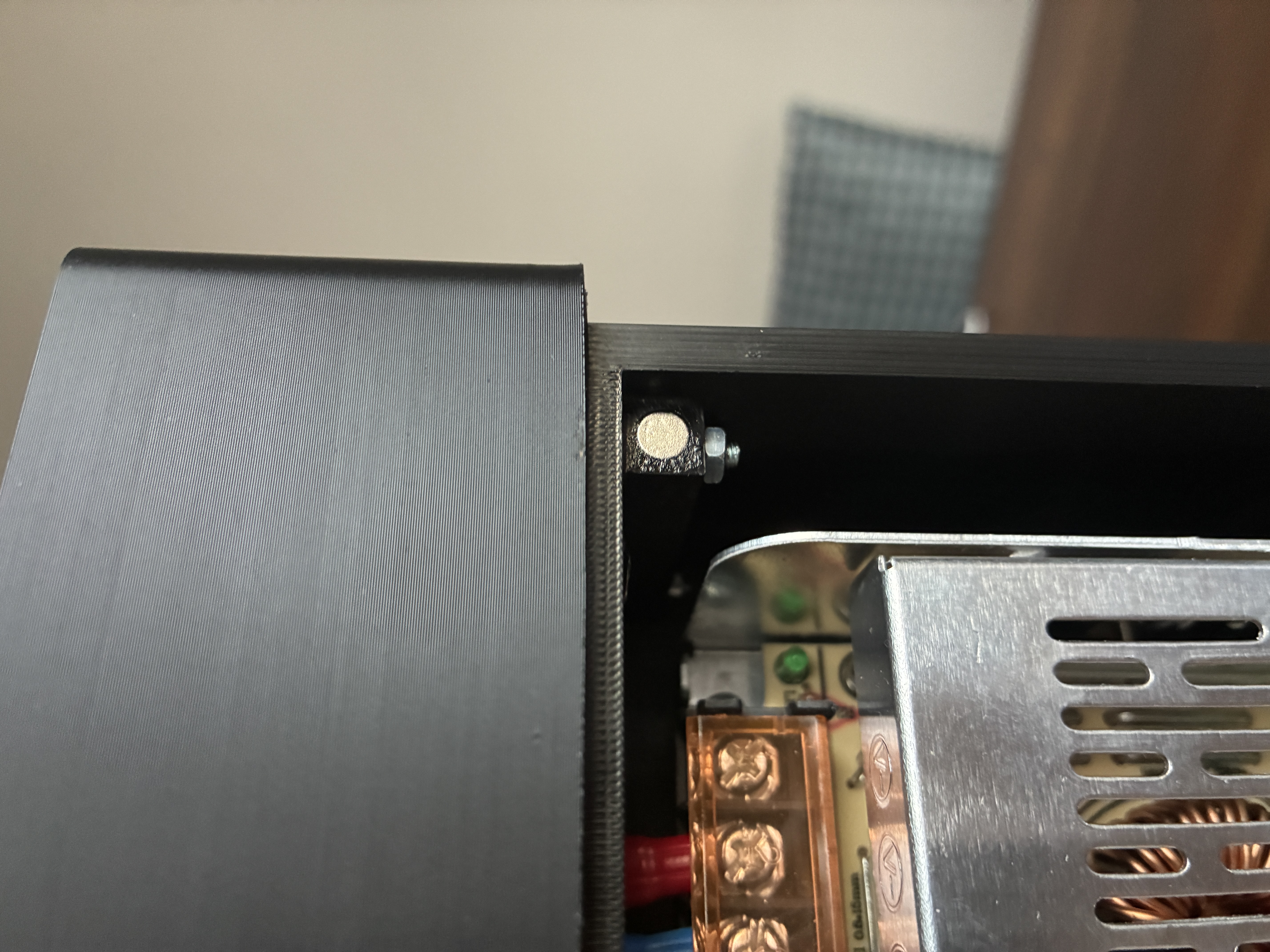
Dab a tiny bit of super glue into each magnet pocket, then press the magnets into the motor housing, motor housing cover, column, and column cover. Do not use a heat source like a soldering iron to insert them, it will demagnetize them.
Connect the base to the column with shorter M3 screws.
Insert 4 M3 nuts into the nut pockets inside the column.
Insert 4 M3 nuts into the grinder holder bridge.
Screw the grinder holder bridge into the column through the nuts inserted in step 6.
Position the power supply onto the four standoffs and screw them in with 5 mm M3 screws. Make sure the input terminals face down and the output terminals face up.
Insert the C14 socket and power switch. Apply some super glue if the fit isn't tight enough to ensure they don't come loose.
Put the shaft connector onto the motor gear.
Insert the extension bit into the other hole of the shaft connector.
Place the hopper onto the grinder.
Finally, put it all together: rest the grinder onto the grinder holder (make sure the rubber band aligns with the holder) and screw in the other half of the holder with four screws to clamp the grinder tightly.
Wiring/Cabling
I am not a professional, so take everything described here with a grain of salt. A wiring mistake with mains voltage can be lethal. Seek professional help if you are not experienced.
Crimp fork connectors onto the two motor cables.
Cut 5 cables to 7–10 cm length and strip the ends. Here are the connectors to crimp onto each one (use matching colors for each cable if you can)
Fork - Female Spade
Fork - Female Spade
Fork - Female Spade
Female Spade - Female Spade
Female Spade - Female Spade
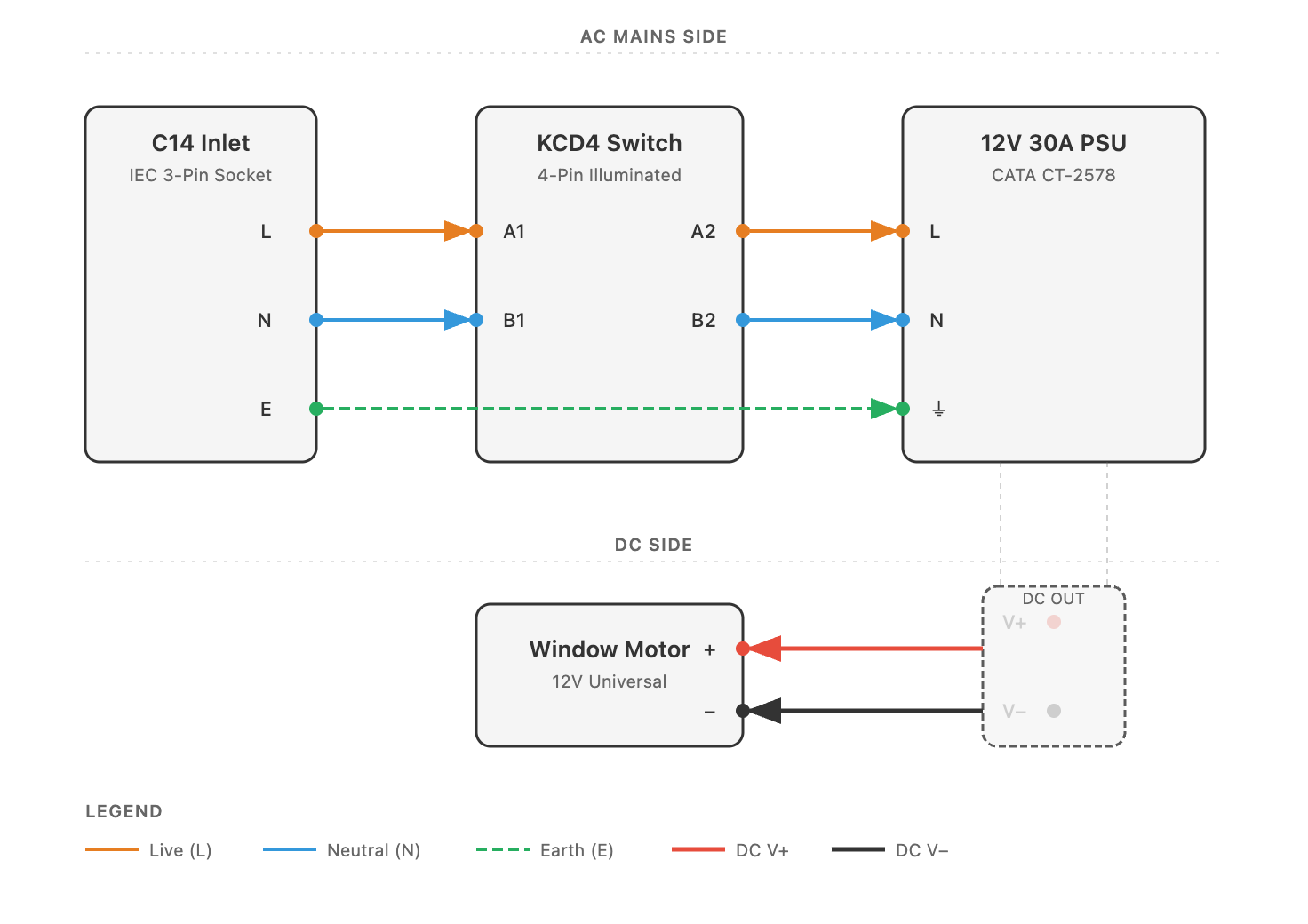
Connect everything as shown in the wiring diagram. The fork ends connect to the PSU terminals, and the female spades connect to the C14 socket and power switch.
Print Settings
I printed everything on a Bambu Lab A1 with a 0.4 mm nozzle using eSun PLA+HS, though PETG would be a better choice for added strength. My settings:
Grinder Holder and Shaft: 50% infill
Everything else: 10–15% infill, but I used modifier shapes in OrcaSlicer to bump critical areas up to 50% infill. These areas include: the socket hole, power switch hole, grinder holder/column connection, column supports, and motor screw standoffs. These modifiers are already included in the combined "All Plates" file.
Notes
The window motor is a universal/generic type, widely available online, but they may have small differences in dimensions. Make sure the shaft diameter matches the printed coupler, or modify the source file to fit yours.
Since the K-Ultra can be adjusted from its outer adjustment ring, the grinder can stay permanently attached to the housing.