
qr2step: QR Code → Editable STEP file generator
We calculate the final price from your selected file. You review and accept it before payment.
Saved on this device.

Wanted to 3D print some QR codes, only found STL generators online. Vibe coded a webapp to make QR → STEP!
- Rating
- 0 / 5
- Likes
- 1
- Downloads
- 7
- Makes
- 0
- Views
- 65
- Reviews
- 0
Updated at source:
Model information
- Source
- Printables
- Category
- Tools
- License
- Creative Commons — Attribution — Noncommercial — Share Alike
▶ Live app: https://gradientprojects.github.io/qr2step/
▶ GitHub: https://github.com/gradientprojects/qr2step
A few top level notes:
I'll be keeping the GitHub page/deployed app more updated than this Printables page.
I'm posting this Printables page so that hopefully more people can find this tool if they're looking for something similar!
I'm uploading a demonstration STEP model to this Printables page, but the whole point is that you use the generator to make your own :)
Why I made this:
Couldn't find a QR code → STEP generator online
Wanted to be able to edit the 3D model of a QR code so that I could add brand logo / font / integrate it into other 3D printed docks etc
Fun project to learn GitHub Pages + more vibe coding stuff (coded it with Claude)
Why this is cool:
Maybe helpful to you as well to be able to get a STEP file and not just a STL of a QR code model
Lots of customization features:
You can add magnets, able to drive the magnet pattern either as inset from edges or absolute XY spacing
Choose between raised-second-color (better for single nozzle machines) vs flat second color (nice with dual nozzle machines, bad for single nozzle machines)
Upload your own font if you want
You can save settings (.json) for re import at a later date
You can export a log or report a bug if something goes wrong (disclaimer that I don't know if I'll do anything with it right now)
It nicely auto-names your exported file
Ok here's a really cool part:
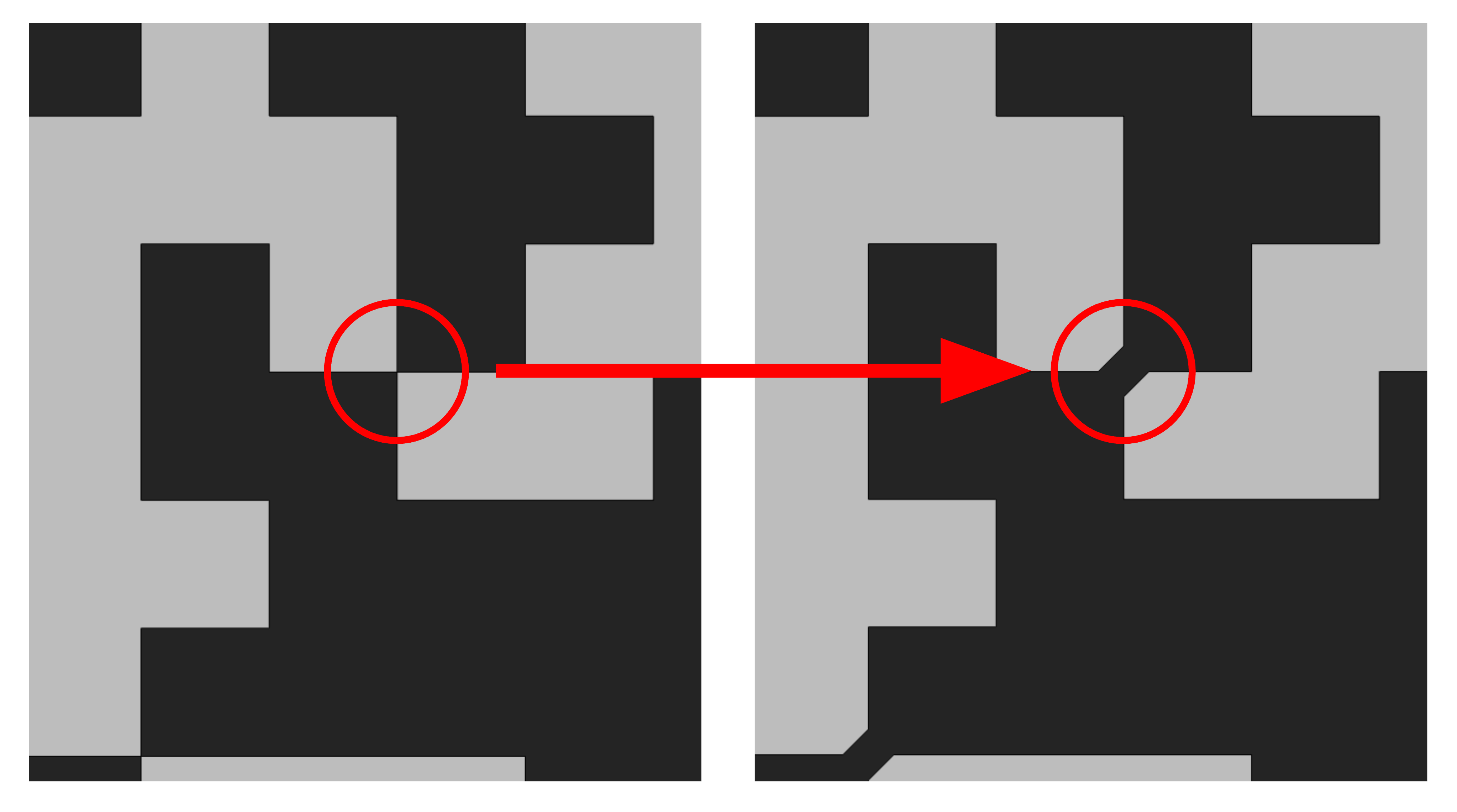
QR code models are inherently non manifold (if the cells are squares) since all the squares touch at sharps.
I implemented a toggle for "connect diagonal modules" which creates a user-adjustable bridge to desharp the corners.
This makes the model more robust to import and edit in CAD programs. You don't need to worry about this for 3D printing, though.
Credit where credit is due:
The UI and feature set is heavily inspired by this awesome QR → STL online tool I found.
I built it all from scratch (well, with Claude), but a ton of the details like magnets, export settings, etc - those are inspired directly by the link above.