
Kellashee Logo For i3 Mini
We calculate the final price from your selected file. You review and accept it before payment.
Saved on this device.
I'm a furry, and I made a logo of my character, and I really like it, so I quickly converted it into a quick, stylish…
- Rating
- 0 / 5
- Likes
- 2
- Downloads
- 7
- Makes
- 0
- Views
- 132
- Reviews
- 0
Updated at source:
Model information
- Source
- Printables
- Category
- Test Models
- License
- Creative Commons — Attribution
I'm a furry, and I made a logo of my character, and I really like it, so I quickly converted it into a quick, stylish test print I use to check different print settings and filament colors.
It's optimized for the Wanhao i3 Mini, using most of the print bed.
Any other printer will still work, though... At the end of the day it's just another 3D model.
Even though it's mostly 2D, this is still a fairly complex shape, so any major issues such as belt/motor slipping, layer shifts, stringing, adhesion failures, or problems with extrusion should present themselves.
Print Settings
Printer Brand:
Wanhao
Printer:
i3 Mini
Rafts:
Doesn't Matter
Supports:
Doesn't Matter
Resolution:
0.2mm
Infill:
20%
Filament: CC3D PLA Silk Black, Silk Red, & Silk Rose Gold
Notes:
The model may load with a weird, glitchy, square "Base" at the bottom of the logo, but this will not actually print. It is a by-product of Cura's built-in image-to-print tool.
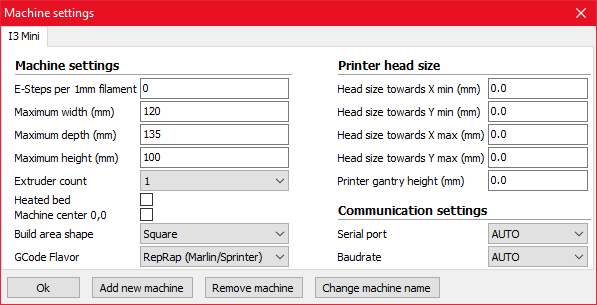
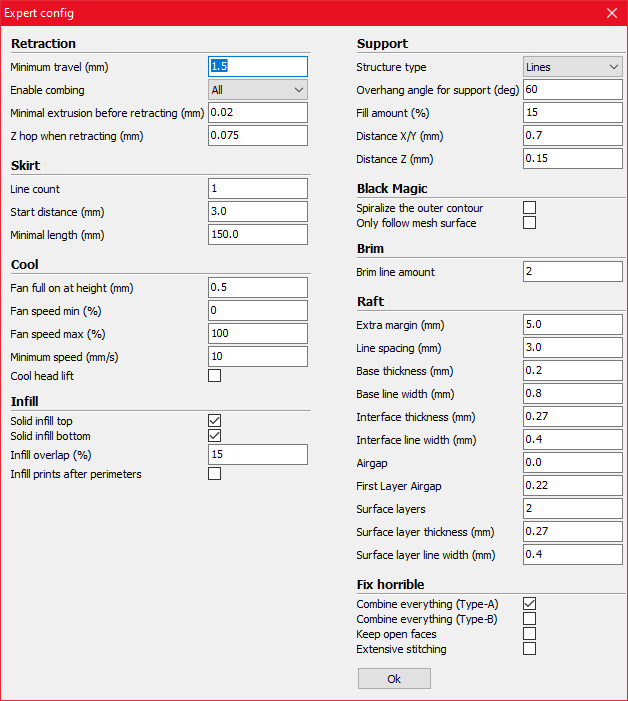
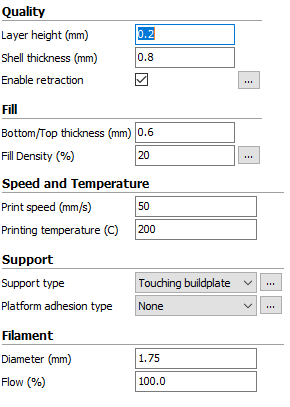
Here are the CURA settings I'm using. Ideally, these should help you dial in your i3 Mini if you're having trouble.I also recommend using Elmer's Disappearing Purple Glue Stick for bed adhesion.
Cura Settings: http://kellashee.fun/~cheetawolf/kellashare/pythonw_2019-12-31_20-46-31.png http://kellashee.fun/~cheetawolf/kellashare/pythonw_2019-12-31_20-47-05.png http://kellashee.fun/~cheetawolf/kellashare/pythonw_2019-12-31_20-47-57.png
Category: 3D Printing Tests