
FlashForge Finder With Cura
We calculate the final price from your selected file. You review and accept it before payment.
Saved on this device.

Utiliser cura sur votre flashforge finder
- Rating
- 0 / 5
- Likes
- 10
- Downloads
- 108
- Makes
- 0
- Views
- 1,315
- Reviews
- 0
Updated at source:
Model information
- Source
- Printables
- Category
- Other Printer Parts & Upgrades
- License
- Creative Commons — Attribution — Noncommercial — Share Alike
_______________________________________
🇬🇧 In English 🇬🇧 (In french below 🇲🇫)
_______________________________________
Create the Flashforge Finder on Cura
Step 1 :
In Cura, create a new printer in the "preferences" tab

Step 2 :
Choose in the “Custom” category the printer “custom FFF Printer” and name your printer

Step 3 :
Then adjust the printer settings as below.

And copy/paste the start and end gcode below.
| Start Gcode | End Gcode |
xgcode 1.0 ;start gcode M140 S0 M104 S{material_print_temperature} T0 M104 S0 T1 M107 G90 G28 M132 X Y Z A B G1 Z50.00 F400 G161 X Y F3300 M6 T0 M907 X100 Y100 Z40 A80 B20 M108 T0 G1 Z.20 F400 | M104 S0 T0 G90 G1 Z140 F3600 G28 X Y M132 X Y Z A B G91 M18 |
step 4: Import profiles and materials
Download the 3 Flashforge finder profiles:
Download Materials Profile
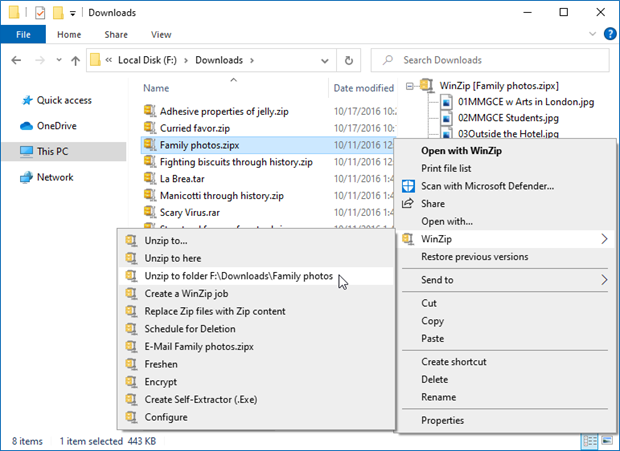
step 5: Unzip the files
step 6: import the profiles into Cura

step 7: import the material
Follow me on Instagram / Facebook / Beacons
Discover My Best 3D Models


_______________________________________
🇲🇫 En Francais 🇲🇫
_______________________________________
étape 1 : Créer la Flashforge Finder sur Cura
Dans Cura, créez une nouvelle imprimante dans l'onglet "préférences"
étape 2 : Choisissez dans la catégorie “Custom” l'imprimante “custom FFF Printer” et nommez votre imprimante
étape 3 : Réglez ensuite les paramètres de l'imprimante comme ci-dessous.

Et copiez/collez le gcode de début et de fin ci-dessous.
| Start Gcode | End Gcode |
xgcode 1.0 ;start gcode M140 S0 M104 S{material_print_temperature} T0 M104 S0 T1 M107 G90 G28 M132 X Y Z A B G1 Z50.00 F400 G161 X Y F3300 M6 T0 M907 X100 Y100 Z40 A80 B20 M108 T0 G1 Z.20 F400 | M104 S0 T0 G90 G1 Z140 F3600 G28 X Y M132 X Y Z A B G91 M18 |
étape 4 : Importer les profils et matériaux
Télécharger les 3 profils de la Flashforge finder :
Télécharger le profil de matériaux
étape 5 : Décompressez les fichiers
étape 6 : importer les profils dans Cura

étape 7 : importer le matériau
Follow me on Instagram / Facebook / Beacons
Discover My Best 3D Models