
Parametric Dog/Cat tag
We calculate the final price from your selected file. You review and accept it before payment.
Saved on this device.

Parametric dogtag, requires Fusion360 w/ ParametricText or Prusa Slicer
- Rating
- 4 / 5
- Likes
- 18
- Downloads
- 217
- Makes
- 1
- Views
- 760
- Reviews
- 1
Updated at source:
Model information
- Source
- Printables
- Category
- Animals
- License
- Creative Commons — Attribution
NB! Use 0.4 nozzle or lower - 0.6 does not produce good enough results!
# STL - make your own
Grab the STL and put in your text using the embedded Prusa Slicer text feature ;)
# Fusion 360 - Make your own
To create your own dog tag, make sure you have the ParametricText module installed for Fusion 360:
Parametric dog tag, requires Fusion360 and an addin called ParametricText
https://apps.autodesk.com/FUSION/en/Detail/Index?id=2114937992453312456&appLang=en&os=Mac
Once you have installed it, open up the .f3d file and change it to your liking as follows, open up the Modify menu and then > Change Text Parameters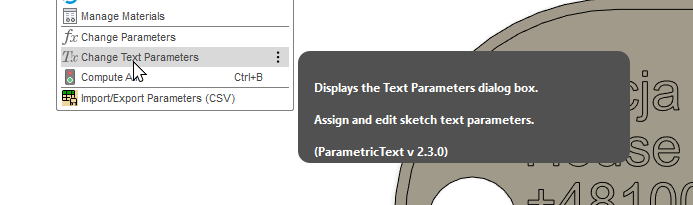
Change the text parameters to your liking, it can glitch out if the text is too long ;)
Export the generated file


Slicing
Slice with your favourite slicer, for me it will be the OrcaSlicer as I have AMS:

Select all objects excluding mainBody and rim - as they're the bottom and the rim, change the color to what you want the accent colors to be.
Set the filament color for the base.