1 / 2
Parametric Auger Screw (OpenSCAD)
Order a print of this model
We calculate the final price from your selected file. You review and accept it before payment.
Saved on this device.

Customizable auger screw for OpenSCAD
- Rating
- 5 / 5
- Likes
- 37
- Downloads
- 579
- Makes
- 2
- Views
- 2,020
- Reviews
- 2
Updated at source:
Model information
- Source
- Printables
- Category
- Mechanical Parts
- License
- Creative Commons — Attribution
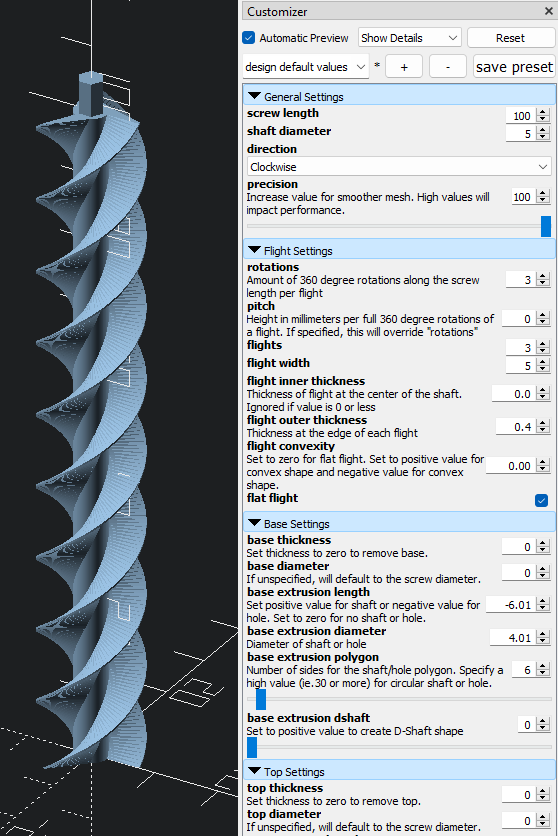
Customizable auger screw for OpenSCAD. Allows customization of options such as length, width, and pitch. Optional shafts or holes can be added at each end to facilitate daisy chaining additional screws or adapting other objects.
Instructions
OpenSCAD is a free software that facilitates parametric 3D modeling. If you are unfamiliar with OpenSCAD, I really encourage you to try it out. Just follow these steps to start generating your own custom models:
- Download and install OpenSCAD (its free!): https://openscad.org/downloads.html
- Open the model file with OpenSCAD. These typically use the “.scad” extension.
- Adjust the model parameters in the “Customizer” section as desired.
- The “Customizer” section will be visible by default on right side of the window. If not, it can be toggled through the top menu (Window=>Customizer)
- Press F5 (or the “Preview” button at the top menu) to preview the model.
- Press F6 (or the “Render” button at the top menu) to generate the model.
- Press F7 (or the “Export to STL” button at the top menu) to save the exported STL to your computer.
OpenSCAD Customizer Preview