
1 / 1
Supports as stand - Cura and PrusaSlicer project files
Order a print of this model
We calculate the final price from your selected file. You review and accept it before payment.
Saved on this device.

Project files showing how to create detailed custom stands automatically from supports.
- Rating
- 0 / 5
- Likes
- 1
- Downloads
- 17
- Makes
- 0
- Views
- 189
- Reviews
- 0
Updated at source:
Model information
- Source
- Printables
- Category
- Sculptures
- License
- Creative Commons — Attribution — Share Alike
Here's 2 project files (hopefully) demonstrating how you can use supports to create display base or stand
Instructions:
Cura
- Import your model
- Orient it how you would like it displayed
- If you want the supports to have a taller base make sure to click off “Drop Down Model” in the move tool options
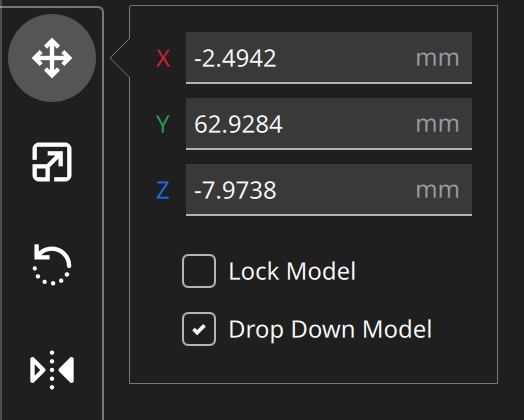
- Make sure the Support blocker Cube is oriented so that only the bottom portion of your model gets supports
- Slice and print.
PrusaSlicer
- Open Project and import your model
- Orient it how you would like it displayed
- If you want the model to hover above the print surface making a taller stand/base then make sure the teeny tiny square is grouped with your model and your model is translated up.
- Make sure the Support blocker Cube is oriented so that only the bottom portion of your model gets supports
- Slice and print.
Tweeks
You can customize this with any flavor supports or any other support version that you prefer. The interface layers don't have to be as solid as I've set them to be.
Please ask lots of questions…I'm hoping my info is clear but I'm sure I forgot something.