
Raspberry Pi HQ Camera Mount
We calculate the final price from your selected file. You review and accept it before payment.
Saved on this device.

A mount for the Raspberry Pi HQ Camera to sit inside the top of the frame looking down at the build plate.
- Rating
- 0 / 5
- Likes
- 24
- Downloads
- 53
- Makes
- 0
- Views
- 1,288
- Reviews
- 0
Updated at source:
Model information
- Source
- Printables
- Category
- Accessories
- License
- Creative Commons — Attribution
A mount for the Raspberry Pi HQ Camera to sit inside the top of the frame looking down at the build plate. When combined with the 6mm wide angle lens, provides clear shots of the whole bed during a print.
Bill of Materials
- 3 Printed Parts
- Raspberry Pi HQ Camera
- 4x M2x6mm self tapping pan head screws
- 3x M3 square nuts
- 3x M3x10mm screws
Instructions
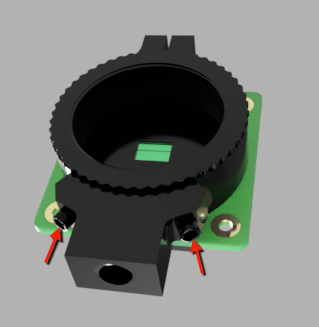
- Remove the two screws holding the tripod mount onto the camera.

2. Attach the camera to the mount using the self tapping screws

3. Insert 3 M3 square nuts into the channels on the back.

4. Slide each side of the cover around the camera. Be careful that the tongue and grove line up correctly. Screw an M3x10 screw in either side to secure.

5. Position the camera in the middle top of the enclosure, and secure using a final M3x10 screw.
Settings
- Filament: PETG
- Nozzle Diameter: 0.4mm
- Layer Height: 0.2mm
- Infill: Gyroid 15%