1 / 3
Kobra 2 Pro profiles for OrcaSlicer
Order a print of this model
We calculate the final price from your selected file. You review and accept it before payment.
Saved on this device.
Model information
- Source
- Printables
- Category
- Anycubic Parts & Upgrades
- License
- Creative Commons — Public Domain
Updates:
- 01.03.24 - Updated process settings for 2.0.0 BETA
- 24.03.24 - Minor speed adjustments
- 16.04.24 - Updated for 2.0.0. added filament cooling tweak, see below for more details
- 27.04.24 - Added multimaterial / color change settings, see below for more details
- 11.08.24 - Minor process adjustments, Arc Welder post processing removed
Installation
- Extract zip files and import .json files (file → import → import configs…)
- Ensure “Kobra 2 Pro 0.4” is selected as printer. Do not use presets with @MyKlipper in process name.
Arachne or classic wall generator?
- Arachne is not always the best choice. Prints with very fine details will benefit from Arachne, classic is however often better for mechanical/functional parts. Any missing details will show in preview of sliced files, it is easy to determine when Arachne is the best option. Arachne is enabled by default.
Pressure advance
- Pressure advance is enabled, with values that'll yield good results for several filament brands. For best results, tune pressure advance to your specific filament - Pressure advance tuning
2.0.0 update (16.04.24)

- Some filaments do not like big changes to layer time, Layers placed on solid infill / top layers are prone to bulging. The reason this happens is often due to speed and cooling differences. On request, I've edited settings to minimize visible layer time bulging.
- The main change is made to “layer time”. A layer time bulge test print has been added, which will also reveal if retraction needs calibration.
Multimaterial update

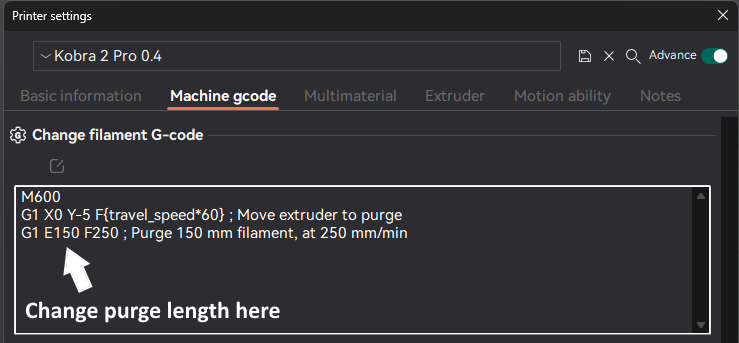
- Do you envy material changing systems such as Bambu Lab's AMS? You can achieve same print results without AMS - with manual color change. Profiles are updated with multimaterial settings. Prime tower is enabled, purge is set to 150mm. If color change is made from dark to light colors, it can become necessary to increase purge length, or clean by other means such as cold pull.