
Personalied Flexible Luggage Tag
We calculate the final price from your selected file. You review and accept it before payment.
Saved on this device.

Personalise your luggage. Store travel details inside. One piece print.
- Rating
- 0 / 5
- Likes
- 24
- Downloads
- 104
- Makes
- 1
- Views
- 722
- Reviews
- 0
Updated at source:
Model information
- Source
- Printables
- Category
- Other Ideas
- License
- Creative Commons — Attribution
This one-piece luggage tag folds over leaving a space inside for a business card or a paper with your travel details. You can personalise it using PrusaSlicer's Text Modifier (see the .3mf).
The tag uses a dovetail edge to hold the two sides together. For the most flexible plastics, 30D-40D (81A-91A), I've used a 10° angle so the two sides don't come apart to easily. For firmer plastics, 95A-98A (46D-53D), I've included a model with 5° angles to make them easier to clip together. You may need to experiment with your plastic.
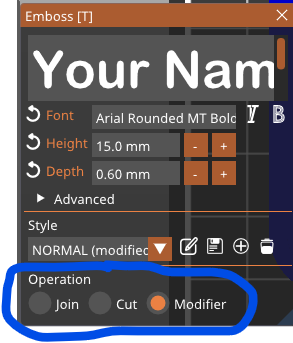
Use the .3mf included. Right-click on each of the Text modifiers to enter your details. Don't forget the Init-ials on the bottom (outsides) of the luggage tag. You may need to adjust the Height (font size) if your name or email address it long.
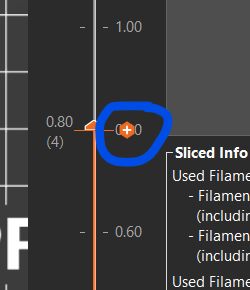
If you don't have a multi-colour printer, change the inside Text modifiers (name, phone, email) operation from ‘modify’ to ‘join’ and the outside text (initials) to ‘cut’ add a colour change (click the little ‘+’ icon on the layer slider) at the 0.80 layer and another at the 2.20mm layer.
Print with 4 perimeters so the interlocking dovetale edges are solid. And, obviously, you always have to print flexibles print slowly.
Handy hint: flexibles can sometimes be difficult to remove from the powder coated steel sheet. After printing, heat the print bed to 100°, the print will then peel off more easily. If you use a PEI coated sheet, apply some gluestick or you might have a hard time getting the print off.