
FormD T1 Side Panels
We calculate the final price from your selected file. You review and accept it before payment.
Saved on this device.

Open source 3D printable side panels for the FormD T1
- Rating
- 5 / 5
- Likes
- 45
- Downloads
- 527
- Makes
- 1
- Views
- 5,881
- Reviews
- 1
Updated at source:
Model information
- Source
- Printables
- Category
- Computers
- License
- Creative Commons — Attribution
As seen in my YouTube video: The Ultimate FormD T1 Air Cooled Build
Panels require a large print bed (300mm+) and a well calibrated printer.
They are somewhat experimental, trial and error may be necessary to get satisfactory results.
The panels include 4 built-in break away supports which will need to be removed after printing.
How to print:
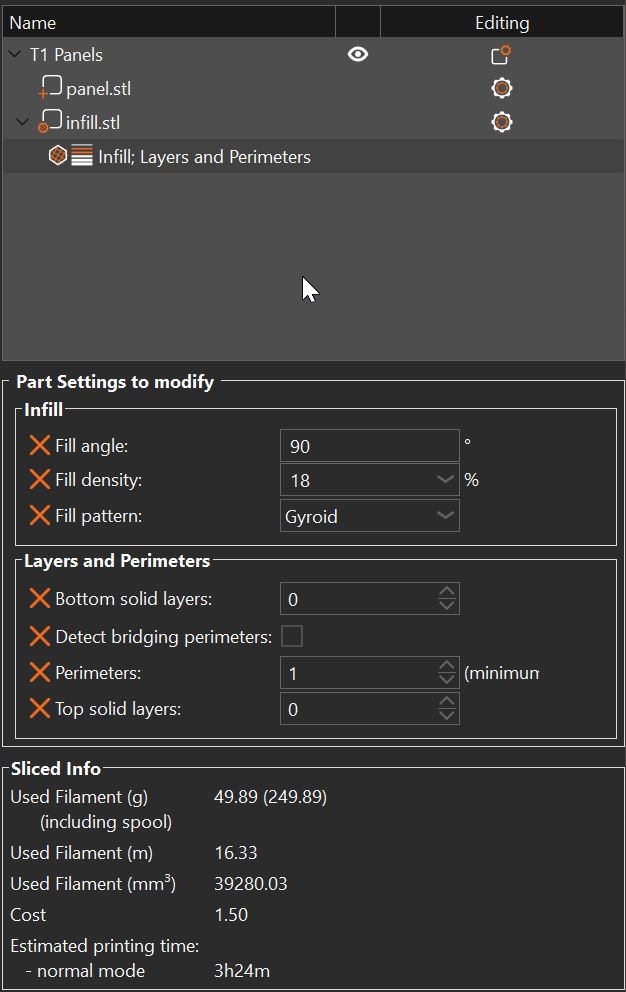
- Import Panel.stl into your slicer (I recommend PrusaSlicer).
- Right click model choose Add Modifier and select the Infill.stl file
- Right click the infill model in the sidebar and add the following settings:
- Infill density 10-30 (Depends on infill pattern, but higher density is better)
- Fill pattern Cubic, Gyroid (Recommended), Triangles, etc
- Bottom solid layers: 0
- Detect bridging perimeters: Off (Eliminates ugly bridging at edge of infill area)
- Perimeters: 0-3 (For the infill modifier itself, I recommend 2)
- Top solid layers: 0
Make sure the bridging for the overhanging panel lip is perpendicular, and if not, manually set the bridging angle.

Recommended materials and print settings:
ASA/ABS or PETG
0.2 layer height
textured PEI print surface
Special considerations:
Due to the size and rectangular shape of the panels make sure your printer is skew calibrated and it prints with a reasonable degree of dimensional accuracy.
The design files are optimized with ASA/ABS shrinking in mind.
PETG prints a bit more snug* but no scale compensation should be needed. If the panel does print too large then try compensating by scaling down up to .5%.
You may need to slow down your infill speeds / accelerations to get a clean look
*Tested with Prusament PETG