
Stencil for technical drawings
We calculate the final price from your selected file. You review and accept it before payment.
Saved on this device.

Different stencils for letters, numbers and symbols used in technical drawings.
- Rating
- 0 / 5
- Likes
- 108
- Downloads
- 423
- Makes
- 0
- Views
- 2,267
- Reviews
- 0
Updated at source:
Model information
- Source
- Printables
- Category
- Tools
- License
- Creative Commons — Attribution — Noncommercial — Share Alike
A stencil set that is made for technical drawings. Everything should meet the ISO-standards.
Using the slider helps getting the distance between the characters right (see "how to use" below).
Printing
The print settings are up to you. The only option i'd recommend is switching “avoid crossing perimeters” to ON.
How to use
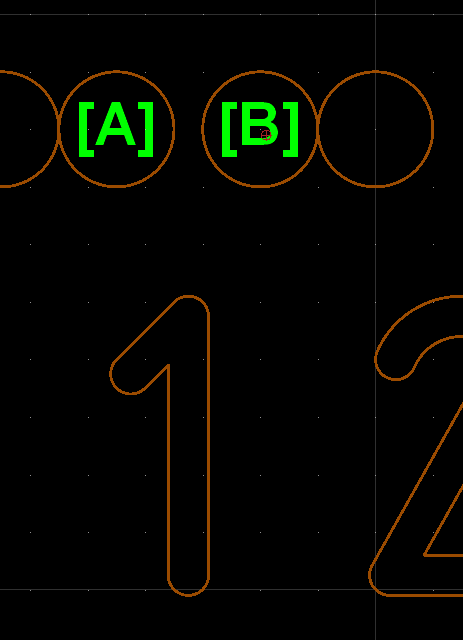
The Slider has a little notch on the top that helps to find the right position. This helps getting the spacing of the letters right. Each character has two reference points.
- Point [A] is the starting point of the CURRENT character
- Point [B] is the starting point of the NEXT character
Drawing the characters with the help of the Slider works as following:
- Draw the firs character
- Move the Slider to position [B] without moving the stencil strip
- Move the stencil strip so that it fits position [A] of the next character (without moving the slider)
- Repeat
Note:
- Every stencil strip has a line right at the beginning. This helps to position the Slider to the last character.
- Some Characters use two positions on the stencil strip. To draw them simply move the strip to the next position without moving the slider.
- The letter “Q" is based on the letter “O”.
- All other two-part characters have both parts right next to each other.
- this affects following characters: B, Q, &, Ø, 8