
FFBeast Encoder Assembly
We calculate the final price from your selected file. You review and accept it before payment.
Saved on this device.
Model information
- Source
- Printables
- Category
- Mechanical Parts
- License
- Creative Commons — Attribution
Recently, for some unknown reason, a lot of people have been questioning and obsessing over the idea of using stupid high CPR encoders. If you're one of those, consider this:
If you do the math for 4096 CPR that is 1024ppr, that means one pulse every ~0.3deg (that's like 5% of a minute in an analog clock). I DOUBT you'd be able to differentiate that with while on a stopped car, let alone with forces driving over bumps and all that jazz. There is a reason we all use it: it's cheap, it works really well and it's been well tested and used. Also worth keeping in mind that you're building a toy to drive your pretend race car, not a surgery robot :)
That being said, this was designed with the FFBeast project in mind, using an MT6701 ~17x15mm encoder.
If you insist on running a higher resolution and bitrate encoder, although unnecessary, you may use an MT6835, as long as you follow the same previously mentioned dimensions and board form factor (reference the board image bellow). Personally I don't think it's needed. Some users report a difference in feel in some specific areas like friction, some don't, some had trouble setting it up.. so pick your poison I guess :P
A set of printed parts meant to center and hold both the magnet and magnetic encoder onto the hoverboard motor.
Due to the fact that the motor heats up during operation, it is recommended that you print these parts in PETG, ABS or ASA.
PLA may deform under higher temperatures.
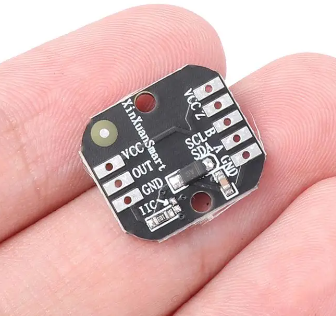
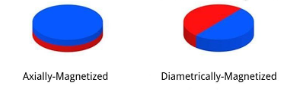
Also my encoder already came with a 6mm diameter magnet, so that's what it was designed for. If you buying the magnet separately, make sure to get diametricaly magnetized ones.
To proceed with the assembly process bellow, you want to have already drilled the necessary holes in your hoverboard motor. You'll need a 24mm hole in the center and 6x 5mm holes in a 70mm circular pattern (make sure this is centered).
Spiky designed a drill guide that makes life a lot easier for locating and drilling the needed holes.
Assembly:
1- Sandwich the Centering Piece between the motor housing and your wheel spacer
2- Put the stator in place
3- Feed the wires through the stator axle and the Encoder Support Piece (ideal print orientation shown)
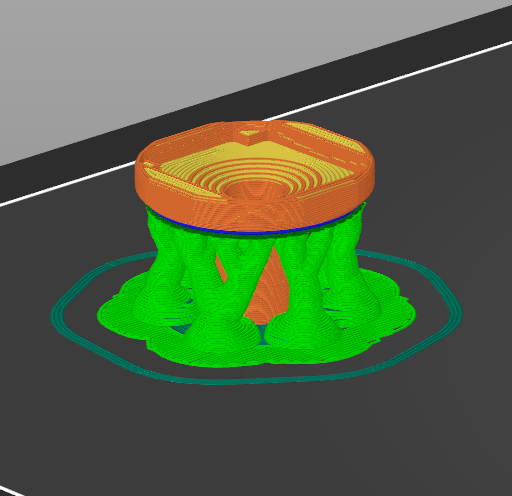
4- Solder the wires onto the encoder (you may need to extend the ones that come with the ODrive depending on your assembly)
5- Hot glue the encoder onto the Encoder Support Piece after carefully routing its wires. You want it to sit as flush as possible on the printed part
6- Install the encoder and the Encoder Support Piece onto the stator axle
7- Place the magnet into the hole in the Magnet Carrier Piece
8- Put the Magnet Carrier Piece in position (in the center of the Centering Piece and screw it in.
-Guide of the assembly process (by Seigen):
The only observation to make here is that somewhere around 2:50 he mentions the hub spacer being optional, It is kind of necessary though. You need the spacer (or at least for your wheel) to have a hole in the middle so you have that window to install the encoder through.
More information on the FFBeast project can be found here:
https://ffbeast.github.io/docs/en/wheel.html