
The Rubik's Cube Solver
We calculate the final price from your selected file. You review and accept it before payment.
Saved on this device.
Model information
- Source
- Printables
- Category
- Puzzles & Brain-teasers
- License
- Creative Commons — Attribution
The record so far: 1.260 second !
Disclaimer
Despite being inspired by different robots, the model presented below is entirely from my imagination. It represents many hours of work. I am very happy to share it with you, but I ask you to respect my work, and not to forget to reference this design if you use it.
Abstract
Have you always dreamed of solving the Rubik's cube, but never succeeded? Then this robot is made for you! He can solve the Rubik's cube in less than two seconds! Yes, two seconds!
The robot is completely autonomous: it has a camera allowing it to scan the colors of the different faces. This step takes 6 seconds.
Then, thanks to its six robotic axes, the puzzle can be solved in less than two seconds, whatever the starting configuration.
The puzzle is surrounded by LED panels which imitate a Rubiks cube. They have two functions: the first, to ensure diffused and constant light during the recognition phase; the second: they allow you to reproduce the movements of the different faces of the puzzle while the motors move, thus producing hypnotic light animations.
The robot is almost entirely 3D printed, apart from the electromechanical components and the plexiglass panels, everything can be printed!
Thanks to the spring suspensions, the rubiks cube can easily be inserted and removed. Little extra, the front axle mounts on a pivot link, allowing access to the cube more easily.
The design was made in such a way that (almost) no wires are visible. All cables are routed inside the frame using integrated gutters. They are wide enough to contain the motor and LED cables.
Clearly, it's not the most useful robot in the world, but it does its job, and it easily impresses onlookers. In a science show, open days, or other gathering of nerds, guaranteed effect!
Units
Unless mentioned, all dimensions are in mm. This is also valid for the STEP/DXF files.
For the miscellaneous parts, I use DIN or ISO standards.
Print Settings
I printed all the part with a Prusa MK3S, using a 0.4mm nozzle, and 0.3mm layers.
All the parts are printed with the Galaxy Black PLA filament. I love this one, it gives a nice shinny effect that hides the layers, and make the plastic looking like metalic parts.
For most of the parts, the infill is set to a pretty low value (10-15%), but to ensure stiffness, the number of perimeters is always set to at least 3. If it increases the print time, it also drasticaly increases the part stiffness.
Building the machine
The transmissions
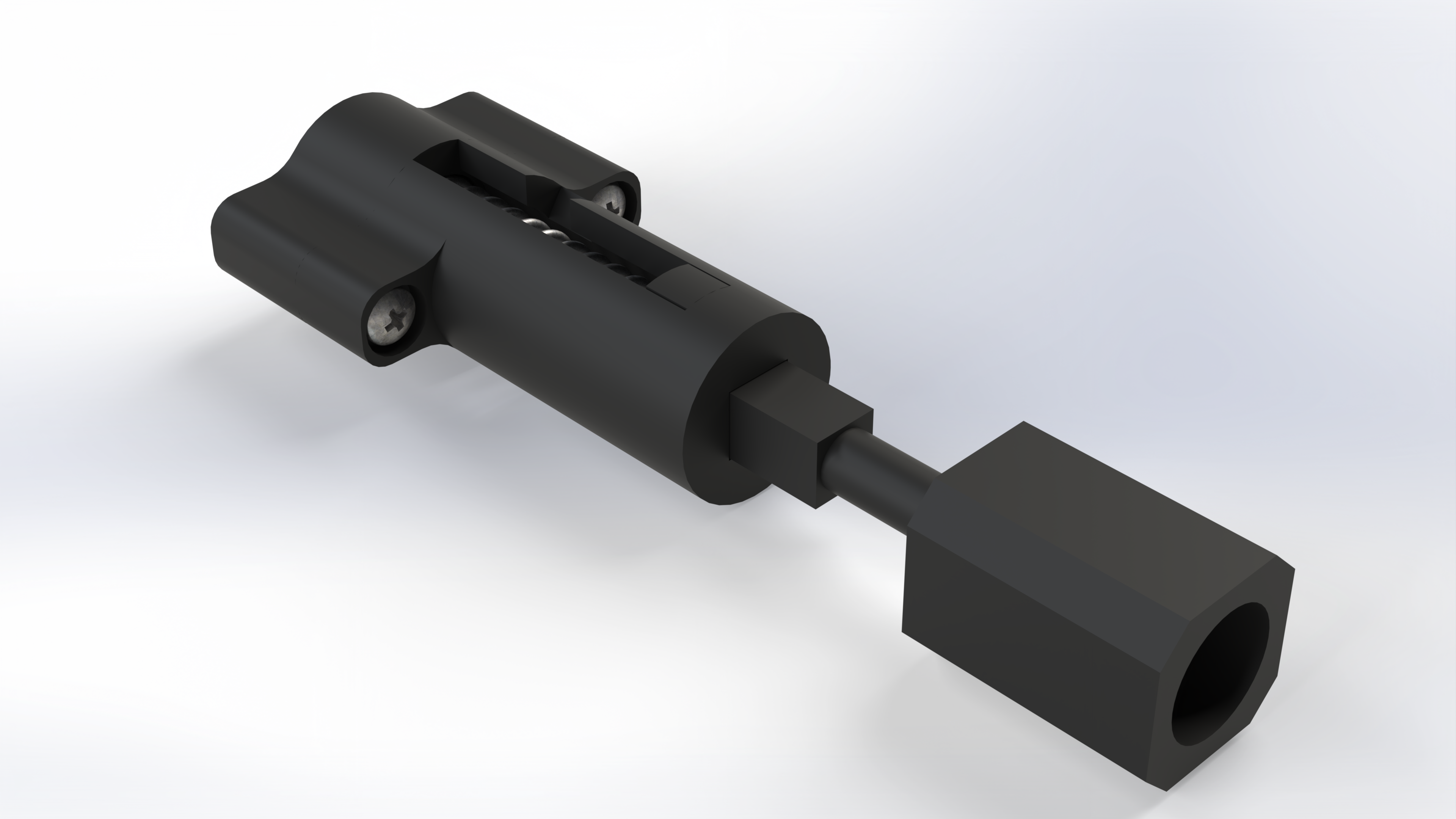
The transmissions are one of the very key components of the machine. They transmit the movement of the motors towards the faces of the rubiks cube. To set each face in motion, the transmissions fit inside the central facet of each face.
They were designed for “SpeedCube” type rubiks cubes from the GAN brand. These cubes have much less friction, and are much more tolerant to the corner cut phenomenon (the fact that you cannot turn a face if it is not perfectly aligned).
As shown on the video bellow, the transmission can be locked in the unloading position. This enable easier installation of the rubiks cube inside the machine.
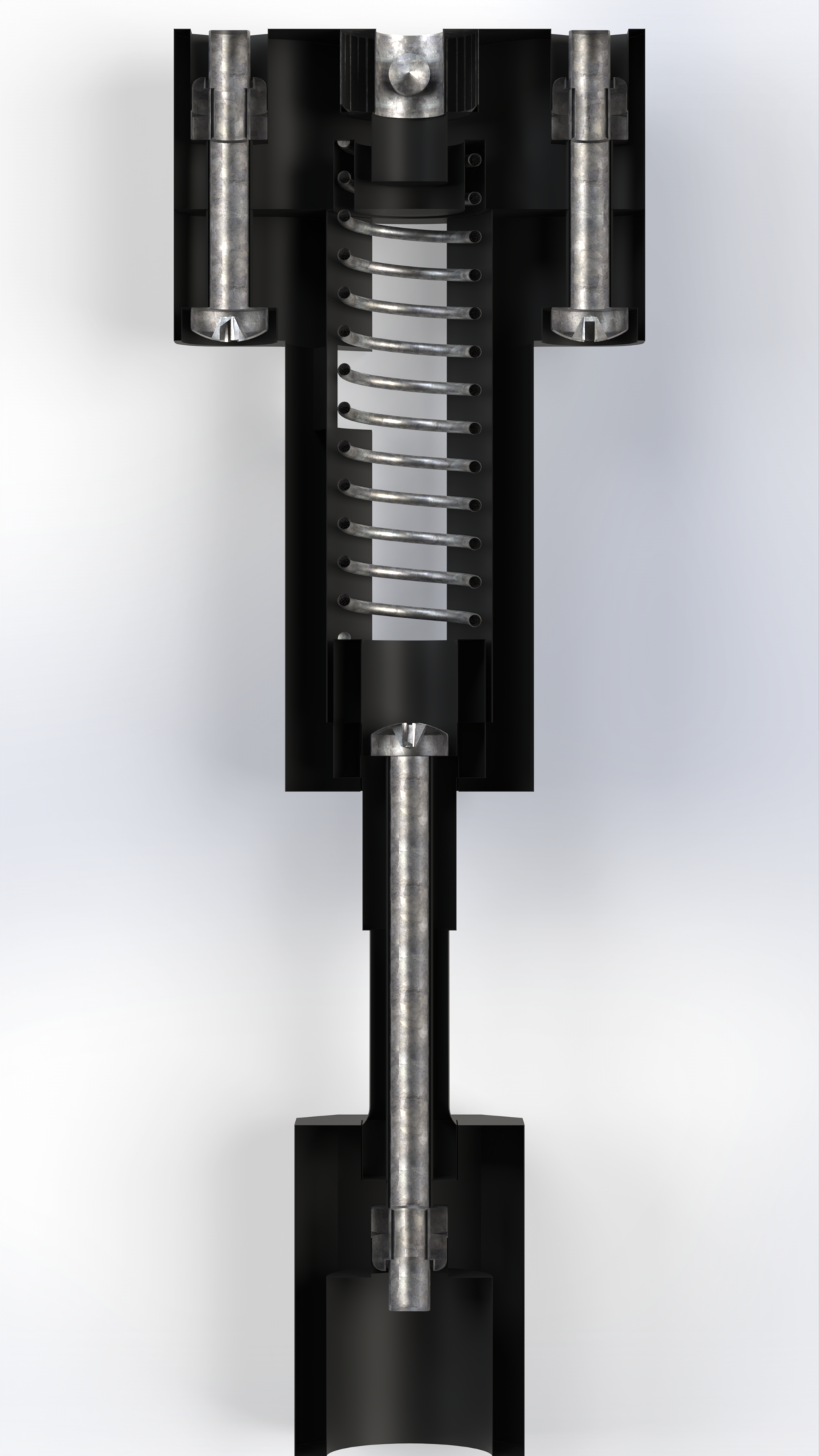
The transmission is mounted on the motor shaft thanks to a locking ring (DIN705) that is mounted by force inside the base of the transmission. The ring set screw allows proper mounting on a D-type shaft.
To ensure good stiffness of the transmission, an M3x40 screw passes through the transmission shaft to the interface with the Rubik's cube. Thus, delamination of the shaft is not possible, since the screw will recover the forces (like the pre-stressing with the concrete).
Transmission B.O.M
For each transmission you'll need the following parts:
| Part | Qty (total) |
|---|---|
| Base.step | 1 (6) |
| Body.step | 1 (6) |
| Piston.step | 1 (6) |
| Interface.step | 1 (6) |
| M3 Prevailing torque nut (DIN 985) | 3 (18) |
| M3x40 Pan Head Cross recess screw (DIN 7985) | 1 (6) |
| M3x20 Pan Head Cross recess screw (DIN 7985) | 2 (12) |
| Shaft Collar - ID5/OD10/Thickness6 (DIN 705) | 1 (6) |
| Compression Spring (0.9x10x40) | 1 (6) |
The side panels
The side panels have two main features:
- They host the LED strips creating the light animations
- They hold the stepper motors, ensuring their correct positioning.
You have to build 5 side panels, since the sixth motor is mounted on a movable frame.
The LED Arrays
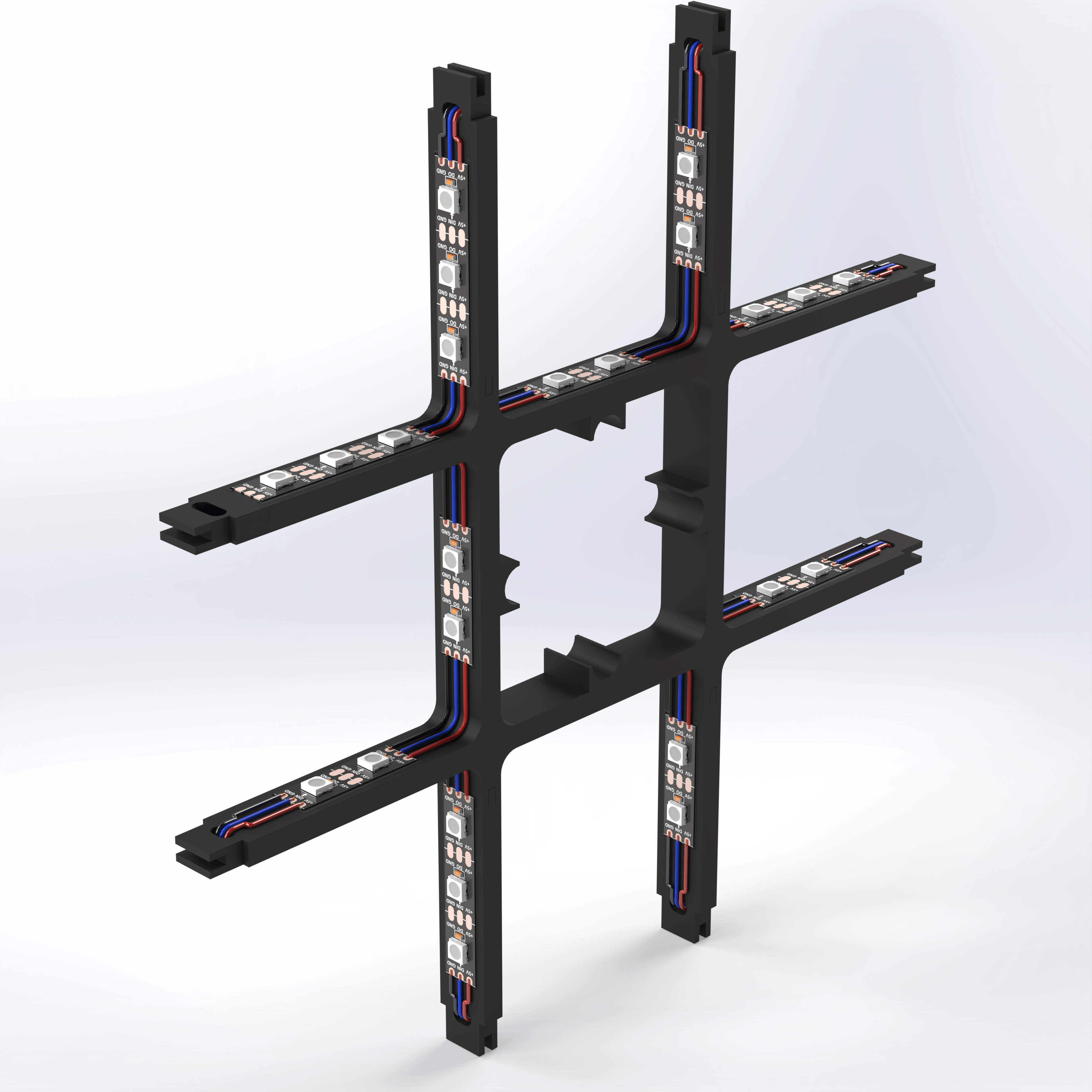
The LED array will mimic the puzzle by creating a light show on all sides of the robot. To do this, I use the famous WS2812B addressable LEDs. These LEDs are really practical, inexpensive and simple to use. They reduce the number of electrical wires, while still being incredibly powerful.
Each LED panel is broken down into 9 facets, exactly like the Rubik's cube. Only the 8 exterior faces are illuminated, the central face housing the engine.
There are two types of exterior facets: corners (L-shaped), and centers (U-shaped). To facilitate programming, but also to have a uniform light, each facet has 6 LEDs. The corners are made up of 2strips of 3 LEDs, while the centers are made up of 3strips of 2 LEDs.
The LED strips are simply sticked to the plastic arms, thanks to the integrated tape. At each location, raised lines allow the LED strips to be perfectly aligned.
Unfortunately, the full array is too big for my 3D printer, therefore I had to split the part to make it fit. This is why you've two different parts. The LED_holder.step part and the LED_holder_side.step. For each pannel, you need one LED_holder, and 4 LED_holder_side. The LED_holder_side parts are simply glued into the LED_holder, using regular cyanoacrylate.
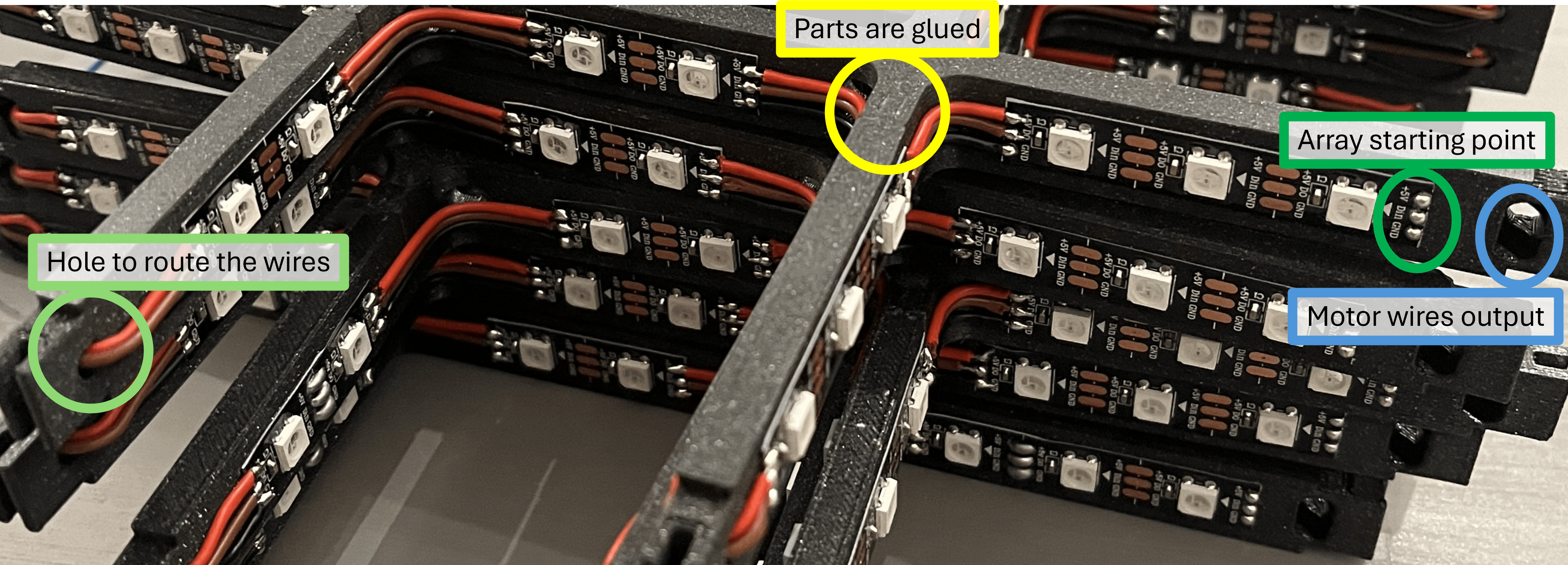 When gluing the parts together, watch the orientation of the side parts to ensure the LEDs locations are correct.
After gluing the plastic part, you need to get ready for some soldering. This part took me about 4 hours in total (for all the 5 panels, so slightly less than an hour per array). Unfortunately, you'll have to solder the wires directly on the PLA. This can be tricky since the PLA might start to melt.
However, by doing it properly, it will work like a charm. I haven't melted any plastic part by doing the soldering very carefully. To do so, before sticking the LED strips on the part, I tinned each pad. Then I applied the LED strips on the parts, and finally, soldered each wire (already cut to size, and pre-tinned). This way, the soldering of each wire only take about 1 or 2 seconds, wich is short enough to not melt the PLA (the copper inside the LED strip will diffuse the heat).
On each extremity, there is a hole to route the wire from one side of an harm to the other.
The WS2812B LEDs are cascadables. Each strip can be connected to another one. Formally speaking, we could cascade all the 5 LEDs panels. However, I dediced to keep the 5 panels completely independants, this for two main reasons:
- Reducing the number of wire: by keeping the LEDs panels independant, you only need 3 wires for each panel (+5V, DataIn, GND). Would you cascade all the panels, you would need 6 wires (+5V in and out, DataIn and DataOut, GND in and GND out).
- Avoiding heat dissipation: Each LED needs up to 60mA, with 48 LEDs per array, and 5 arrays in total, it's 240 LEDs in total, which means the LEDs arrays can drive up to 14.4A. Such a current will make the wires quite warm, or require thick cables. By having the power supply spreaded over the 5 panels, you only drive 2.9A for each panel (maximum), which is more acceptable for thin wires. This way, no heat, no melted PLA.
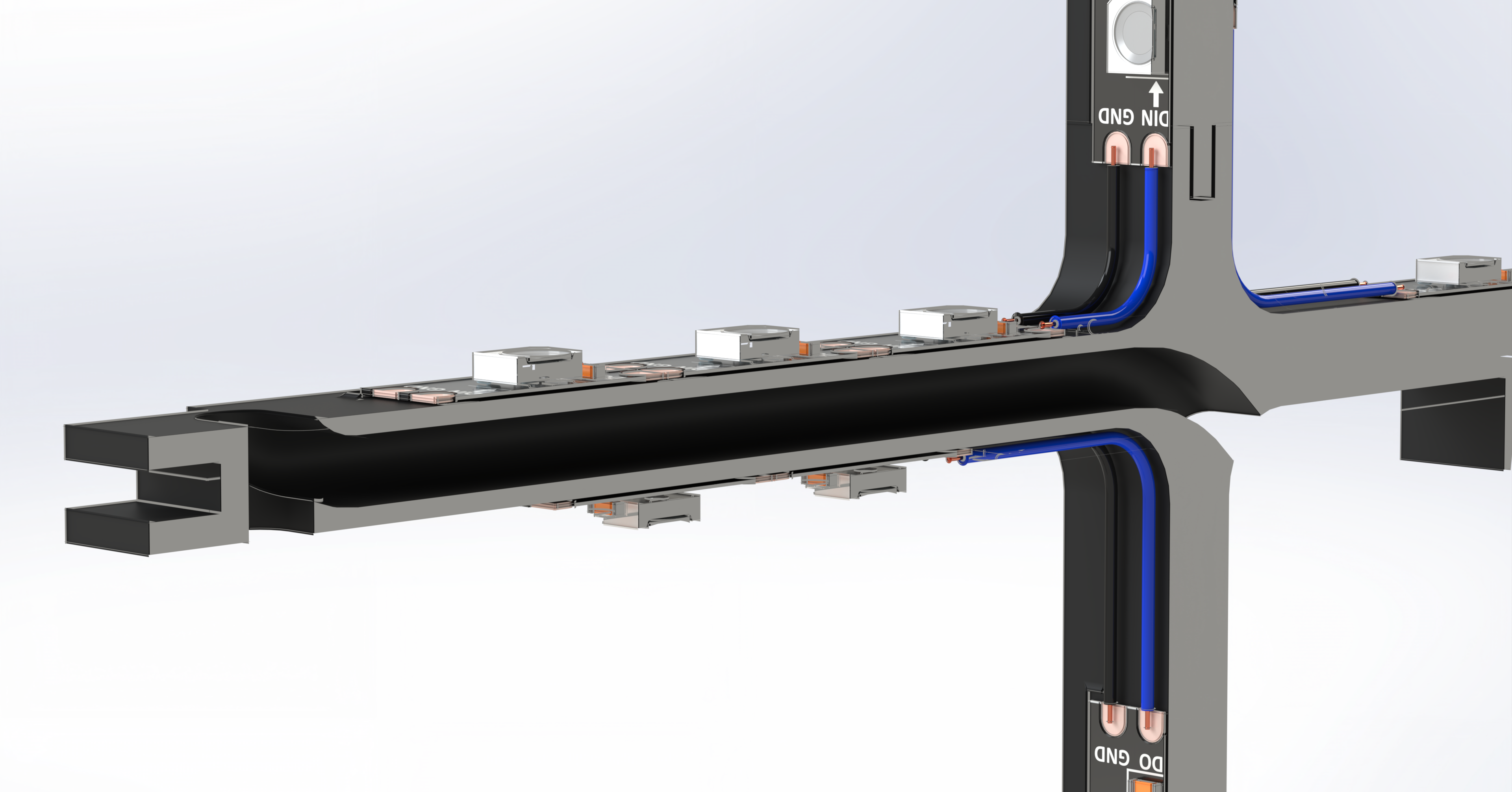
In the end, the motor will be completely surrounded by the LED array, to keep the motor wires invisible, a gutter is hidden inside one the LED array arm (see cut view bellow). This gutter easily fits the 4 wires of the motor. The arm on which the motor wires will come is also the starting point of your LED strip. This way, on this extremity of the array, you'll have the 7 wires (the 4 for the motor, and the 3 for the LEDs). This is important for the final assembly.
LED Arrays B.O.M
For each LED Array you'll need the following parts:
| Part | Qty (total) |
|---|---|
| LED_Holder.step | 1 (5) |
| LED_Holder_Side.step | 1 (5) |
| WS2812B LED Strip 5V - 60 LEDs/meter, IP30 | 48 (240)* |
| 20 AWG electrical wire - Red, Black, Blue | About 50cm for each color (6) |
* With one 5m spool (300 LEDs), you can do all the 5 arrays
Full side panel assembly
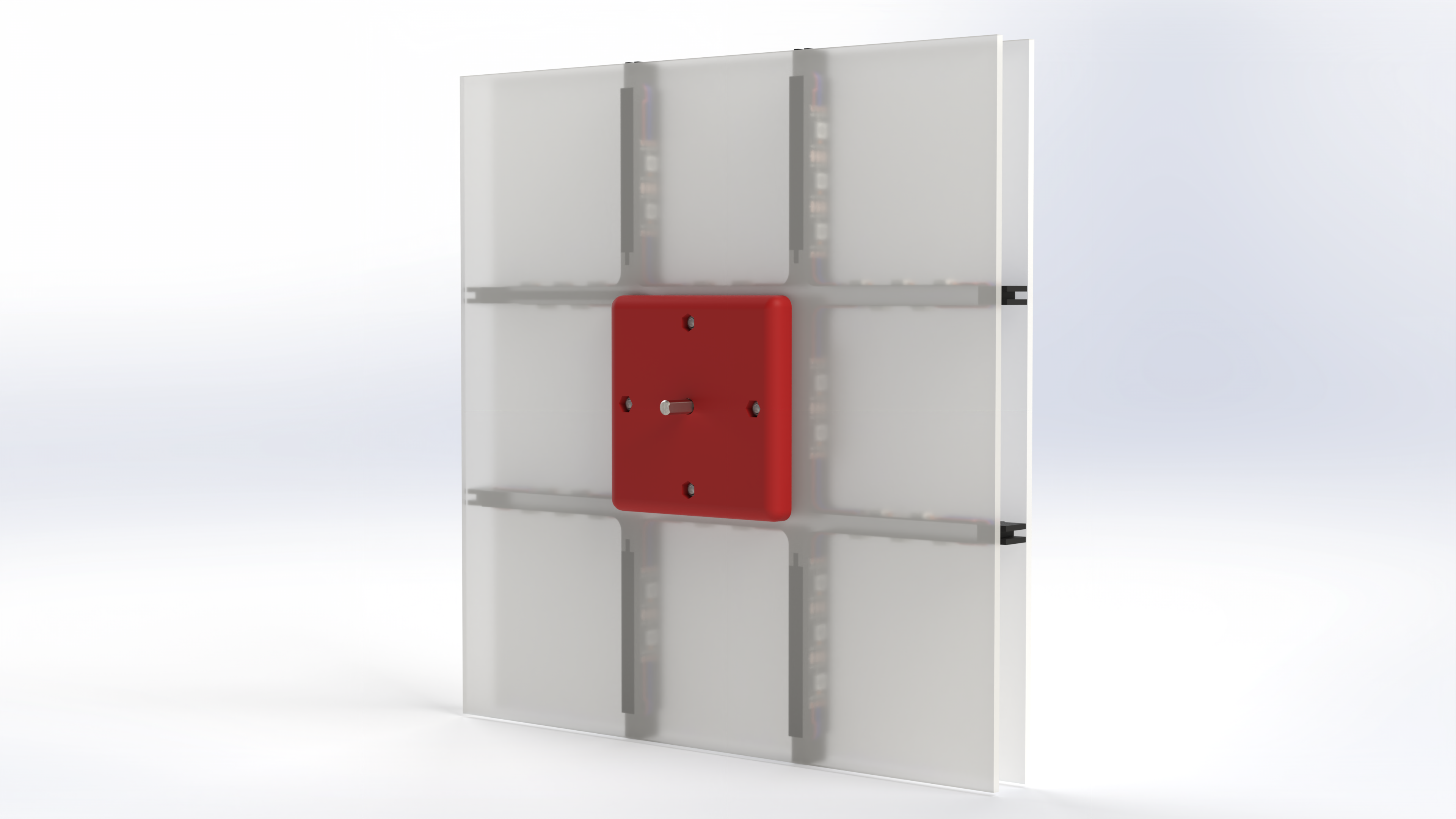
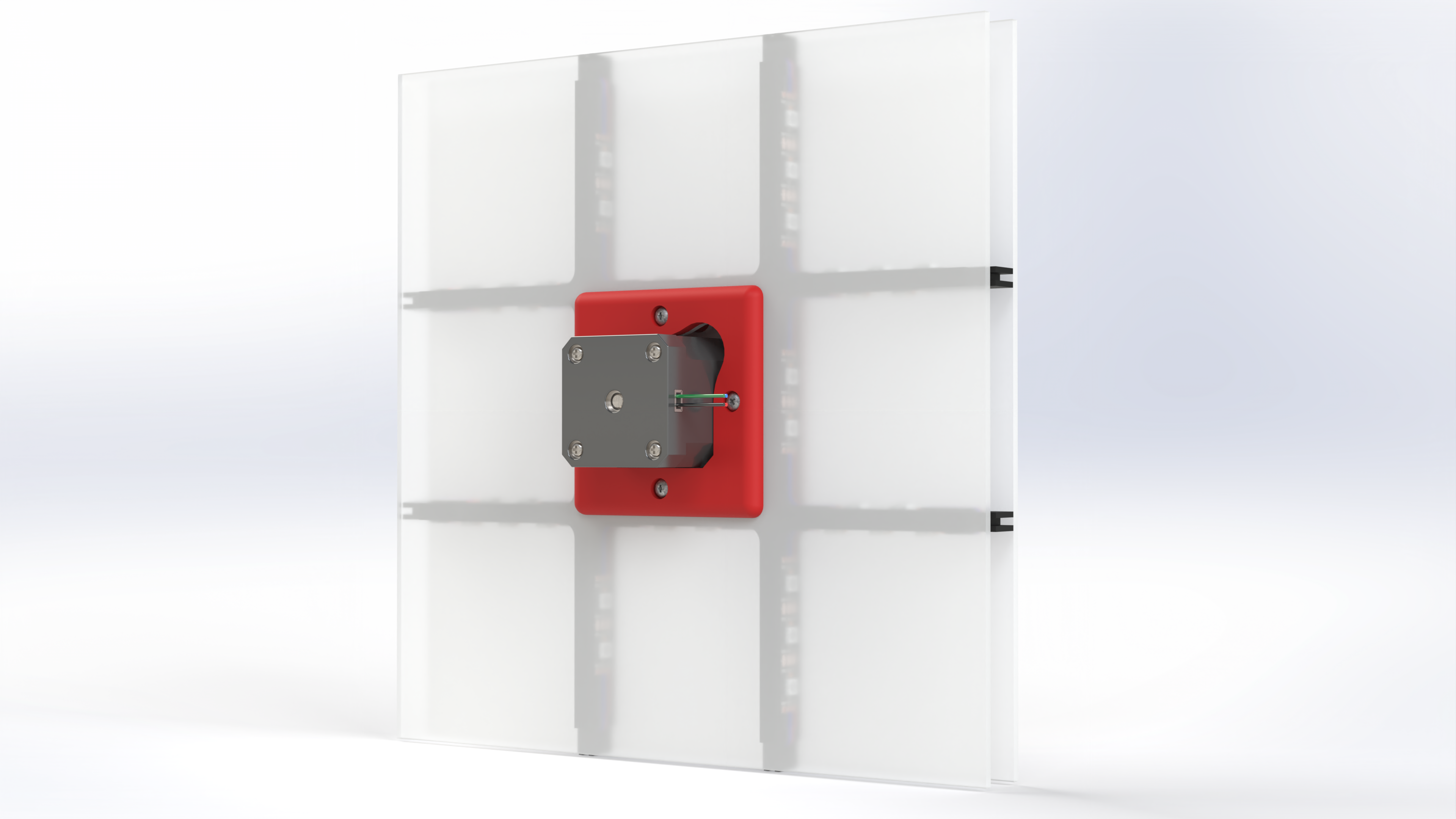
With the LED arrays ready, you can now do the full side panels assembly. The motors are obviously the working horses of the machine. For this project I decided to use stepper motors. They are cheap, easy to control and capable of being relatively precise, even in opened loop (without encoders - position sensors).
However, they loose torque very quickly as the speed is increased. For this reason, I use a big version of NEMA 17 type motors: the 48mm long ones. They are rated for 2A per coil, giving a holding torque of 0.6 N.m.
The motors are tightened to the light diffusers. These are the only plastic parts that you cannot 3D print. I ordered these parts online, providing the DXF profile, I received nicely laser cutted plastic plates, for a relatively cheap deal (5EUR per plate).
I used Opal GS white plexiglass plates, with a thickness of 3mm, and a light diffusion of 32%. The PVC thickness is important, since the plate are assembled on rails.
The 32% gives a nice light diffusion, while allowing to see the LEDs spots (which is something I wanted). If you want to avoid seeing the LEDs, pick up a material with a smaller light transmissions.
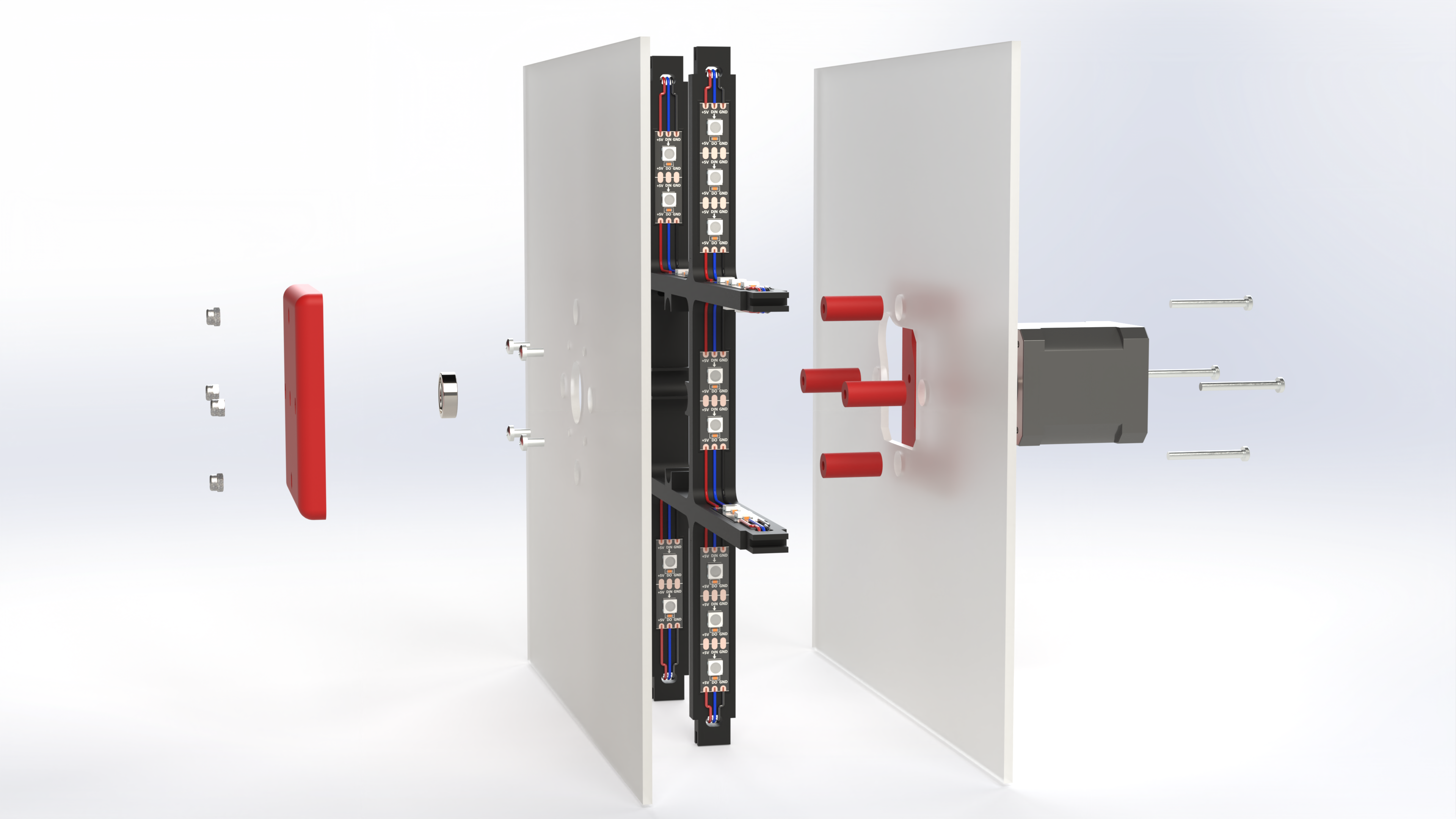
The LEDs arrays are sandwiched between the two light diffusing plates. Four spacers will host the screws that keep everything assembled.
Two 3D printed parts hide the central facet of the LED array. They are also used to indicate wich face of the puzzle is supposed to be connected to this motor. On a 3x3 rubiks cube, the central pieces never moves. Red will always be in front of Orange, Yellow in front of White, etc. Therefore, the motors covers are printed in five different colors (Red, Orange, Blue, Green, and Yellow).
Inside the front cover, a ball bearing is fitted to guide the motor axis and take the load. The picture bellow shows an exploded view of the side panel full assembly.
Side Panel B.O.M
For each Side Panel you'll need the following parts:
| Part | Qty (total) |
|---|---|
| LED Array | 1 (5) |
| Motor_Cover.step | 1 (5) |
| Motor_Cover_External.step | 1 (5) |
| Spacer.step | 4 (20) |
| Nema 17 - 42x42x48 - 2A | 1 (5) |
| M3 Prevailing torque nut (DIN 985) | 4 (20) |
| M3x6 Pan Head Cross recess screw (DIN 7985) | 4 (20) |
| M3x30 Pan Head Cross recess screw (DIN 7985) | 4 (20) |
| 625RS Ballbearing (ISO) - 16x5x5mm | 1 (5) |
| Light_Diffuser_External.step - Laset cut 3mm plastic plate | 1 (5) |
| Light_Diffuser.step - Laset cut 3mm plastic plate | 1 (5) |
Here we are, with this done, you have your five side panels !
The front motor
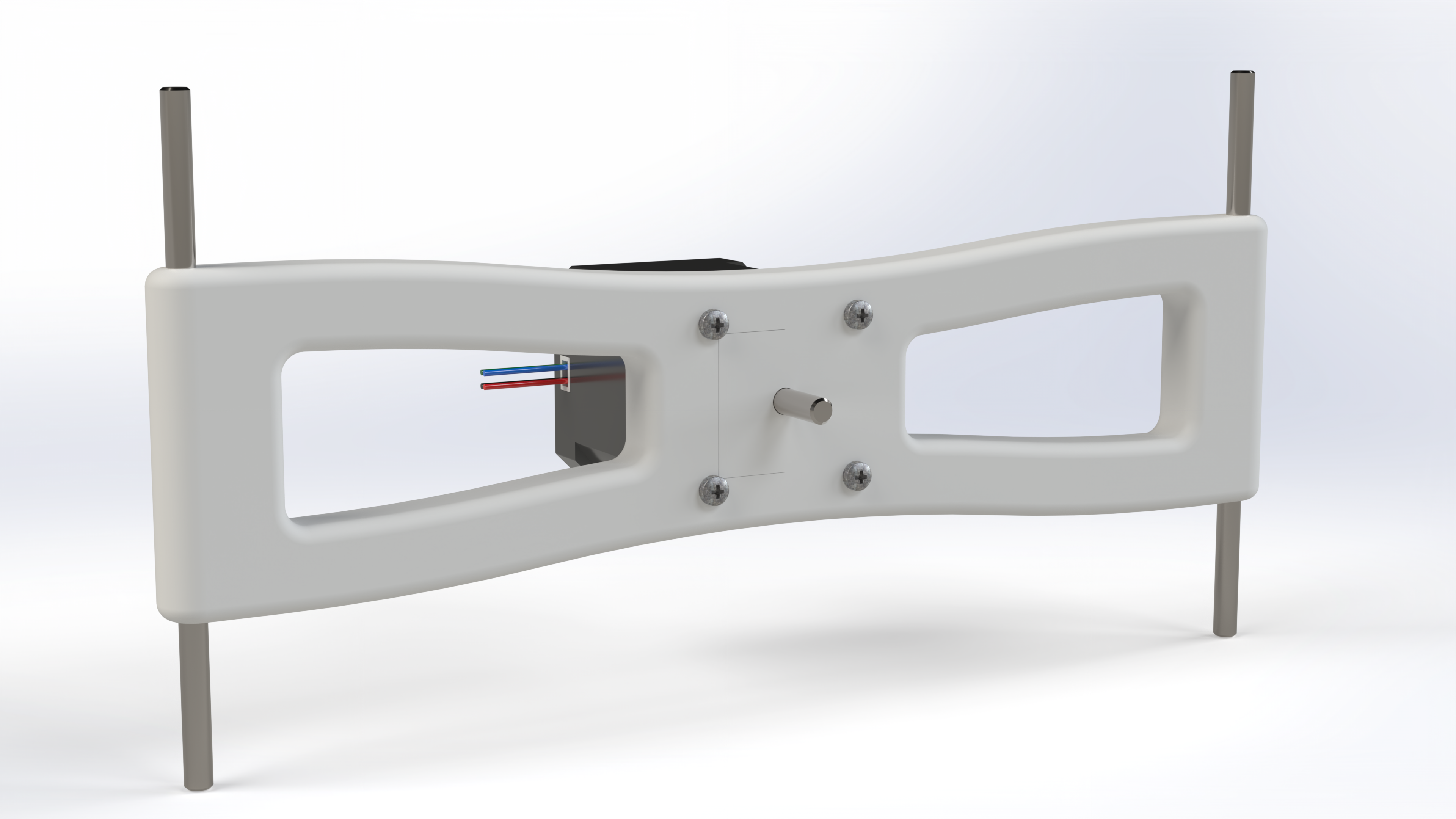
The front motor is assembled in a slightly different way. Obviously, it cannot be mounted on a LED panel, otherwise, it would simply be impossible to access the puzzle.
Also, I wanted to be able to “remove” the front motor easily, to perform the cube loading/unloading. This is why this motor is mounted on a movable frame, that is linked to the main frame with a pivot link. This way, the front motor is mounted on an arm that can be opened like a door.
As for the LED Array, the part doesn't fit the printer build plate… Therefor, the part is split in two. The motor will link the two parts together, while two internal pins will provide some stiffness, and a ball bearing guide the motor axis and take the load.
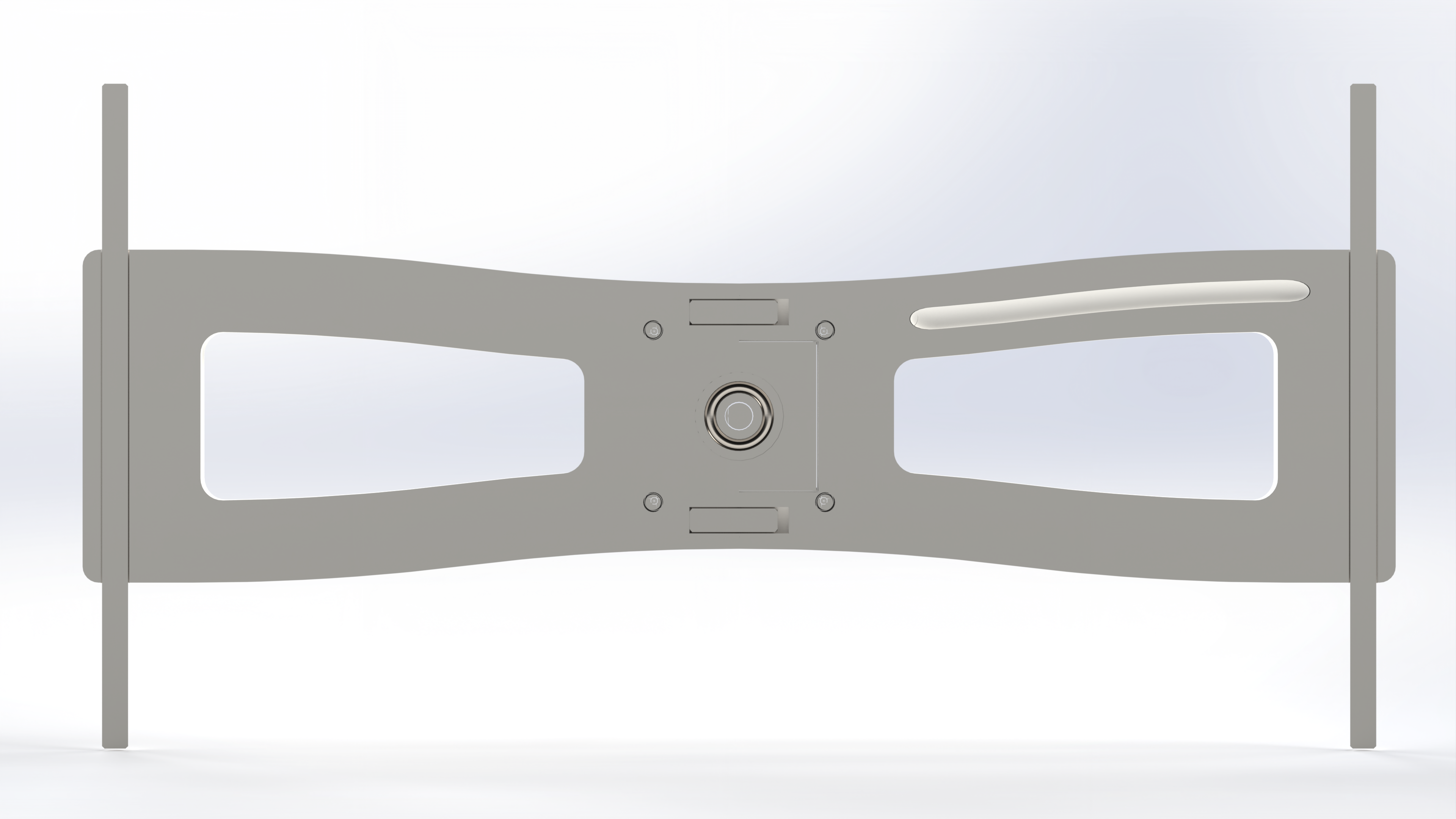
For the motor wires, as for the LED arrays, a gutter allows to route the wires inside the plastic part, hiding them ! The cut view bellow shows the gutter as well as the two hidden pins and the bearing.
Front Motor B.O.M
For the front motor you'll need the following parts:
| Part | Qty |
|---|---|
| Front_Motor_A.step | 1 |
| Front_Motor_B.step | 1 |
| Nema 17 - 42x42x48 - 2A | 1 |
| M3x12 Pan Head Cross recess screw (DIN 7985) | 4 |
| 625RS Ballbearing (ISO) - 16x5x5mm | 1 |
| 5x16 mm Pin | 2 |
| 5x120 mm Smooth Rod | 2 |
With this done, all the six motors are now ready, time to build the frame !
The Frame
The frame is from far the most complex part of the machine.
I wanted something robust, 3D Printable, including cable routing, and this without using glue.
All these constraints together, the design turned to be challenging.
Whatever the way you look at the frame, it's bigger than the build plate of my 3D printer forcing me to split all the parts.
Additionally, stiffness is highly challenged by the 3D printing process.
My desire to not use glue was not helping either.
There is actually one common solution for all the problems : pre-stress. I already used this technique for the transmission shaft. But for the frame, it's even more important, and incredibly robust.
For the frame, I made a design inspired by the Bosch rexroth profils. The profils are customized to:
- Allows internal cable routing
- Hold the side panels
- Host the different components
The profils are printed with only perimeters (no infill), therefor, they are quite long to print. But they turn to be incredibly robust.
All the profiles are based on the same design, but some variations were needed to host the different peripherals (Camera, Front motor, Opening, Screen). The basic profile looks like this:
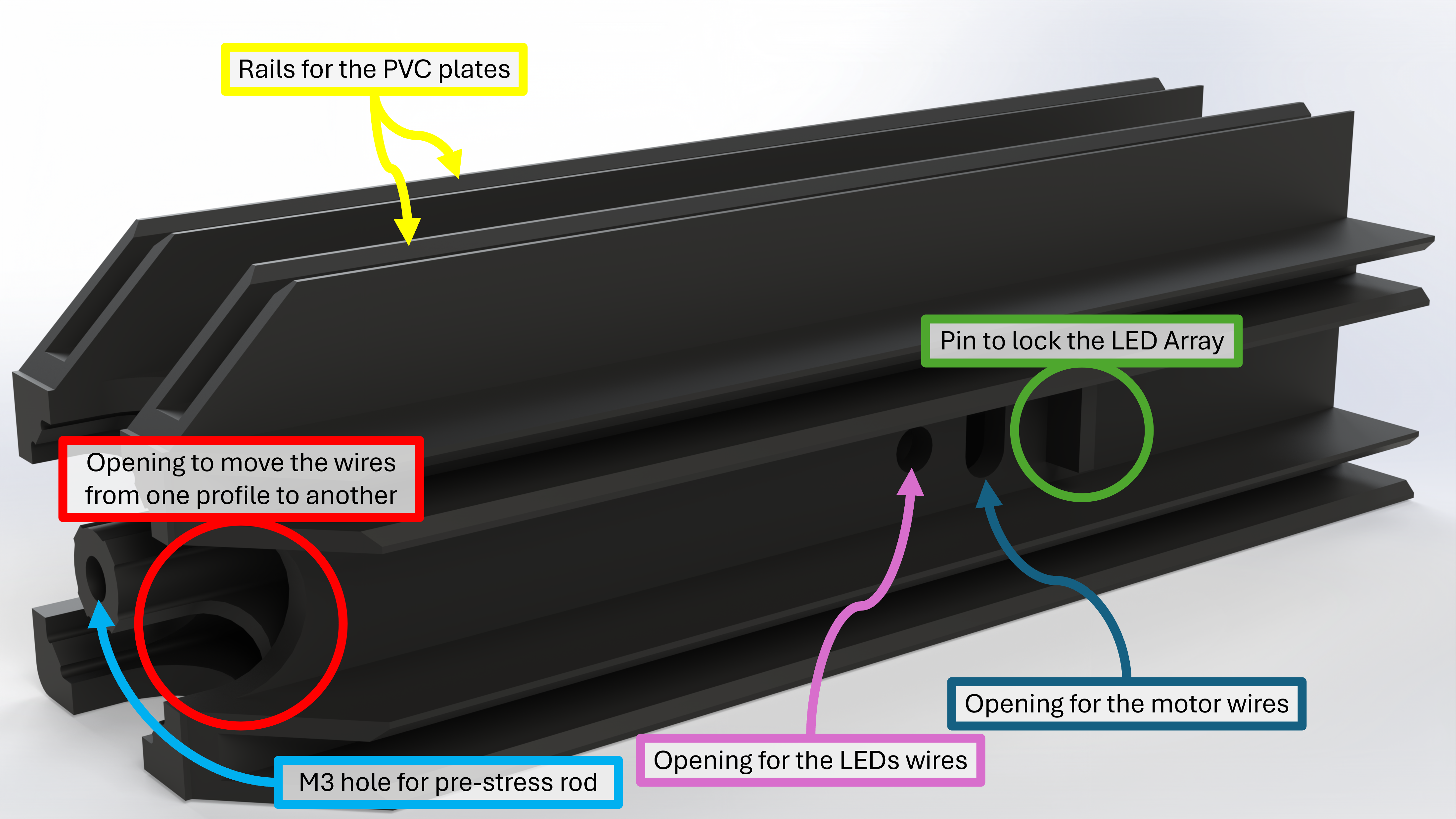
To make one frame edge, you need two profiles. They are assembled together on their flat side. A M3 threaded rod goes through the two profiles. While tightenings nuts on the two extremity of the rods, you lock the two profiles together, and the load is carried by the rod, not by the profile. The alignement of the two profiles is done by the PVC plates, that will fit into the dedicated rails. Between each rail, a pin is designed to lock the LED Array extremities, while two holes are designed to route the wires (one for the motor, the other for the LEDs).
While reaching the end of the profile, the wires can be routed at 90 degrees to another profile thanks to the opening. This same opening allows the wires to exit the frame.
In the end, there is one main profile, and seven variations:
- A.step: It is the main profile, the one shown on the picture above
- B.step: The same than A, but with only one side with rails, this is for the face that has no LED panel
- C0.step: The same than B, but with a lock for the mobile motor axis
- C1.step: The symmetric version of C0 and an additional hole to route the front motor wires
- D0.step: The same than B, but with a clipping for the mobile motor moving axis
- D1.step: The symmetric version of D0
- E0.step: The same than A, but with a place to fit the camera
- E1.step: The symmetric version of E0, with an additional hole to route the camera cable
The profiles are connected together in the frame corners. There are four types of corners:
- Corner.step: A simple cube with holes for tightening the nuts
- Corner_leg.step: A variation of Corner.step, with an additional leg to elevate the frame
- Corner_screen_0.step: A variation of Corner.step, with an additional leg and a place to hold the touchscreen
- Corner_screen_1.step: The symmetric version of Corner_screen_0.step
The positioning of all the different profiles looks like this: (Note that the Side Panels are omitted for clarity, you should not build the frame without inserting the side panels.)
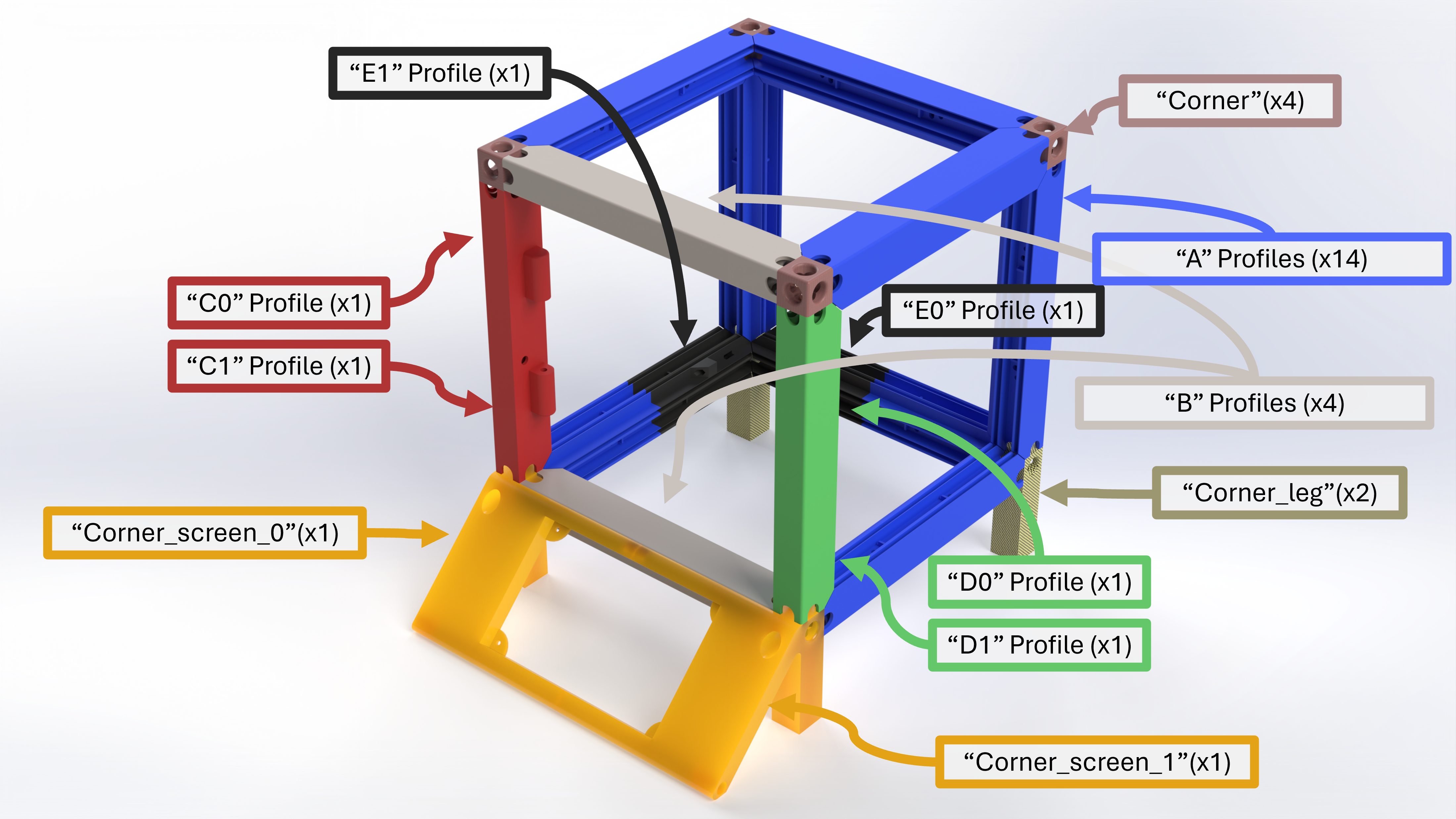
On the C1 profile, one can see the hole where the wires from the front motor will pass.
On the E1 Profile, one can see the hole where the camera cable will pass.
The assembly of all the parts together is done by inserting 254mm long M3 threaded rods inside the profiles. The nuts are located on the corners. I recommend to apply some thread lock on one side and wait for it to dry. Once done, insert the rod through the corners and the profiles, and tight the other side. You might be surprise to see how strong this assembly is!
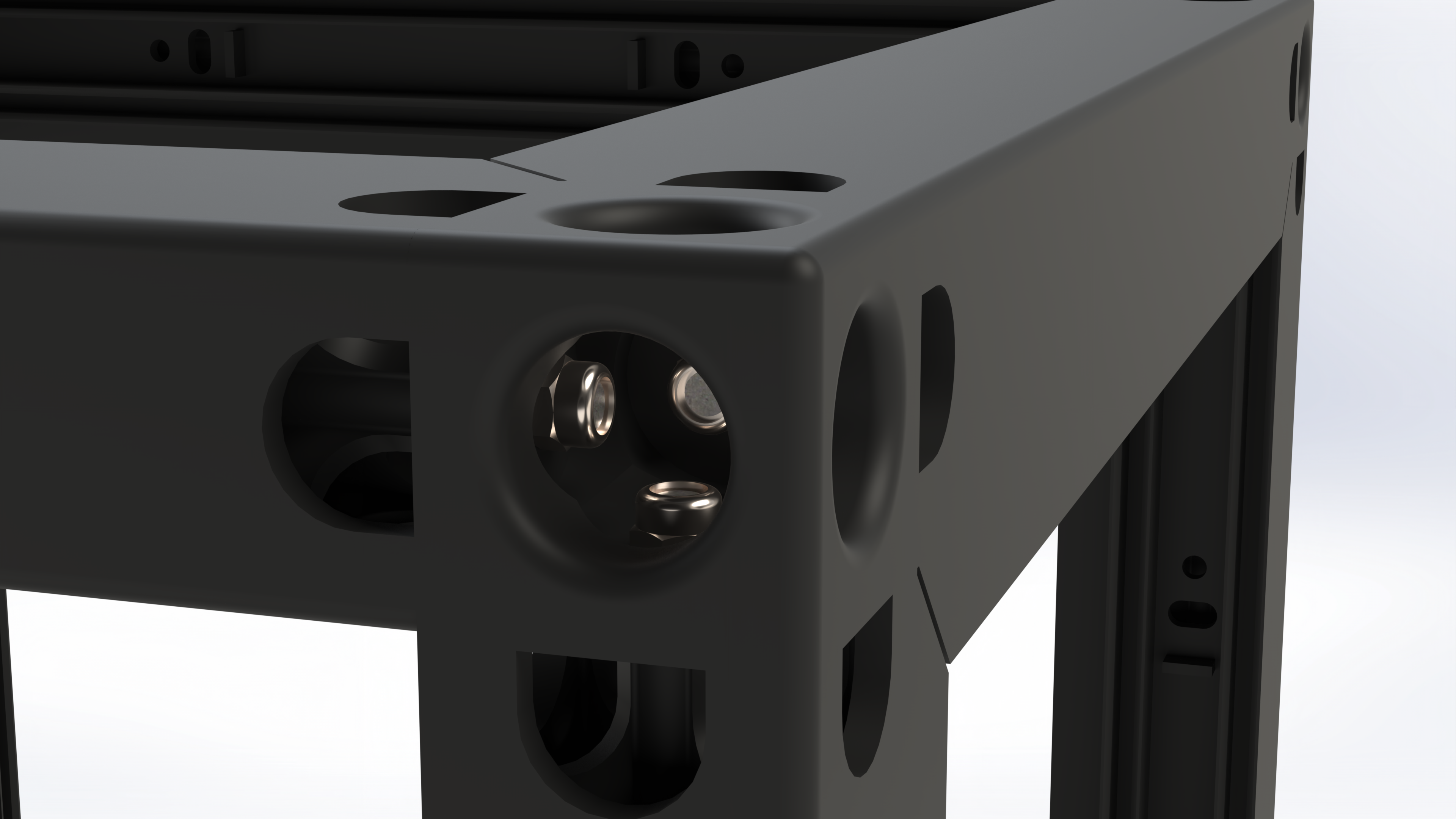
Frame B.O.M
For the whole frame, you'll need the following parts:
| Part | Qty |
|---|---|
| A.step | 14 |
| B.step | 4 |
| C0.step | 1 |
| C1.step | 1 |
| D0.step | 1 |
| D1.step | 1 |
| E0.step | 1 |
| E1.step | 1 |
| Corner.step | 4 |
| Corner_leg.step | 2 |
| Corner_screen_0.step | 1 |
| Corner_screen_1.step | 1 |
| Camera_Support.step | 1 |
| M3 Prevailing torque nut (DIN 985) | 30 |
| 254mm M3 threaded rods (to be cut)* | 13 |
| 5x16 mm Pin | 1 |
| Electronic components | |
| Touch screen - Freenove 800x480 Pixel IPS Display | 1 |
| Raspberry Pi 4B - 4GB | 1 |
| GeeekPi Raspberry Pi 4 GPIO Screw Terminal Block | 1 |
| M2.5x6 Pan Head Cross recess screw (DIN 7985) | 4 |
| M2.5x4 Pan Head Cross recess screw (DIN 7985) | 4 |
| M3x12 Pan Head Cross recess screw (DIN 7985) | 2 |
| M3x20 Pan Head Cross recess screw (DIN 7985) | 2 |
| Innomaker 720p USB2 Camera | 1 |
| Innomaker aluminum alloy tripod case | 1 |
*In a one meter long rod you can cut 3 rods, the remaining will be use in a later step.
Assembling the frame
In order to assemble the frame, you have to follow a few steps.
- Start by assembling the two Screen legs together : insert the M5x16 pin inside the part, and tight them together with one of the 254mm M3 threaded rod. Tight on both side.
- Do the assembly of the touch screen and the raspberry.
- Add the terminal bloc on the RPi GPIO
- Mount the the touch screen on its support (It can be hard to do it after)
- Mount the camera in its case
- Route the camera cable inside one C1 profile and the E1 profile
- Assemble the transmissions on all the motors
- Assemble the first side panel with the bottom part of the frame, route the wires, and tight all the 8 nuts
- Mount the camera on its support (2x M3x12), and tight it to the frame (2x M3x20).
- Now the hard part:
- Pre-assemble, all side panels but the top one, route all the cables, but don't tight the nuts. Don't forget to insert the front motor, and to route its wires. If you have printed the motors covers in different colors, watch their placement, since the purpose is to mimic the puzzle.
- Assemble the top panel, route the cables
- Tight ALL the nuts
All the wires (Motors, LEDs, Camera) should exit the frame on the bottom side.
At this point, the machine must looks like this:
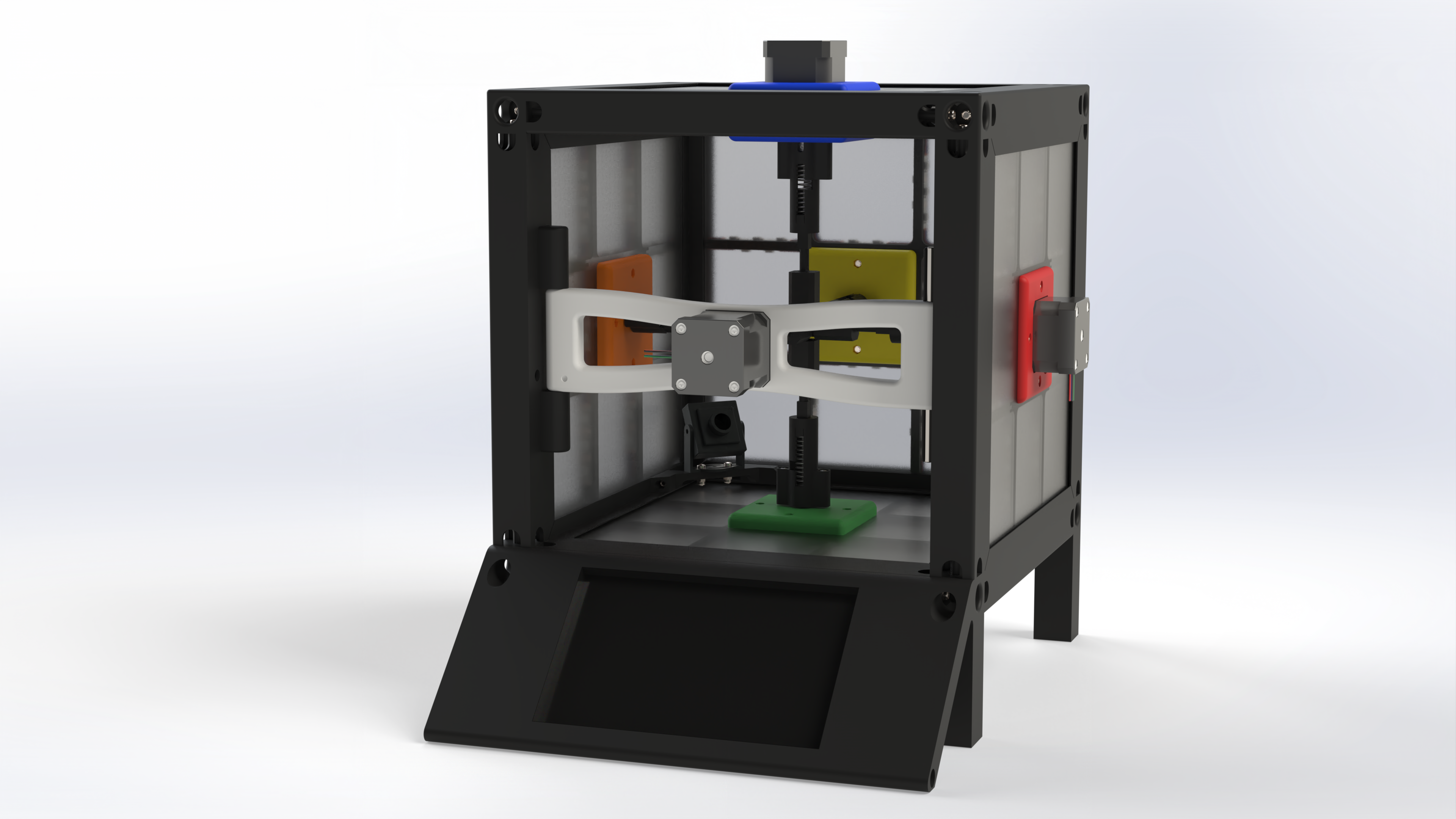
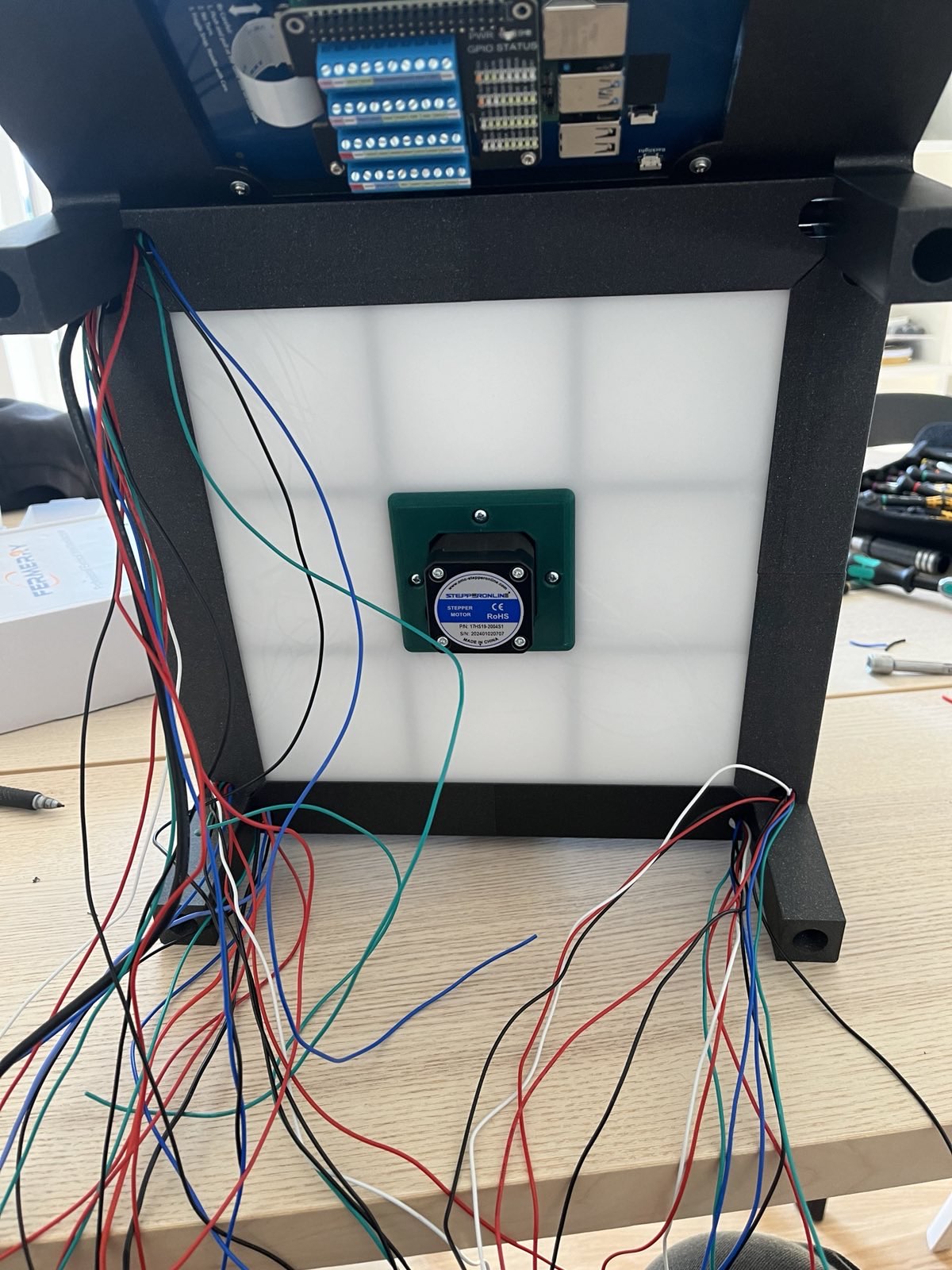
Your frame is now complete !
The last step: The cabling
Finally, you're done with the main frame assembly. But you are not yet fully done. You're missing one step, the cabling.
As you can see, there's quite a few wires ! So far, you've all the LEDs strips and all the motors, but nothing to drive them.
To drive the motors, I use the well known TB6600 drivers. They are easy to use, capable of dealing with high current and high voltage, capable of generating microsteps, and also, they have an enable feature. Step motors can turn quite warm, look at your 3D printer, and you'll see it. Leaving the motors on for a while could deform the PLA frame. But we don't need the motors to be on all the time. And actually, we don't WANT the motors to be on all the time.
As I said at the begining, speed cubes have an interesting feature: they are tolerant to miss-alignements of the faces. If you try to rotate a face while one of its orthogonal face is not perfectly aligned, it will self-align : magic.
If our motors are enabled all the time, they will prevent this magic from happening. On top on solving the heat problem, it allows the robot to go even faster.
Unfortunately, the Raspberry is not good at dealing with step motors, or at least, not as it is. Step motors need precise timings, and because of its OS, the raspberry is not suited for this.
One could use a dedicated shield, but I decided to go for another solution: the motors are driven by an arduino DUE.
Why the DUE ? For several reasons!
- It works in 3V3, therefore, it can be connected directly to the Raspberry, without level shifters
- It's faster than the MEGA (84MHz vs 16MHz)
- It has a lot of pins, and we will need a lot !
Now, we still have the LEDs strips. We cannot use the Raspberry either, for roughly the same reason: timing ! The RPi could drive two leds strips, but not more.
We could connect all the strips in cascade, but for reasons mentionned above, this is not what I implemented.
Formally speaking, the DATA IN of the LEDs strips must be at a 5V level. But the modern WS2812's tolerates 3V3. We can then connect led strips to the arduino as well. Practically speaking, I had a little issue with interferences. It took me a while to understand, until I realized the LED strip power supply was delivering 5.5V, not 5V. Reducing this voltage from 5.5V to 4.8V made the interferences gone since.
But in the end, what is the role of the Raspberry ? Well, crucial. We still have to deal with the touchscreen. Ok, this could be achieved with the arduino, but in a more complex way.
We also still have to deal with the color recognition, thanks to the camera. Formally speaking, this could also be done with the Arduino, but we start demanding a lot of ressources.
The main reason for the raspberry is: solving the cube. Once we identified the colors, we need to generate the solving sequence. To do so, I use the Kociemba algorithm, and this one demand some computing power.
In the end, we have the arduino for its precision, and the raspberry for its computing power.
As a conclusion, for each face, we have 5 wires going to the arduino:
- Motor Direction
- Motor Step
- Motor Enable
- Motor Ground
- Led Strip Data In
This, except for the front face were we only have the 4 motor wires. It makes a total of 29 wires going to the arduino.
Additionaly, the arduino communicates with the RPi through the ardware serial link, thanks to the voltage compatibility, we can connect the two devices together.
The connections are as follow:
| Face | Signal | Arduino Pin |
|---|---|---|
| Blue Face | Motor EN | 23 |
| Motor DIR | 44 | |
| Motor PULL | 6 | |
| Led Strip | 28 | |
| Red Face | Motor EN | 22 |
| Motor DIR | 42 | |
| Motor PULL | 7 | |
| Led Strip | 29 | |
| Green Face | Motor EN | 24 |
| Motor DIR | 46 | |
| Motor PULL | 5 | |
| Led Strip | 31 | |
| Yellow Face | Motor EN | 25 |
| Motor DIR | 48 | |
| Motor PULL | 4 | |
| Led Strip | 40 | |
| Orange Face | Motor EN | 26 |
| Motor DIR | 50 | |
| Motor PULL | 3 | |
| Led Strip | 30 | |
| White Face | Motor EN | 27 |
| Motor DIR | 52 | |
| Motor PULL | 2 | |
| Led Strip | None |
The raspberry shares 3 wires with the Arduino
| Signal | Raspberry GPIO | Arduino Pin |
|---|---|---|
| RPi Serial TX / Arduino Serial RX | 14 | 15 |
| RPi Serial RX / Arduino Serial TX | 15 | 14 |
| GND | 6 | GND |
For the power supply, it's pretty easy. There are two main power supplies:
- 24V - 20A to supply the TB6600 (motor drivers)
- 5V - 20A to supply the LED strips (in my case, set to 4.8V)
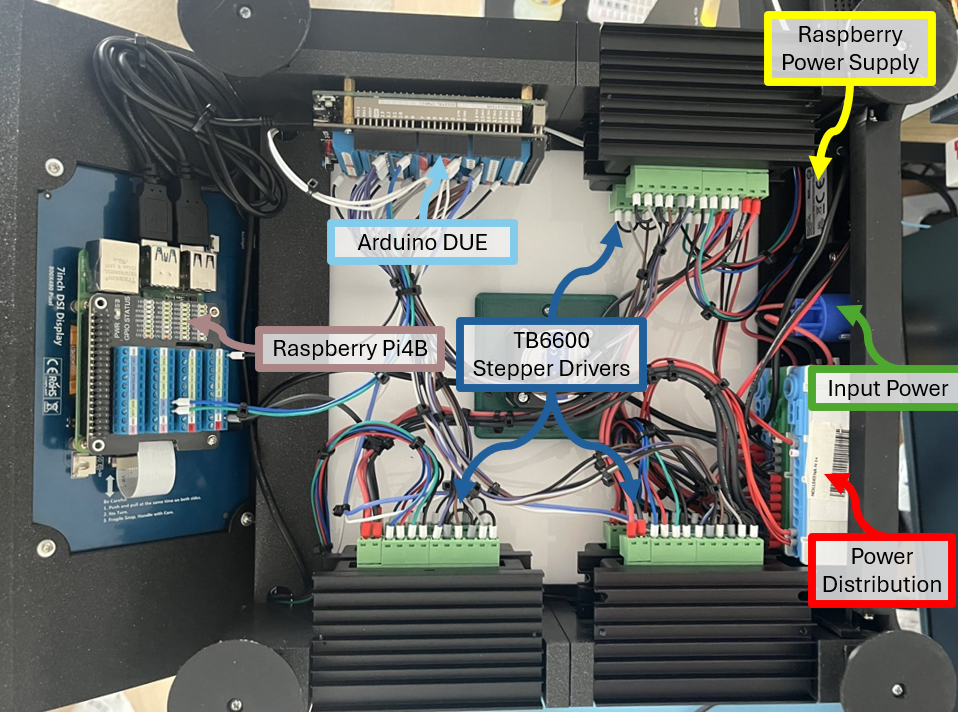
Additionnaly, one DC-DC converter transform the 24V from the motors supply to 5V-3A for the rasperry. This converter is convenient, since it comes directly with an USB-C output.
The Arduino is supplied by USB, through the Raspberry.
All grounds must be common !!!
Don't hesitate to add some additional capacitors, since both the motors and the led strips can be noisy….
In the end, it's a lot of components ! How to do a proper cable management ?
The last step: Electrical Racking
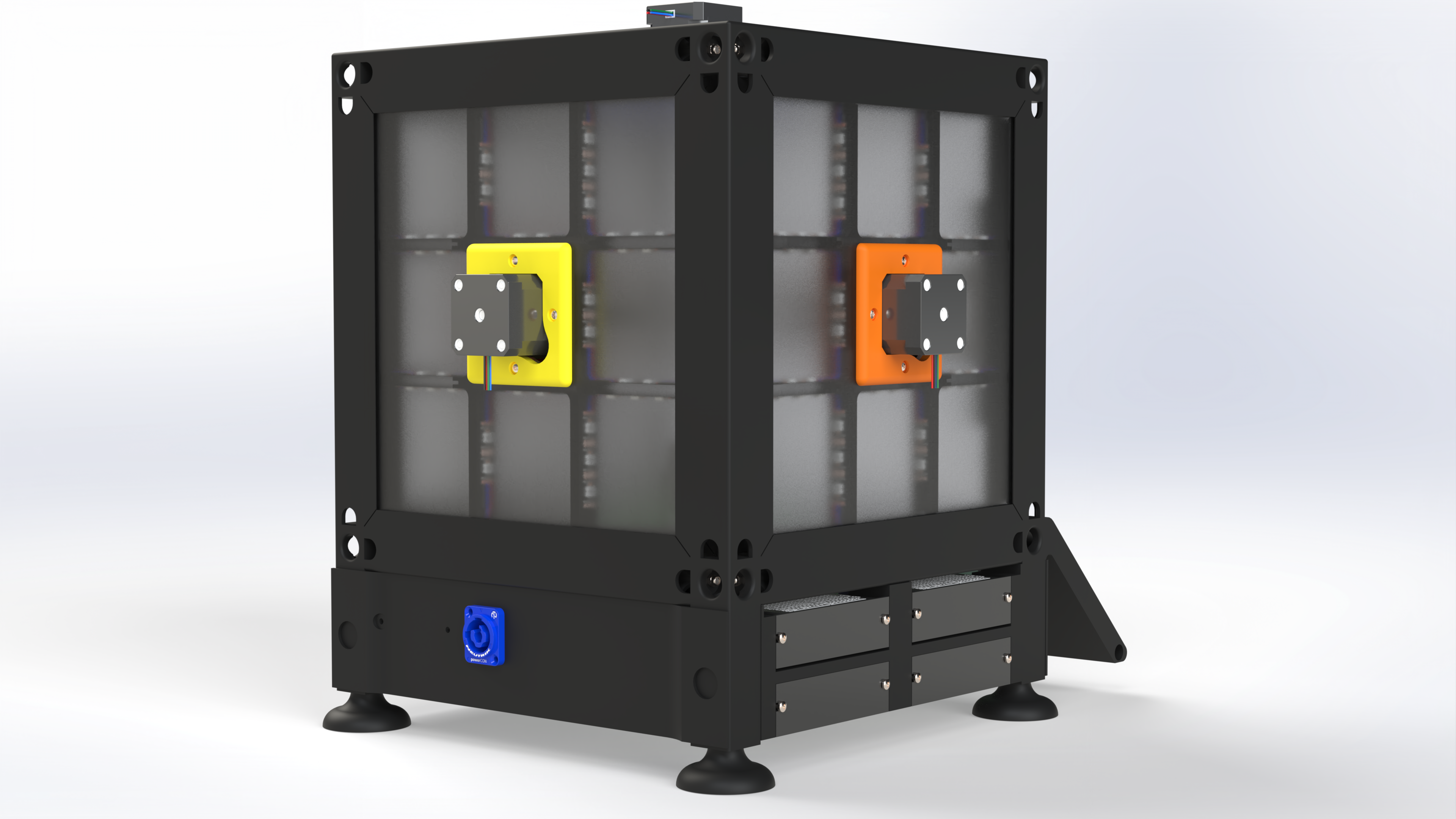
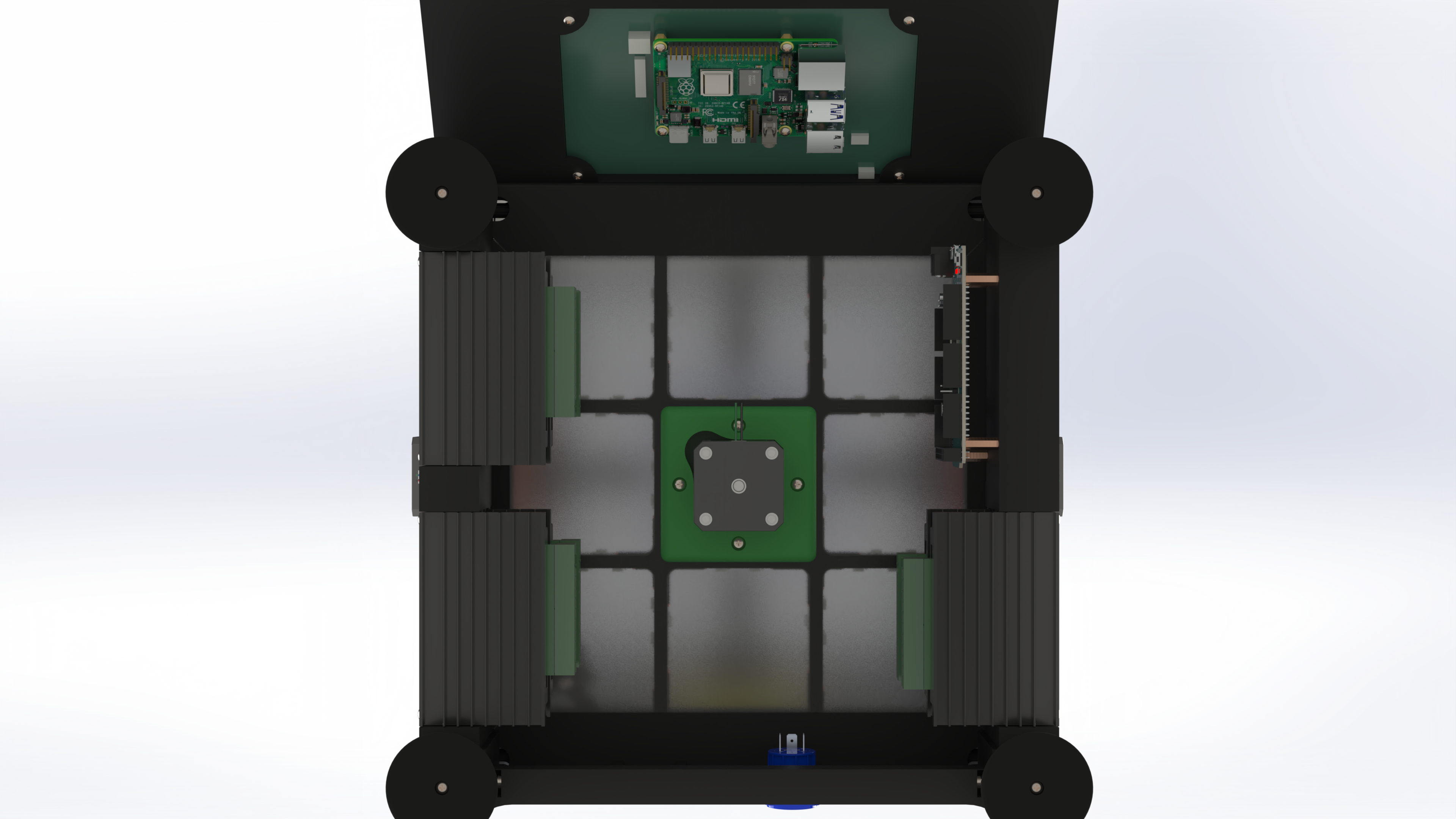
To ease the cabling, I designed additional components that fits between the frame legs. They aim to host the different components: arduino, TB6600, power connector, bus bar,…
The TB6600 are made such that they can be “racked”, their housing is therefor made such that it works like a drawer.
The arduino is mounted with screws, and a dedicated breakout board on top.
Finally, there is one din rail (3D Printed) to install three power distributions (24V, GND, 5V), one mounting hole for a powercon connector, and some place to install the DC-DC converter for the raspberry.
You've 10 additional parts to print. The rack for the TB6600 (3 parts), the arduino support (who also host a decoration), the connector support, the power distribution support and the four feet.
With all the parts installed, your robot must look like this now:
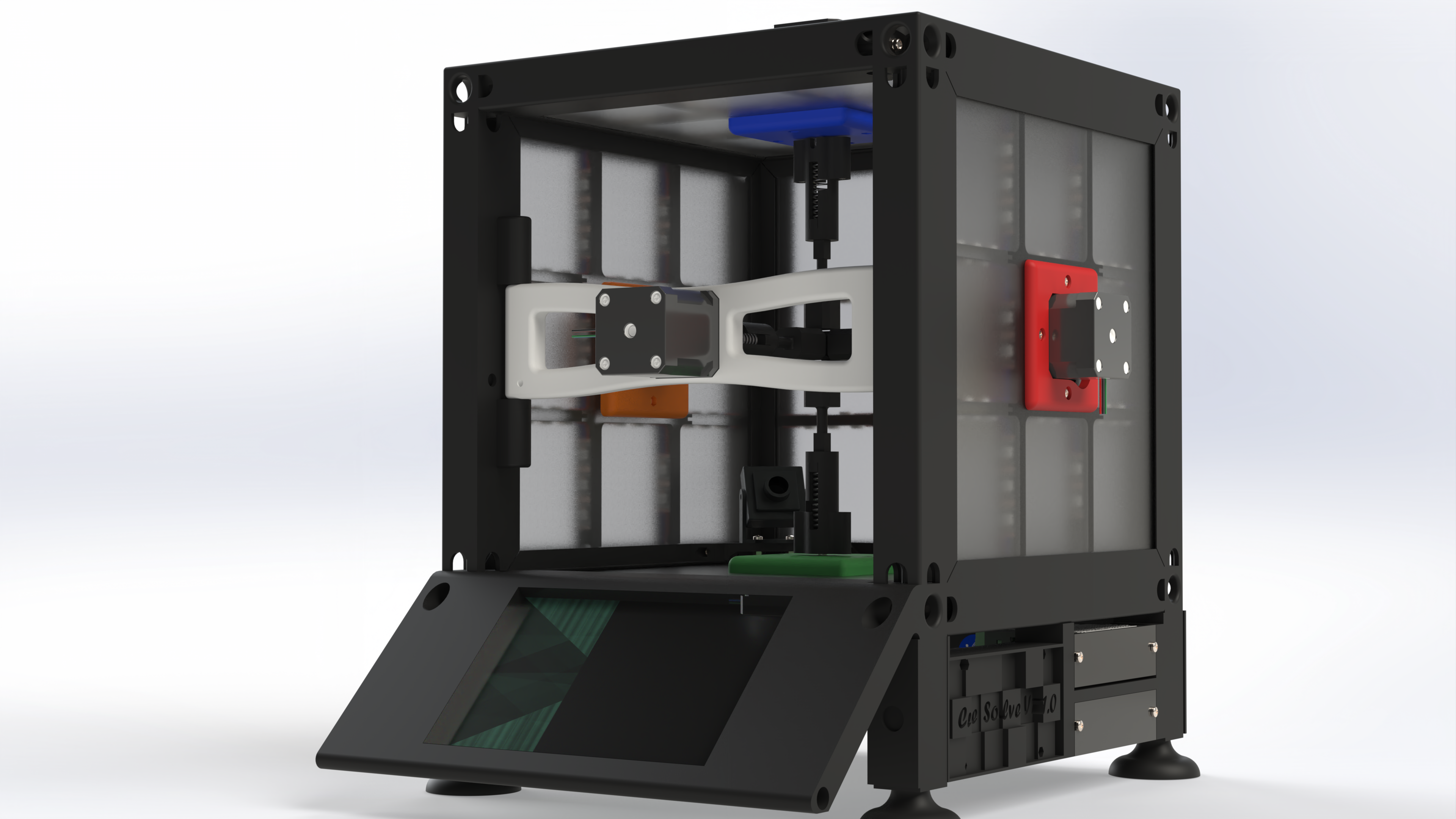
You can now enjoy doing the cable management!
Electrical B.O.M
Finally, you'll need the following parts:
| Part | Qty |
|---|---|
| Support_TB6600.step | 2 |
| Support_TB6600_Symmetric.step | 1 |
| Support_PS.step | 1 |
| Support_Neutrik.step | 1 |
| Support_Arduino.step | 1 |
| Foot.step | 4 |
| M3 Prevailing torque nut (DIN 985) | 18 |
| M3x25 Pan Head Cross recess screw (DIN 7985) | 12 |
| M3x40 Pan Head Cross recess screw (DIN 7985) | 4 |
| 226mm M3 threaded rods (to be cut)* | 1 |
| 232mm M3 threaded rods (to be cut)* | 2 |
| Electronic components | |
| TB6600 Motor Driver | 6 |
| Arduino DUE | 1 |
| GeeekPi MEGA 2560 R3 Terminal Block (Compatible with DUE) | 1 |
| DIN Mounted Bus Bar (5V, 24V and GND) | 3 |
| Neutrik PowerCon (Panel and Connector) | 1 |
| DC DC 8V-32V to 5V Voltage Converter USB-C 3A 15W | 1 |
| AC-DC 230V-24V/20A Power Supply (Motors and RPi) | 1 |
| AC-DC 230V-5V/20A Power Supply (LED Strips) | 1 |
* You can use the remaining length from the frame
Programming
Once you're done with the assembly and the cabling, you can start programming. I strongly recommend you to test all the electrical connections before turning on the power… It's a rubik's cube machine, not a smoking machine !
Here, you can find the current version of the code I use (.ino for the arduino, .py for the RPi). It's not very clean and documented, but it should be clear enough to get the feeling.
For the LED Panels, you might experiment some issue with the mapping of the facelet. This is not a big deal, it simply depend on the orientation you took when installing the array in the frame.
In the file “Arduino_Receiver.ino” you'll find 6 functions named void mirror_*(String OPCODE)
The * can be either f, u, d, r, l, or b. (Front, Up, Down, Right, Left or Back).
You don't have to modify mirror_f since there's no LED on this face.
For the other functions, a solved cube is represented as follow:
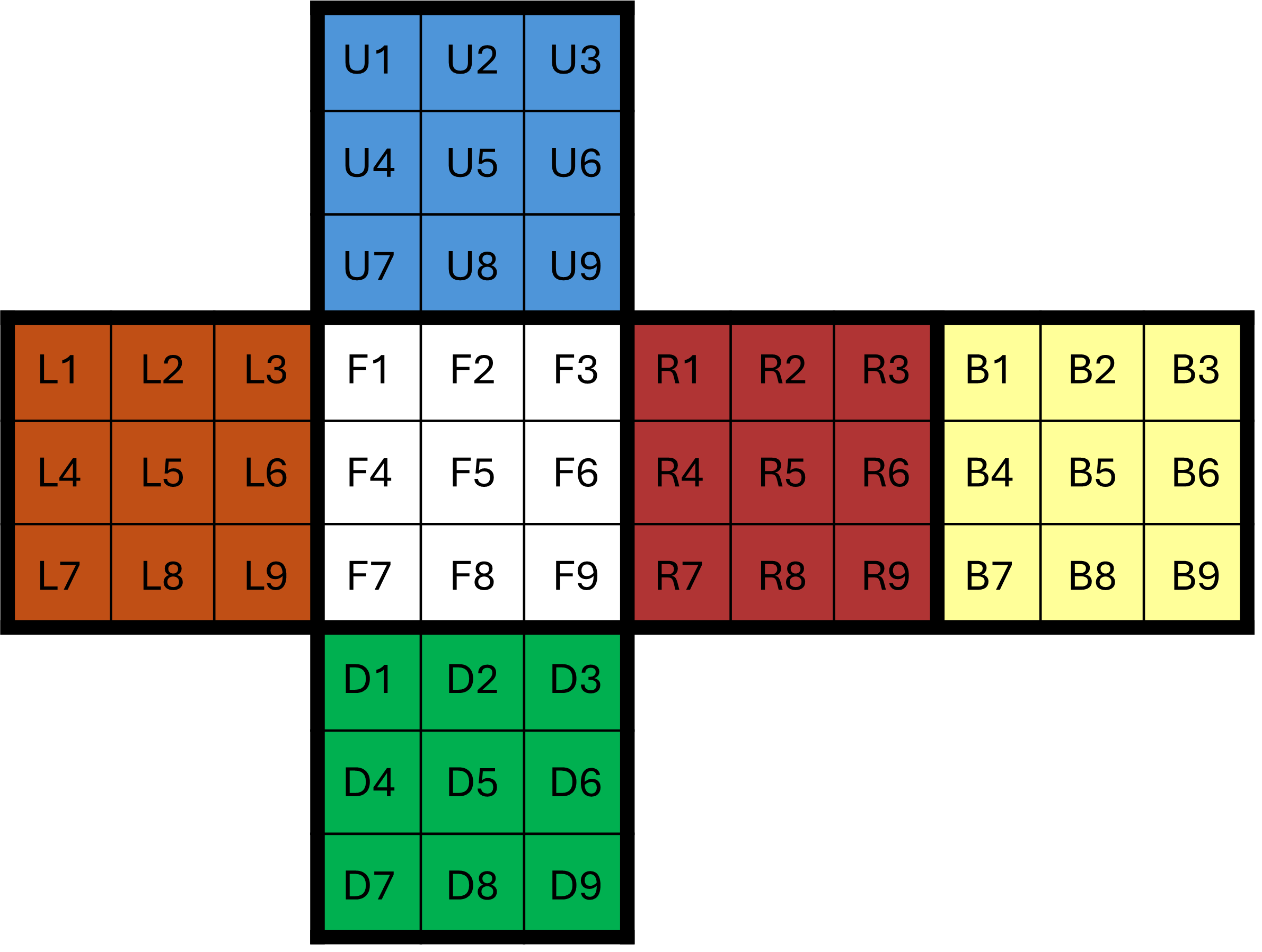
The mirror function does the mapping between a theoretical cube and your led panel configuration. This is why the CubeString X5 is never mapped, since we don't light this facelet. Depending on how your panel is oriented, you must have to switch the mapping. This has no other impact than destroying the LED Solving, the cube will anyway be solved.
Going faster ?
Assuming the Kociemba algorithm gives the best solution, the main limitation for the solving time is about motors.
In this configuration, with a super good lubrication of the rubik's cube, you can solve it as fast as 1.5 second. By disabling the LEDs in the Arduino program, you can save a few 100ms. With this ardware, it's barelly impossible to go faster.
To increase the speed, two important changes are required:
- Using bigger motors: more current → more torque → higher speed possible
- Using encoders and working in closed loop
Currently, everything is running in open loop. For the one not familiar with control system, it means that if I ask the motor to do one turn, I can only assume the motor actually did a full turn. We have no feedback on the actual motor shaft position.
If this is not a problem at low speeds, it becomes a big issue at higher speeds. While starting to rotate (during the acceleration phase), the step motor can “miss” some steps. With an encoder, this will be spotted immediately, and the missing steps will be compensated. But since we don't have any position feedback, we have to limit the spped to one where we are sure the motor won't miss any steps.
Costs
I summarise here the different costs. The real cost is highly dependant on what you already have or not, and you can definitely find cheaper prices than me (for the screw for example).
In my case, I already had the TB6600, the arduino, the raspberry the PLA and all the screw, but at least, this list is complete.
Screws
| Part | Total Qty | Link | Packing | Price (EUR) | Qty to buy | Total Price (EUR) |
|---|---|---|---|---|---|---|
| M3 Prevailing torque nut (DIN 985) | 86 | Amazon | 100 | 8,62 | 1 | 8,62 |
| M2.5x4 Pan Head Cross recess screw (DIN 7985) | 4 | Amazon | 10 | 5,39 | 1 | 5,39 |
| M2.5x6 Pan Head Cross recess screw (DIN 7985) | 4 | Amazon | 10 | 5,39 | 1 | 5,39 |
| M3x6 Pan Head Cross recess screw (DIN 7985) | 20 | Amazon | 50 | 17,04 | 1 | 17,04 |
| M3x12 Pan Head Cross recess screw (DIN 7985) | 6 | Amazon | 50 | 17,2 | 1 | 17,2 |
| M3x20 Pan Head Cross recess screw (DIN 7985) | 14 | Amazon | 50 | 17,67 | 1 | 17,67 |
| M3x25 Pan Head Cross recess screw (DIN 7985) | 12 | Amazon | 50 | 17,73 | 1 | 17,73 |
| M3x30 Pan Head Cross recess screw (DIN 7985) | 20 | Amazon | 50 | 19,05 | 1 | 19,05 |
| M3x40 Pan Head Cross recess screw (DIN 7985) | 10 | Amazon | 50 | 18,35 | 1 | 18,35 |
| 1m long threaded M3 threaded rods (sell by 1m long rods) | 5 | RS | 5 | 3,58 | 1 | 3,58 |
| Shaft Collar - ID5/OD10/Thickness6 (DIN 705) | 6 | RS | 10 | 8,84 | 1 | 17,68 |
| Compression Spring (0.9x10x40) | 6 | Amazon | 10 | 14,31 | 1 | 14,31 |
| 625RS Ballbearing (ISO) - 16x5x5mm | 6 | Amazon | 20 | 10,99 | 1 | 10,99 |
| 5x16 mm Pin | 3 | Prusa | 1 | 1,91 | 3 | 5,73 |
| 5x120 mm Smooth Rod | 2 | Prusa | 1 | 3,99 | 2 | 7,98 |
| Total: | 186,7 EUR | |||||
Material
| Part | Total Qty | Link | Packing | Price (EUR) | Qty to buy | Total Price (EUR) |
|---|---|---|---|---|---|---|
| Prusa PLA - Galaxy Black | 2,87 | Prusa | 2 | 49,99 | 2 | 99,98 |
| Light_Diffuser_External.step - Laset cut 3mm plastic plate | 5 | PlaquePlastique | 5 | 50 | 1 | 50 |
| Light_Diffuser.step - Laset cut 3mm plastic plate | 5 | PlaquePlastique | 5 | 50 | 1 | 50 |
| Total: | 199.98 EUR | |||||
Electromechanical
| Part | Total Qty | Link | Packing | Price (EUR) | Qty to buy | Total Price (EUR) |
|---|---|---|---|---|---|---|
| Nema 17 - 42x42x48 - 2A | 6 | StepperOnline | 1 | 12,12 | 6 | 72,72 |
| TB6600 Motor Driver | 6 | Amazon | 3 | 29,47 | 2 | 58,94 |
| Raspberry Pi 4B | 1 | Amazon | 1 | 70,38 | 1 | 70,38 |
| GeeekPi Raspberry Pi 4 GPIO Screw Terminal Block | 1 | Amazon | 1 | 19,9 | 1 | 19,9 |
| Touch screen - Freenove 800x480 Pixel IPS Display | 1 | Amazon | 1 | 49,44 | 1 | 49,44 |
| Innomaker 720p USB2 Camera | 1 | Amazon | 1 | 13,03 | 1 | 13,03 |
| Innomaker aluminum alloy tripod case | 1 | Amazon | 1 | 9,21 | 1 | 9,21 |
| Arduino DUE | 1 | Amazon | 1 | 52,41 | 1 | 52,41 |
| GeeekPi MEGA 2560 R3 Terminal Block (Compatible with DUE) | 1 | Amazon | 1 | 26,85 | 1 | 26,85 |
| WS2812B LED Strip 5V - 60 LEDs/meter, IP30 | 240 | Amazon | 300 | 28,67 | 300 | 28,67 |
| 20 AWG electrical wire | 1 pack | Amazon | 1 pack | 18,76 | 1 pack | 18,76 |
| DIN Mounted Bus Bar (5V, 24V and GND) | 3 | Amazon | 1 | 9,07 | 3 | 27,21 |
| Neutrik PowerCon (Panel and Connector) | 1 | Amazon | 4 | 16,07 | 1 | 16,07 |
| DC DC 8V-32V to 5V Voltage Converter USB-C 3A 15W | 1 | Amazon | 1 | 12,87 | 1 | 12,87 |
| AC-DC 230V-24V/20A Power Supply (Motors and RPi) | 1 | Amazon | 1 | 40,59 | 1 | 40,59 |
| AC-DC 230V-5V/20A Power Supply (LED Strips) | 1 | Amazon | 1 | 24,9 | 1 | 24,9 |
| Total: | 541,95 EUR | |||||
Grand total:
| Part | Total Price (EUR) |
|---|---|
| Screws | 186,70 |
| Material | 199,98 |
| Electromechanical | 541,95 |
| 928,63 EUR |
Acknowledgements
I wanted to thank my friends who put up with my endless discussions on this machine for weeks xD Especially Xavier for being the one who took pleasure in following the progress of this project every day, Gerd, for facilitating the delivery of the plastic plates and sharing his enthusiasm, Natacha and Sebastien, my Swiss friends, for having made this project an opportunity to restore things, and Nicolas, for giving me the virus for playing with motors!
The last word
If someone like my work, I'm seeking a job ;) (Prusa, in case you read…)
--
Cedric