
KLP1 230 Toolhead Cover (BTT EBB 36 adapter)
Obliczymy ostateczną cenę na podstawie wybranego pliku. Sprawdzisz ją i zaakceptujesz przed płatnością.
Zapisane na tym urządzeniu.
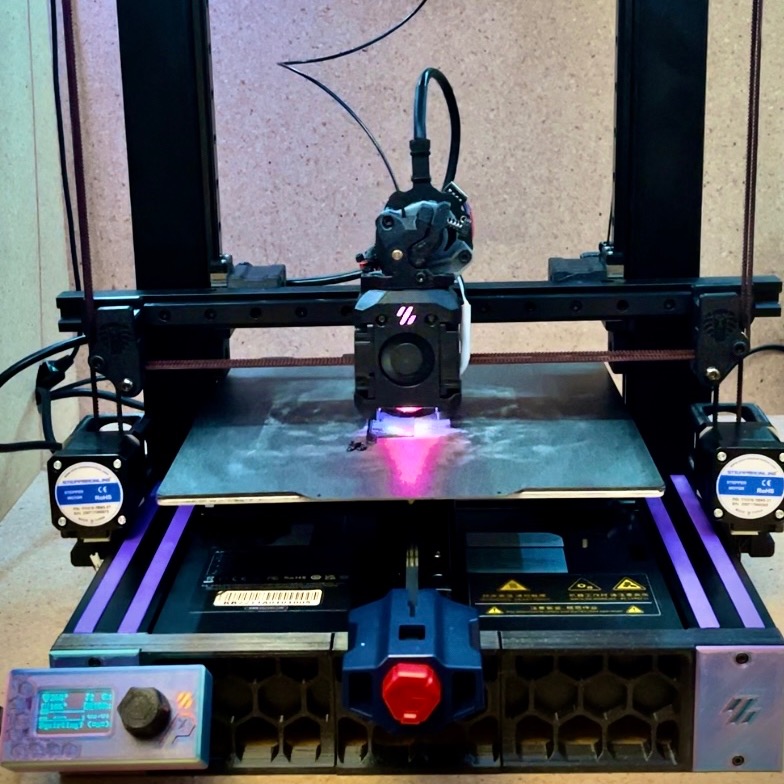
This is a Toolhead cover I designed to be able to utilize the EBB 36 toolhead board.
- Ocena
- 0 / 5
- Polubienia
- 9
- Pobrania
- 43
- Wydruki
- 0
- Wyświetlenia
- 627
- Oceny
- 0
Aktualizacja u źródła:
Informacje o modelu
- Źródło
- Printables
- Kategoria
- Other Printer Parts & Upgrades
- Licencja
- Creative Commons — Attribution
****UPDATE***
Someone figured out how to flash the original MOBO and THR so this isnt needed if you dont want to switch to BTT ecosystem.
I have completely gutted all of Kingroons' control boards in my KLP1 230, and replaced them with BTT counterparts. I was so upset that Kingroon said their machines were open source but they give no documentation on how to run a newer version of Linux so you are stuck with an outdated system.
This toolhead cover allows you to use BTT EBB36 instead of their proprietary BS. Downside is the EBB takes up the place where the part cooling fan is. So I installed a 120mm auxiliary part cooling fan. I have other designs/adapters to replace their motherboard and their touch screen. Step files included!!
ITEMS NEEDED
Original toolhead cover screws
4 M3 heat stake inserts
4 M3 x 3mm screws
JST Crimpers
INSTALL
- Remove hotend cover, fan, and MKS THR board
- Heat stake the EBB adapter
- Mount the EBB board on the adapter
- Wire up the EBB based on the documentation
- Mount new KLP Toolhead Cover on Toolhead
- Screw in two M3 screws on sides of cover to secure EBB adapter to cover
***I had to extend the Extruder motor wires. The original probe is powered by 24V, so I looked at the THR board to see what wire was power and put it in its own JST connector on one of the fan power pins on the EBB and it works just the same.
EBB 5015 Version
I decided to model and test a 5015 version of the EBB36 tool head. You will want to change your printer.cfg to have the homing direction change. Change the homing direction to TRUE and end stop location to 230, delete or comment out the homing override section. This will make the machine home to max (right)instead of min(left).
Here is my printer.cfg for the MANTA E3EZ, BTT EBB36, and this 5015 Toolhead. Double check everything in the CFG before use, I am NOT liable for any damage to your printer.
In orca slicer I used excluded bed area to limit the toolhead from trying to go too far left.

Use two m3 heat stake inserts for the fan shroud. Trim a 5015 fan down to just the back plate, feed the fan wire through the cover and connect it to the fan port on EBB36, I tied in the 24v wire from the probe to the VIN wire on the fan, secure the tool head cover over the tool head, use VHB to secure the fan in the tool head, I recommend actual VHB. One downside is that one EBB mounting screw is behind the fan so idk if its really necessary I think the one screw should be fine.
I used these 6x2 magnets, and glue for the fan cover.
DONT MIND the terrible print quality, I started modding this printer, and didnt have a backup printer, and had no cooling fan for most of these parts LOL


################EBB 4010 VERSION UNTESTED##########################
Added an optional 4010 blower version which requires trimming a 4010 fan case down to just a 20mm circle around the fan post and un pin the connector, slide through wire hole, glue in center of printed fanbox re pin connector and connect to EBB board.
I would assume you will need to do the same thing with your printer.cfg/ slicer as the 5015 version.