
Mini Midi 12 Pad Controller DIY for DJs / Beat makers / Musicians / Mechanical Keyboard
Obliczymy ostateczną cenę na podstawie wybranego pliku. Sprawdzisz ją i zaakceptujesz przed płatnością.
Zapisane na tym urządzeniu.

A simple DIY MIDI Controller that only uses an Arduino Pro Micro, 4 pots, 12 24mm Arcade Buttons
- Ocena
- 0 / 5
- Polubienia
- 47
- Pobrania
- 89
- Wydruki
- 1
- Wyświetlenia
- 1082
- Oceny
- 0
Aktualizacja u źródła:
Informacje o modelu
- Źródło
- Printables
- Kategoria
- Music
- Licencja
- Creative Commons — Attribution — Noncommercial — Share Alike
🔥 DIY Mini MIDI Controller – Arcade-Style Tactile Control at Your Fingertips! 🎛🎶
This little box has quickly become one of my favorite MIDI controllers—a compact, DIY MIDI powerhouse that’s as fun to use as it is to build! Designed for seamless integration with your favorite DAW, synths, plugins, or any MIDI-compatible device, it delivers an ultra-tactile experience thanks to 12 satisfying 24mm arcade buttons and 4 precision rotary knobs.
💡 Why You’ll Love It:
✅ Old-School Arcade Feel – Clicky, responsive, and addictive to press!
✅ Minimalist & Compact – Small footprint, big impact on your desk setup.
✅ Fully Customizable – Map buttons & knobs to anything MIDI!
✅ DIY-Friendly & Affordable – Built with an Arduino Pro Micro and easily sourced components for under $40!
🛠 Parts List (Budget-Friendly!):
🔹 1x Arduino Pro Micro https://amzn.to/3QwiA2y
🔹 4x Pots - 10K Ohm Linear Rotary Potentiometers https://amzn.to/4ifofpl
🔹 12x 24mm Arcade Buttons https://amzn.to/43bix3C
🔹 1x Non-slip stick on pads https://amzn.to/41ffmW3
💻 Simple Wiring & Setup
No complex schematics here—just a common ground for buttons & potentiometers, with each component connected to its own Arduino pin. Even if you’ve never wired an arcade button before, you’re good to go!
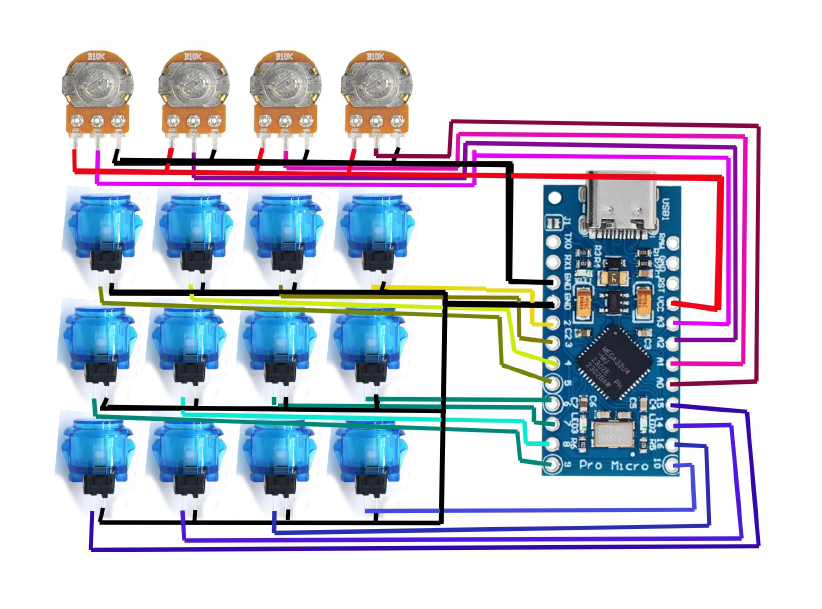
📝 No Coding Skills? No Problem!
I used The Nerd Musician’s awesome Arduino MIDI Code Generator (Generate Your Code Here)—just wire it up, upload the code, and start jamming! He’s got fantastic tutorials on turning Arduino into a MIDI controller if you’re new to this world.
🔹 The Nerd Musician website
🔹Arduino Code Generator https://go.musiconerd.com/code-gen-basic
🎨 Join the DIY Audio Revolution!
Maker-driven, customizable, and built for serious sound. I am working on some foot controllers, physical rack-mountable re-creations to control plugin versions of all kinds of studio equipment, and mixer/faders/slider control boxes.
💬 What would you map these arcade buttons to? Let me know in the comments! 🎚🎶
/*
Made by Gustavo Silveira, 2023.
- This Sketch reads the Arduino's digital and analog ports and send midi notes and midi control change http://www.musiconerd.com
http://www.youtube.com/musiconerd
http://facebook.com/musiconerdmusiconerd
http://instagram.com/musiconerd/
http://www.gustavosilveira.net
[email protected]
If you are using for anything that's not for personal use don't forget to give credit.
PS: Just change the value that has a comment like " // "
*/
/////////////////////////////////////////////
// Choosing your board
// Define your board, choose:
// "ATMEGA328" if using ATmega328 - Uno, Mega, Nano...
// "ATMEGA32U4" if using with ATmega32U4 - Micro, Pro Micro, Leonardo...
// "TEENSY" if using a Teensy board
// "DEBUG" if you just want to debug the code in the serial monitor
// you don't need to comment or uncomment any MIDI library below after you define your board
#define ATMEGA32U4 1 // put here the uC you are using, like in the lines above followed by "1", like "ATMEGA328 1", "DEBUG 1", etc.
/////////////////////////////////////////////
// Are you using buttons?
#define USING_BUTTONS 1 // comment if not using buttons
/////////////////////////////////////////////
// Are you using potentiometers?
#define USING_POTENTIOMETERS 1 // comment if not using potentiometers
/////////////////////////////////////////////
// LIBRARIES
// -- Defines the MIDI library -- //
// if using with ATmega328 - Uno, Mega, Nano...
#ifdef ATMEGA328
#include <MIDI.h> // by Francois Best
//MIDI_CREATE_DEFAULT_INSTANCE();
// if using with ATmega32U4 - Micro, Pro Micro, Leonardo...
#elif ATMEGA32U4
#include "MIDIUSB.h"
#endif
#ifdef USING_POTENTIOMETERS
// incluir a biblioteca ResponsiveAnalogRead
#include <ResponsiveAnalogRead.h> // https://github.com/dxinteractive/ResponsiveAnalogRead
#endif
// ---- //
/////////////////////////////////////////////
// BUTTONS
#ifdef USING_BUTTONS
const int N_BUTTONS = 12; // total numbers of buttons
const int BUTTON_ARDUINO_PIN[12] = {2, 3, 4, 5, 6, 7, 8, 9.10, 11, 12, 13, 14, 15}; // pins of each button connected straight to the Arduino
int buttonCState[N_BUTTONS] = {}; // stores the button current value
int buttonPState[N_BUTTONS] = {}; // stores the button previous value
//#define pin13 1 // uncomment if you are using pin 13 (pin with led), or comment the line if not using
byte pin13index = 12; // put the index of the pin 13 of the buttonPin[] array if you are using, if not, comment
// debounce
unsigned long lastDebounceTime[N_BUTTONS] = { 0 }; // the last time the output pin was toggled
unsigned long debounceDelay = 50; // the debounce time; increase if the output flickers
#endif
/////////////////////////////////////////////
// POTENTIOMETERS
#ifdef USING_POTENTIOMETERS
const int N_POTS = 4; // total numbers of pots (slide & rotary)
const int POT_ARDUINO_PIN[4] = {A3, A2, A1, A0}; // pins of each pot connected straight to the Arduino
int potCState[N_POTS] = { 0 }; // Current state of the pot
int potPState[N_POTS] = { 0 }; // Previous state of the pot
int potVar = 0; // Difference between the current and previous state of the pot
int midiCState[N_POTS] = { 0 }; // Current state of the midi value
int midiPState[N_POTS] = { 0 }; // Previous state of the midi value
const int TIMEOUT = 300; // Amount of time the potentiometer will be read after it exceeds the varThreshold
const int varThreshold = 20; // Threshold for the potentiometer signal variation
boolean potMoving = true; // If the potentiometer is moving
unsigned long PTime[N_POTS] = { 0 }; // Previously stored time
unsigned long timer[N_POTS] = { 0 }; // Stores the time that has elapsed since the timer was reset
int reading = 0;
// Responsive Analog Read
float snapMultiplier = 0.01; // (0.0 - 1.0) - Increase for faster, but less smooth reading
ResponsiveAnalogRead responsivePot[N_POTS] = {}; // creates an array for the responsive pots. It gets filled in the Setup.
int potMin = 10;
int potMax = 1023;
#endif
/////////////////////////////////////////////
// MIDI
byte midiCh = 0; // MIDI channel to be used - start with 1 for MIDI.h lib or 0 for MIDIUSB lib
byte note = 36; // Lowest note to be used
byte cc = 1; // Lowest MIDI CC to be used
/////////////////////////////////////////////
// SETUP
void setup() {
// Baud Rate
// use if using with ATmega328 (uno, mega, nano...)
// 31250 for MIDI class compliant | 115200 for Hairless MIDI
Serial.begin(115200); //
#ifdef DEBUG
Serial.println("Debug mode");
Serial.println();
#endif
#ifdef USING_BUTTONS
// Buttons
// Initialize buttons with pull up resistors
for (int i = 0; i < N_BUTTONS; i++) {
pinMode(BUTTON_ARDUINO_PIN[i], INPUT_PULLUP);
}
#ifdef pin13 // initialize pin 13 as an input
pinMode(BUTTON_ARDUINO_PIN[pin13index], INPUT);
#endif
#endif
#ifdef USING_POTENTIOMETERS
for (int i = 0; i < N_POTS; i++) {
responsivePot[i] = ResponsiveAnalogRead(0, true, snapMultiplier);
responsivePot[i].setAnalogResolution(1023); // sets the resolution
}
#endif
}
/////////////////////////////////////////////
// LOOP
void loop() {
#ifdef USING_BUTTONS
buttons();
#endif
#ifdef USING_POTENTIOMETERS
potentiometers();
#endif
}
/////////////////////////////////////////////
// BUTTONS
#ifdef USING_BUTTONS
void buttons() {
for (int i = 0; i < N_BUTTONS; i++) {
buttonCState[i] = digitalRead(BUTTON_ARDUINO_PIN[i]); // read pins from arduino
#ifdef pin13
if (i == pin13index) {
buttonCState[i] = !buttonCState[i]; // inverts the pin 13 because it has a pull down resistor instead of a pull up
}
#endif
if ((millis() - lastDebounceTime[i]) > debounceDelay) {
if (buttonPState[i] != buttonCState[i]) {
lastDebounceTime[i] = millis();
if (buttonCState[i] == LOW) {
// Sends the MIDI note ON accordingly to the chosen board
#ifdef ATMEGA328
// use if using with ATmega328 (uno, mega, nano...)
MIDI.sendNoteOn(note + i, 127, midiCh); // note, velocity, channel
#elif ATMEGA32U4
// use if using with ATmega32U4 (micro, pro micro, leonardo...)
noteOn(midiCh, note + i, 127); // channel, note, velocity
MidiUSB.flush();
#elif TEENSY
//do usbMIDI.sendNoteOn if using with Teensy
usbMIDI.sendNoteOn(note + i, 127, midiCh); // note, velocity, channel
#elif DEBUG
Serial.print(i);
Serial.println(": button on");
#endif
} else {
// Sends the MIDI note OFF accordingly to the chosen board
#ifdef ATMEGA328
// use if using with ATmega328 (uno, mega, nano...)
MIDI.sendNoteOn(note + i, 0, midiCh); // note, velocity, channel
#elif ATMEGA32U4
// use if using with ATmega32U4 (micro, pro micro, leonardo...)
noteOn(midiCh, note + i, 0); // channel, note, velocity
MidiUSB.flush();
#elif TEENSY
//do usbMIDI.sendNoteOn if using with Teensy
usbMIDI.sendNoteOn(note + i, 0, midiCh); // note, velocity, channel
#elif DEBUG
Serial.print(i);
Serial.println(": button off");
#endif
}
buttonPState[i] = buttonCState[i];
}
}
}
}
#endif
/////////////////////////////////////////////
// POTENTIOMETERS
#ifdef USING_POTENTIOMETERS
void potentiometers() {
for (int i = 0; i < N_POTS; i++) { // Loops through all the potentiometers
reading = analogRead(POT_ARDUINO_PIN[i]);
responsivePot[i].update(reading);
potCState[i] = responsivePot[i].getValue();
potCState[i] = analogRead(POT_ARDUINO_PIN[i]); // reads the pins from arduino
midiCState[i] = map(potCState[i], potMin, potMax, 0, 127); // Maps the reading of the potCState to a value usable in midi
//midiCState[i] = map(potCState[i], 0, 4096, 0, 127); // Maps the reading of the potCState to a value usable in midi - use for ESP32
if (midiCState[i] < 0) {
midiCState[i] = 0;
}
if (midiCState[i] > 127) {
midiCState[i] = 0;
}
potVar = abs(potCState[i] - potPState[i]); // Calculates the absolute value between the difference between the current and previous state of the pot
//Serial.println(potVar);
if (potVar > varThreshold) { // Opens the gate if the potentiometer variation is greater than the threshold
PTime[i] = millis(); // Stores the previous time
}
timer[i] = millis() - PTime[i]; // Resets the timer 11000 - 11000 = 0ms
if (timer[i] < TIMEOUT) { // If the timer is less than the maximum allowed time it means that the potentiometer is still moving
potMoving = true;
} else {
potMoving = false;
}
if (potMoving == true) { // If the potentiometer is still moving, send the change control
if (midiPState[i] != midiCState[i]) {
// Sends the MIDI CC accordingly to the chosen board
#ifdef ATMEGA328
// use if using with ATmega328 (uno, mega, nano...)
MIDI.sendControlChange(cc + i, midiCState[i], midiCh); // cc number, cc value, midi channel
#elif ATMEGA32U4
//use if using with ATmega32U4 (micro, pro micro, leonardo...)
controlChange(midiCh, cc + i, midiCState[i]); // (channel, CC number, CC value)
MidiUSB.flush();
#elif TEENSY
//do usbMIDI.sendControlChange if using with Teensy
usbMIDI.sendControlChange(cc + i, midiCState[i], midiCh); // cc number, cc value, midi channel
#elif DEBUG
Serial.print("Pot: ");
Serial.print(i);
Serial.print(" ");
Serial.println(midiCState[i]);
//Serial.print(" ");
#endif
potPState[i] = potCState[i]; // Stores the current reading of the potentiometer to compare with the next
midiPState[i] = midiCState[i];
}
}
}
}
#endif
/////////////////////////////////////////////
// if using with ATmega32U4 (micro, pro micro, leonardo...)
#ifdef ATMEGA32U4
// Arduino (pro)micro midi functions MIDIUSB Library
void noteOn(byte channel, byte pitch, byte velocity) {
midiEventPacket_t noteOn = { 0x09, 0x90 | channel, pitch, velocity };
MidiUSB.sendMIDI(noteOn);
}
void noteOff(byte channel, byte pitch, byte velocity) {
midiEventPacket_t noteOff = { 0x08, 0x80 | channel, pitch, velocity };
MidiUSB.sendMIDI(noteOff);
}
void controlChange(byte channel, byte control, byte value) {
midiEventPacket_t event = { 0x0B, 0xB0 | channel, control, value };
MidiUSB.sendMIDI(event);
}
#endif