
Spring-Loaded Hex Bit Case Box
Obliczymy ostateczną cenę na podstawie wybranego pliku. Sprawdzisz ją i zaakceptujesz przed płatnością.
Zapisane na tym urządzeniu.

Upgrade your hex bit storage! This 3D printed case features a fun, spring-loaded lid and holds up to 32 bits + extension
- Ocena
- 4,826 / 5
- Polubienia
- 1072
- Pobrania
- 2028
- Wydruki
- 29
- Wyświetlenia
- 16 549
- Oceny
- 23
Aktualizacja u źródła:
Informacje o modelu
- Źródło
- Printables
- Kategoria
- Organizers
- Licencja
- Creative Commons — Attribution — Noncommercial
Hey everyone, Bear here! I was never really satisfied with the flimsy case my hex bit set came in, so I took matters into my own hands and designed my own! What started as a simple storage solution evolved into a fun, fully 3D-printable, spring-loaded case!
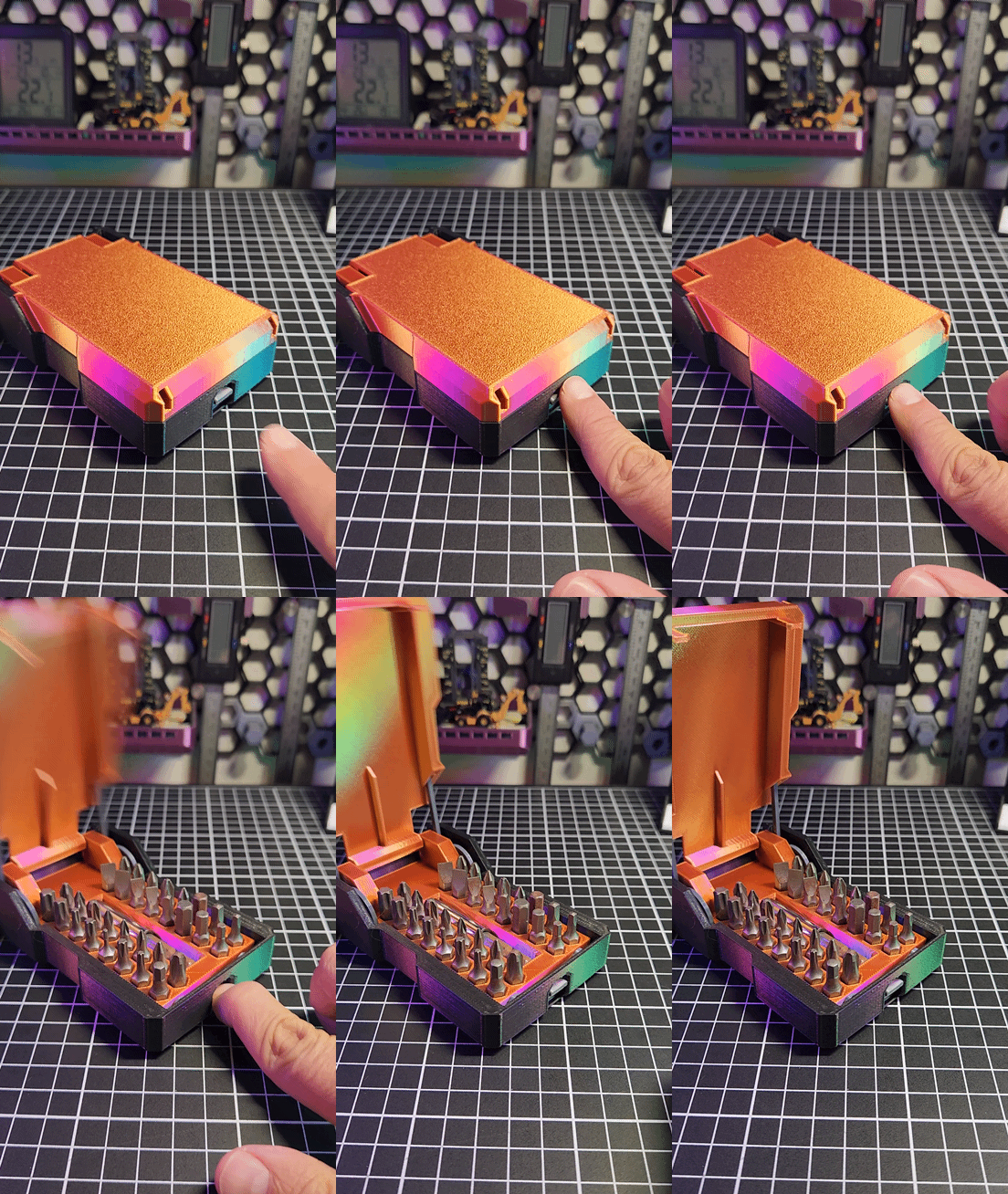
No extra hardware needed! Well, maybe some glue xD The springs are 3D printed too. With a simple push of a button, the lid pops open automatically. It's a satisfying little mechanism that adds a bit of joy to tool organization. This case can hold up to 32 hex bits and even has a dedicated space for an extension.
The model consists of 8 easy-to-print parts, none of which require supports:
- Outer Shell - [HexbitOuterShell.stl]
- Lid - [HexbitSpringLidV3.stl]
- Container Grid - [HexbitContainerGridV4.stl]
- Release lock mechanism - [HexbitReleaseLockV5.stl]
- Hexagonal Pins (x2) - [HexbitHexagonalPin.stl]
- Lid springs (x2) - [HexbitLidSpringV1.stl]

Updates
Update! 05/05/2025: Just uploaded a STP file for you to customize the grid part :D So you can make it fit your needs! The file is HexBitContainerBaseBlank.stp Have fun!
Assembly
Assembly is straightforward but needs to follow this order:
- Push the release lock mechanism firmly into its designated slot in the Outer Shell. Set this aside.
- Attach the lid springs to the Container grid using the hexagonal pins.
- Insert the lid into the assembled springs and Container grid. Secure the lid by inserting a small piece of filament (1.75mm diameter) through the designated holes, cutting it flush inside the Container grid.
- Carefully insert the completed lid, spring, and Container grid assembly into the Outer Shell (with the locking mechanism already installed). I suggest adding some glue between the Container Grid and the Outer Shell.
Once assembled, you can start loading your hex bits! I really enjoyed designing this project and hope you have just as much fun printing and using it!
Support me!
I like to share my work for free, but if you enjoy my work and would like to support it and are able too, you can do so through my buy my a coffee page. It will be greatly appreciated! =)