
HyperX car mouse
Obliczymy ostateczną cenę na podstawie wybranego pliku. Sprawdzisz ją i zaakceptujesz przed płatnością.
Orientacyjna cena wydruku pliku
2,51 € – 3,07 € netto (bez VAT)
Dla pliku: all_parts___SET_I_0.4n_0.2mm_PLA_MK4S_2h50m.gcode
To wstępna wycena jednego pliku. Dokładną cenę poznasz przed zamówieniem.
Plik i założenia wyceny
Plik użyty do wyceny
Średnia wycena orientacyjna: 2,79 € netto (środek widełek).
- Masa podana przez autora
- 34 g
- Czas druku podany przez autora
- 2,83 godz.
- Materiał u źródła
- PLA
- Materiał wyceny
- PLA
- Drukarka wyceny
- Bambu Lab P1S - 0.4 nozzle
- Proces wyceny
- 0.20mm Standard
Orientacyjna wycena wyłącznie wybranego pliku, oparta na masie i czasie druku podanych przez autora. Warianty plików nie są sumowane. Ostateczna cena zostanie obliczona po analizie pliku.
Zapisane na tym urządzeniu.

Car shaped parts for HyperX Pulsefire Saga mouse. Parts come in 3 variants that can be interchanged.
- Ocena
- 5 / 5
- Polubienia
- 139
- Pobrania
- 166
- Wydruki
- 1
- Wyświetlenia
- 2024
- Oceny
- 1
Aktualizacja u źródła:
Informacje o modelu
- Źródło
- Printables
- Kategoria
- Computers
- Licencja
- Creative Commons — Attribution — Noncommercial — Share Alike
Completely redesigned car shaped replacement parts for the HyperX Pulsefire Saga mouse. It looks like a car, but still retains the convenience of using a computer mouse.
Fastening elements, ribs and mating surfaces are taken over. In some cases I also modified them for better printability.
In the files below you can find 3 versions of each part, which can be interchanged at will. There are versions for body, front cover (bumper), buttons and side buttons (thumb buttons).
Parts are organized in SETs (SET I, SET II and SET III) in the files bellow.
Printing in general:
- 2 perimeters
- 0.2mm layer (0.15mm)
- 10% infill, rectilinear
Body printing:
The body part is very easy to print. You don't need any supports, just place the part on the rear flat face. Also refer to the “all_parts___SET_I.3mf” file.
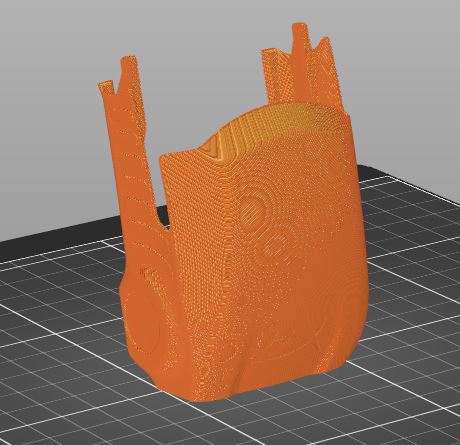
Buttons part printing:
Probably the trickiest part to print. Print this in vertical orientation (placed on the flat narrow back face). I used organic supports (0.1mm Z distance), support on build plate only and "don't support bridges' option ON. In some spots I was able to make the shape that doesn't need support compared to the original part.
One more tip for "bed slingers": In my opinion it is better to align the part with X axis so that the bed (Y axis) moves less during printing. Also refer to the “all_parts___SET_I.3mf” file.
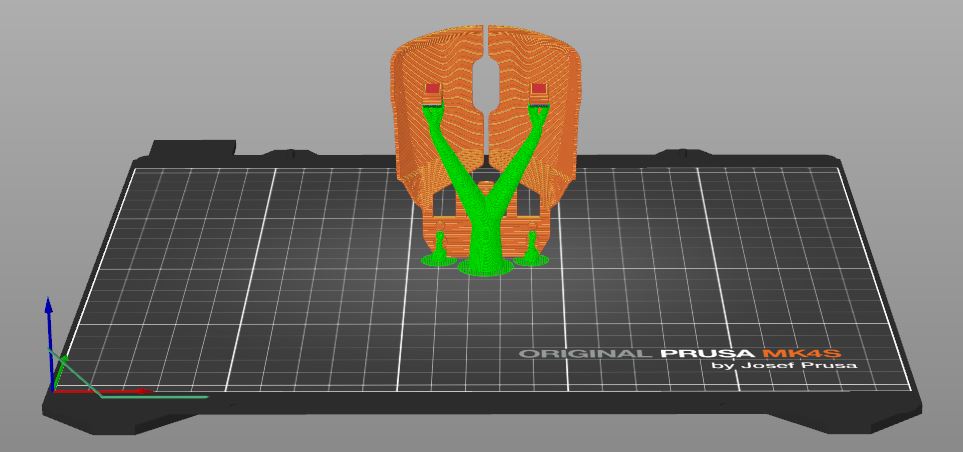
Bumper printing:
Keep the orientation of the stl model (on the bottom face). Use organic support (0.1mm Z distance) on build plate only and "don't support bridges' option ON. I also had to manually block supports on the upper face of USB depression and on the upper face of USB hole. Also refer to the “all_parts___SET_I.3mf” file.
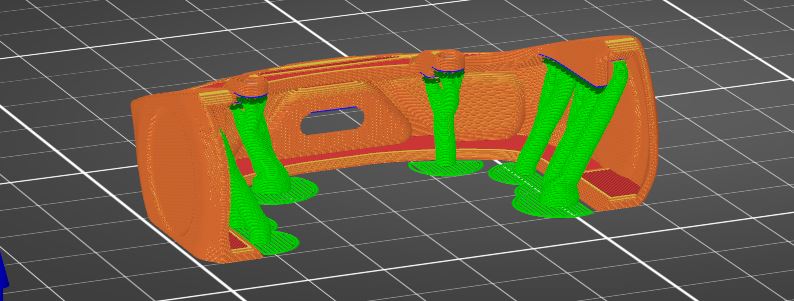
Note that the fixing holes on the brackets tend to be smaller after printing. Be prepared to drill them larger.
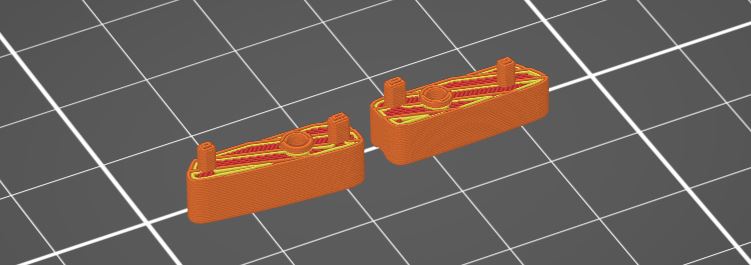
Thumb buttons printing:
These are very easy to print. Print it on the flat faces where the thumb touches the button. Also refer to the “all_parts___SET_I.3mf” file.
Overall this was a great contest that I enjoyed and I would like to thank HyperX for making it possible and sharing their great mouse design with us. Also a big thank you to the Prusa team who hosted this contest on the PRINTABLES platform. 👌👍👏