
[2025] Gridfinity Bin 1.2 (latest fix) with more sizes & easier magnets [Nov 25 update]
Obliczymy ostateczną cenę na podstawie wybranego pliku. Sprawdzisz ją i zaakceptujesz przed płatnością.
Zapisane na tym urządzeniu.
Informacje o modelu
- Źródło
- Printables
- Kategoria
- Organizers
- Licencja
- Creative Commons — Attribution — Noncommercial
NOV25 Update ✨: added Fusion360 file and Script available on GitHub 👍
APR26 Update: added missing scoop versions of 0.9 & 1.2 walls 🧱
I really love these bins, but I was very frustrated with how the magnets need to be pushed in and it really doesn't work with the gridfinity recommended 6x2mm magnets.
I then found the remix by shremi, but both authors have still the older version uploaded.
Took the fusion file with the fix (1.2) and added the better magnet version (like in the remix or like how the baseplate works).
It works well for 6x2mm magnets (as specified in the Gridfinity specification) and it shouldn't require glue (push fit).
There are three wall thickness versions: 0.9mm which is default, 1.2mm and 1.5mm which was mentioned also in the original version, but was never provided. I personally prefer 1.5mm and it doesn't break so easy (especially if you insert magnets^^).
I went full insane mode and wrote a Python script to auto generate lots of different versions:
X, Y, Z: 1-10
Divisions: 1-6
Wall Thickness: 0.9 (as original), 1.2, 1.5mm
Tip: Simply type into the search what grid you want, like “_5x5” (notice the _ at the beginning) to get all bins which are on the 5x5 Grid. To filter by Z, use “x3_” to get all bins which have the Z height of 3.
Note: I only uploaded the stl files for up to 6 for X/Y (I didn't want to flood printables 😅) and I think these are the most common ones. The bigger ones are probably more niche and do only work for Prusa XL (or similar).
Details
Each X / Y step is 41.5mm long + 0.5 for each step
X/Y | → Length |
|---|---|
1 | 41.5mm |
2 | 83.5mm (2x41.5 + 1x0.5) |
3 | 125.5mm (3x41.5 + 2x0.5) |
4 | 167.5mm |
5 | 209.5mm |
6 | 251.5mm (max possible for MK3/4 with fix below) |
7 | 293.5mm |
8 | 335.5mm |
9 | 377.5mm |
10 | 419.5mm |
The smallest bin is Z=3, each increment (+3) adds 21mm on top
Z (1 [U]unit = 7mm + base) | → Height |
|---|---|
3 | 24.55mm |
6 | 45.55mm |
9 | 66.55mm |
12 | 87.55mm |
15 | 108.55mm |
18 | 129.55mm |
Magnets
Diameter: 6mm - 0.1mm of tolerance
Depth: 2mm - 0.4mm of clearance
A hole is added (Diameter of 3mm) so it's possible to remove the magnet again (or you could add a tiny drop of fluid glue)
These were the best settings for me
Divisions
1 - 6
I tried to avoid “useless” versions, like a 1x1x1 with 6 divisions
File Format
{version}_{X}x{Y}x{Z}_w{Wall thickness}d{Divisions}
gfbin1.2_01x01x03_w1.5d01
Gridfinity Bin v1.2
X=1
Y=1
Z=3
Wall thickness=1.5mm
Divisions=1 (no inner walls)
Wall Thickness
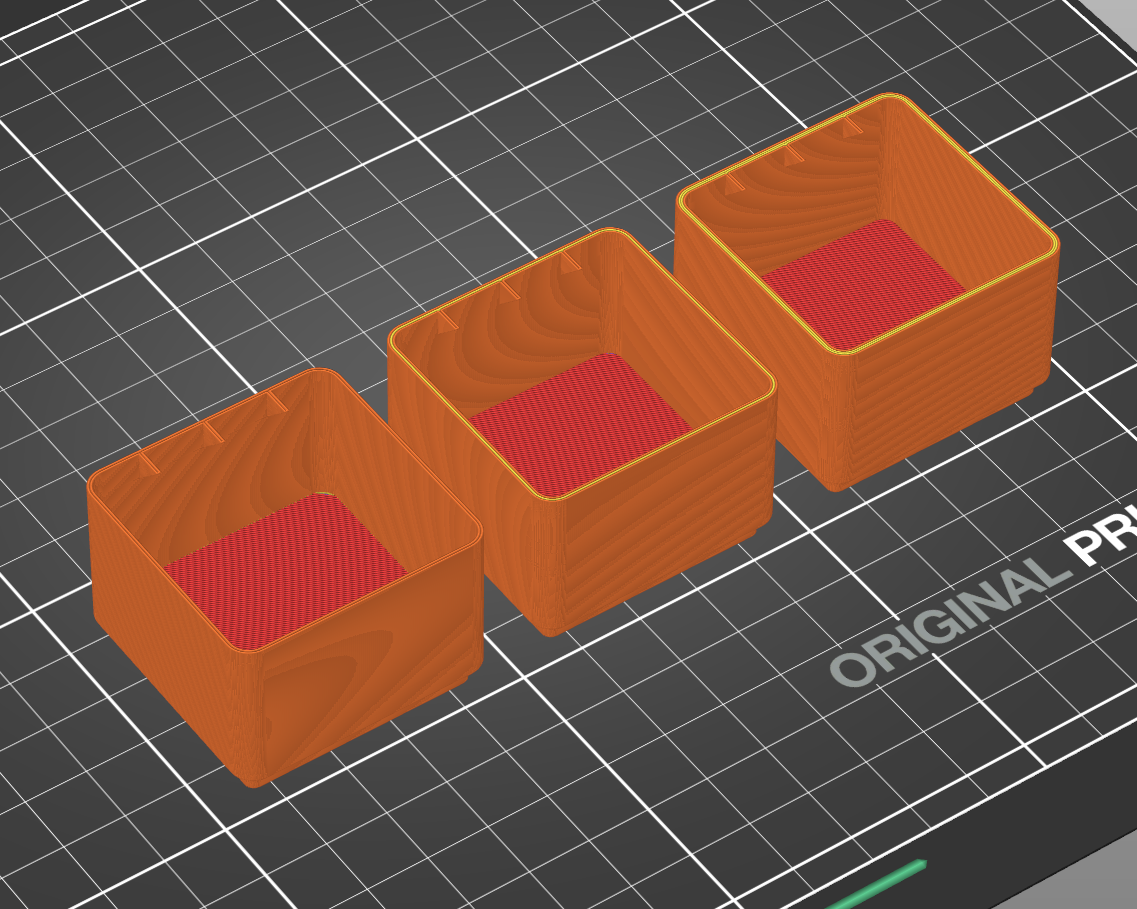
This image illustrates the main difference between the wall thickness versions, notice the yellow perimeter lines.
0.9mm → no perimeter
these are quite fragile with PLA+ w/ Speed Profile print, I accidentally broke a few
1.2mm → 1 perimeter
+1 min of print time for 1x1x3 bin
1.5mm → 2 perimeter
+2 min of print time for 1x1x3 bin
much stronger
Print Instructions
See instructions of original, but technically just 0.2 layer and 20% infill.
Print Tip for MK3/4 & large bins
You can actually print a large box (X or Y =6, the other one is max 5)
The width of the MK3 or 4 bed is 250x210mm, but X=6 is 251.5mm

So per default it's too wide (1-2mm) but you can simply use the following settings:
Printers > General > Bed Shape (Set …) > X: 253, Y: 210 (default)
Printers > Extruder (1-5 in case of MMU) > Extruder offset > x: 1, y: 0
The MK4 has enough space to do this and it will print successful the above container (6x3x6).
(Be sure the build plate is properly placed and just to be sure, have a look)
Fusion360 File & Python Script


You can get the script and instructions on GitHub: https://github.com/TheDelta/f360-gridfinity-bin-exporter
The Fusion360 file is available here now, did some cleanup (I also fixed the scoop curve radius which would break when you change it) and added the snap fit.
Feedback welcome (to both).
Thanks!
Thanks to the original creators and if you like this remix, let me know💖
Changelog
2025-11-14: added Fusion360 file and script (sorry that it took so long),
also added requested user files.2025-05-26: initial version with many many files 😅
2026-05-04: may the force be with you - uploaded missing scoop versions of 0.9 & 1.2 wall thickness, it seems like they were not generated properly. I ran into some 429 errors during upload, hopefully everything went through :D
Funfact
A printables update broke the edit model page for me because there are too many files and the Svelte JS code breaks 🤣 But uh uh Prusa! You can't prevent me from updating this page 😂 I simply removed the Error throwing and just need to wait 1 minute until everything is rendered 😁😁
Kudos to the Printables Dev Team, issue reported through the Feedback option and it was fixed within 24h 💖💖