
MultiBoard: Parametric Bolt-Locked Hooks
Obliczymy ostateczną cenę na podstawie wybranego pliku. Sprawdzisz ją i zaakceptujesz przed płatnością.
Zapisane na tym urządzeniu.
Informacje o modelu
- Źródło
- Printables
- Kategoria
- Organizers
- Licencja
- Creative Commons — Attribution — Noncommercial
[Edit 26-06-21]: Now fully parametric! Make custom bolt-locked hooks based on the official 25x12.5mm bolt-locked hook with custom height and length.
Quick guide: open in Autodesk Fusion, edit starred parameter, export, print, enjoy!
Full guide:
Import the f3d file to Autodesk Fusion (other CAD software may not be supported).
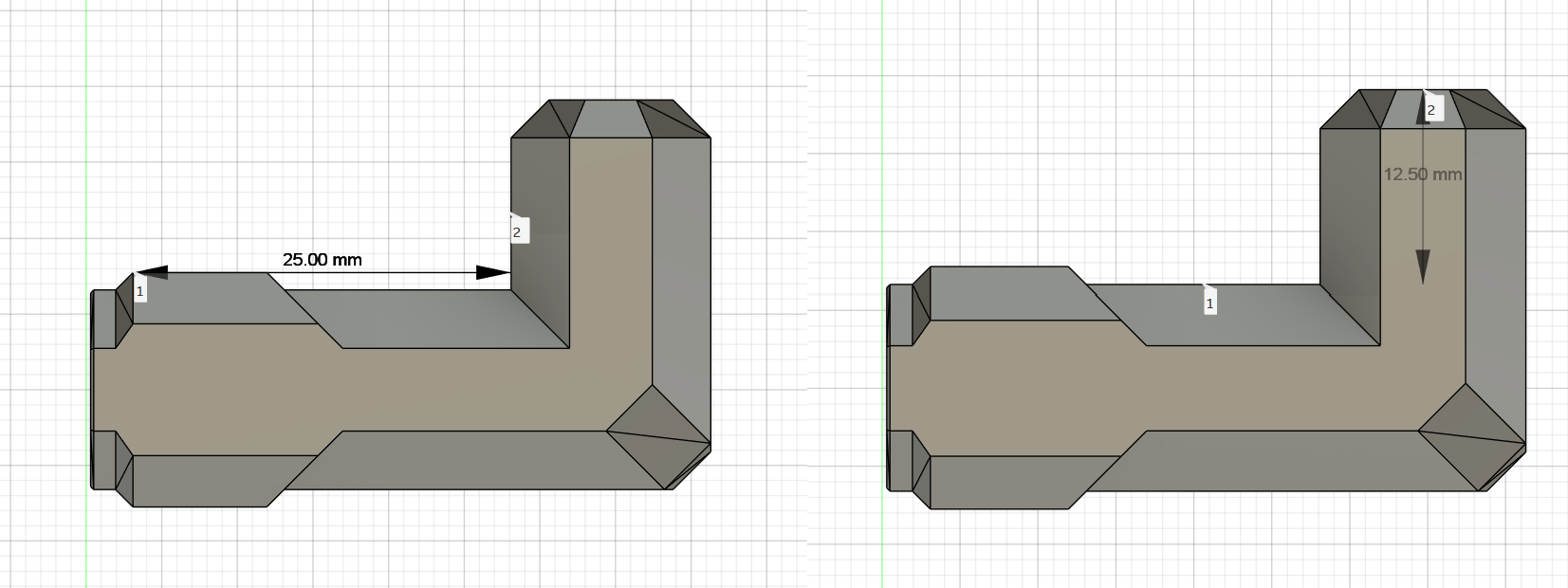
In the parameters tab, adjust height and length as you desire. Note that there is a minimum height and length:
hook_length: the length of the hook, as seen in the picture below. This has a hard-coded minimum of 15mm.hook_height: the height of the hook, as seen in the picture below. This has a hard-coded minimum of 5mm.
After editing parameters, export your model.
Print following the standard MultiBoard print profile as specified on the original: 0.2mm layer height, 3 perimeters, infill of your choice (I pick 20% rectilinear), no support required, provided in the orientation you should print in.
I've also included my original exports of hooks from 30mm to 60mm at 12.5mm height as a preset.
Quick bolt-locked guide: for each hook, print a Snap (I recommend the Moderate Weight-Bearing Snap as the heavy variant is folded and not very suitable for bolt-locking, and the regular variant holds less weight), and a Locking Bolt (the T variant is the easiest to print and works great). Then, you fit the hook into the snap's front, and screw the locking bolt into the back side, before finally installing the snap, with the hook attached.
Files are licensed by the MultiBoard License, and check out MultiBuild for official parts.