
1 / 2
Parametric Magnetic Token Box for Board Game Organization
Zamów wydruk tego modelu
Obliczymy ostateczną cenę na podstawie wybranego pliku. Sprawdzisz ją i zaakceptujesz przed płatnością.
Zapisane na tym urządzeniu.
This fusion 360 file uses parameters to allow for customization. You can quickly make custom boxes for your games.
- Ocena
- 5 / 5
- Polubienia
- 52
- Pobrania
- 150
- Wydruki
- 1
- Wyświetlenia
- 1704
- Oceny
- 1
Aktualizacja u źródła:
Informacje o modelu
- Źródło
- Printables
- Kategoria
- Board Games
- Licencja
- Creative Commons — Attribution — Noncommercial — Share Alike
SzczegółyPliki (1)Wydruki i komentarze (Wydruki: 1) (Komentarze: 2)Remiksy (0)Kolekcje (104)Powiązane
This is a parametric box that's designed to help you create custom storage solutions for your board games - especially the more obscure ones.
Please leave a comment if there are other box types you would like.
Steps:
- Download and install fusion 360 personal, make an autodesk account, and login. https://www.autodesk.com/products/fusion-360/personal
- Download the file attached to this project, and open it in 360.
- In fusion, navigate to MODIFY > Change Parameters

- In the parameter window, change the expressions to match your desired proportions

- The parameters are:
- magnetDia - the diameter of the magnet you will be using. I recommend to use and 5mmx3mm and to leave all the magnet parameters alone.
- length - how long (in mm) the box will be on the Y axis
- width - how long (in mm) the box will be on the X axis
- baseHeight - how tall the box will be on the Z axis
- lid height - how tall the lid of the box will be. I usually use shorter lids, but have used long lids in games like Wingspan, where I want all the eggs in one box, but use the lid and base as containers I can spread around the table.
- thickness - thickness of the walls. I recommend making this a multiple of you nozzle size. I use a 0.8mm nozzle, so I make my walls 1.6mm to get two layers and a much quicker print.
- magnetSpace - the amount of room around the magnet. tweaking this can help with gluing.
- magnetHeight - the height of the magnet you'll be using.
- When you have set your parameters, click ok.
- On the left side of the screen, you'll see a folder called Bodies. Open that folder and right click Box Base > Save as Mesh.
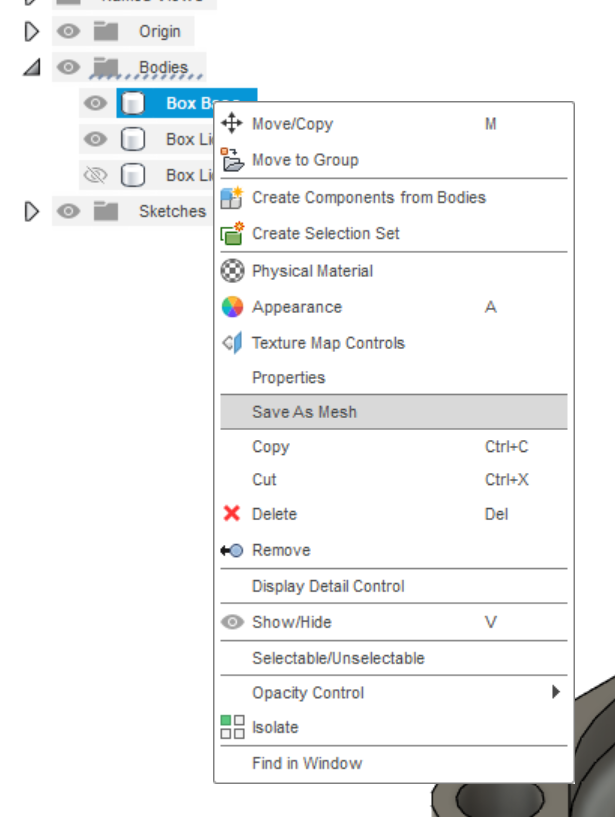
- Click OK in the popup.
- Repeat for Box Lid Mag
- Open the meshes in your slicer, slice, and print.
Please leave a comment if you have questions.