
Extruder Cable Guide for Ender 3 S1 and CR10 Smart Pro by MAXPROBE - Strain relief for Creality Sprite extruder ribbon cable - Cable holder cable mount suits Creality CR10 Smart Pro Ender 3 S1 Pro
Obliczymy ostateczną cenę na podstawie wybranego pliku. Sprawdzisz ją i zaakceptujesz przed płatnością.
Zapisane na tym urządzeniu.

Improved cable guide compatible with Ender 3 S1 / Pro as well as CR10 Smart Pro (Ender 3 versions hit the frame)
- Ocena
- 4,769 / 5
- Polubienia
- 171
- Pobrania
- 1846
- Wydruki
- 18
- Wyświetlenia
- 9887
- Oceny
- 13
Aktualizacja u źródła:
Informacje o modelu
- Źródło
- Printables
- Kategoria
- Creality Parts & Upgrades
- Licencja
- Creative Commons — Attribution — Noncommercial — Share Alike
Extruder ribbon cable strain relief cable guide
Fitting a cable guide to your printer allows the ribbon cable to flex gently over its length rather than bending all in one place - which can lead to broken wires. This unfortunately is a known issue with the original Sprite Extruder ribbon cable design.
This cable guide was developed by MAXPROBE for the Creality Sprite Extruder, specifically designed to maintain your printer's full x-axis gantry movement without hitting the frame.
Features
Protects your ribbon cable from strain damage
Uses original components and fasteners
Fully reversible
Easy to install (takes around 5 minutes)
Suits
Creality Ender 3 S1
Creality Ender 3 S1 Pro
Creality CR-10 Smart Pro
May fit other printers with the Creality Sprite Extruder
Community-confirmed fitments (please leave a comment if you try this on printer not listed above and I will add to the list)
Voxelab Aquila with a Sprite Extruder Upgrade (thanks @JulieDarling_311602)
Choosing the right STL
Two different STLs are provided:
Choose normal if you have long fasteners (9mm thick original mount)
Choose recessed if you have short fasteners (7.5mm thick original mount)
Sick of auto bed leveling issues?
So are we, that is why we developed the MAXPROBE backplate - the solution to auto bed levelling issues on Creality printers with the Sprite Pro Extruder such as the CR10 Smart Pro and Ender 3 S1 Pro. It is easy to install, uses all standard components and does not require cutting any wires. Download the MAXPROBE backplate here

Print instructions
Material: PLA or PETG
Layer height: 0.2
Walls: 1.6 thick (0.4 line width) , 1.5 thick (0.5 line width)
Top/bottom thickness: 1.6
Infill: 35% grid
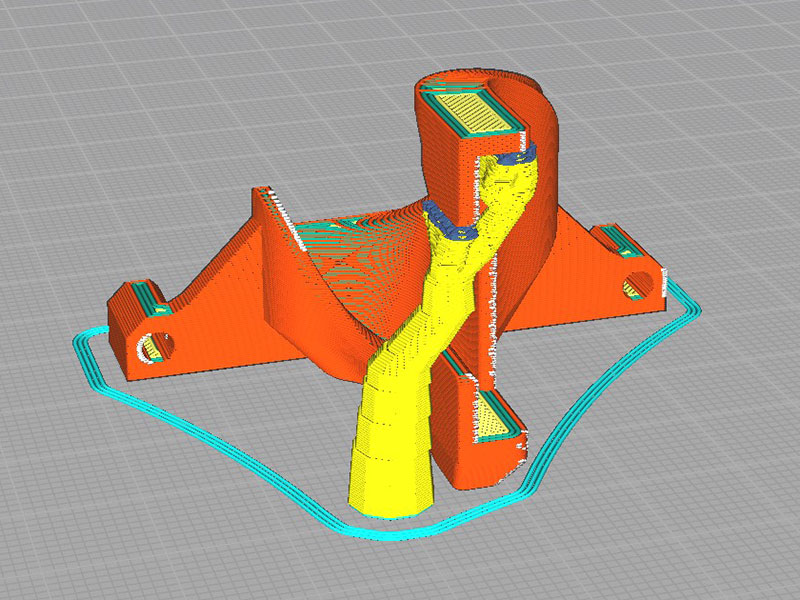
Supports: Required, recommend tree supports at the back only like below:
Installation instructions
Fit the MAXPROBE cable guide to your extruder
Install the ribbon cable into the plug on the extruder
Insert half the cable into the rear of the guide the gently bend the cable over to insert the other half
Move the cable over as far as possible in the clamp on the gantry to give the cable as much room as possible