
Creality K1/K1 Max OrcaSlicer Profile
Obliczymy ostateczną cenę na podstawie wybranego pliku. Sprawdzisz ją i zaakceptujesz przed płatnością.
Zapisane na tym urządzeniu.

I have created an OrcaSlicer config for the K1 and K1 Max.
- Ocena
- 4,857 / 5
- Polubienia
- 561
- Pobrania
- 16 814
- Wydruki
- 6
- Wyświetlenia
- 38 319
- Oceny
- 7
Aktualizacja u źródła:
Informacje o modelu
- Źródło
- Printables
- Kategoria
- Accessories
- Licencja
- Creative Commons — Public Domain
This is my profile for the K1 Max in OrcaSlicer. It contains the printer config, 2 printing profiles and a material profile for the included HyperPLA. Also included are a model for the build plate along with the texture image, see below for instruction on how to add them.
The Standard profile mimics the stock Creality .2 profile from Creality Print. The Quality profile has the speeds turned down.
See the profile in use in these videos:
To add the build plate and texture follow these steps:
- Open the Printer Settings and select Set
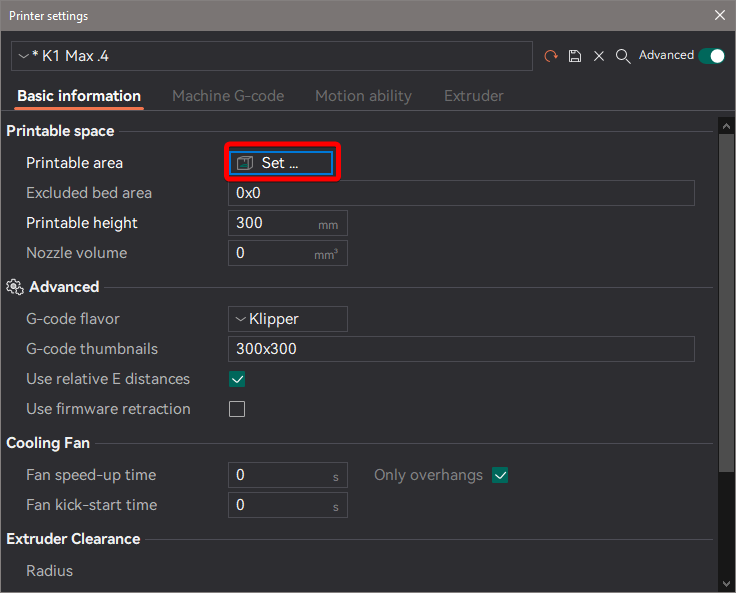
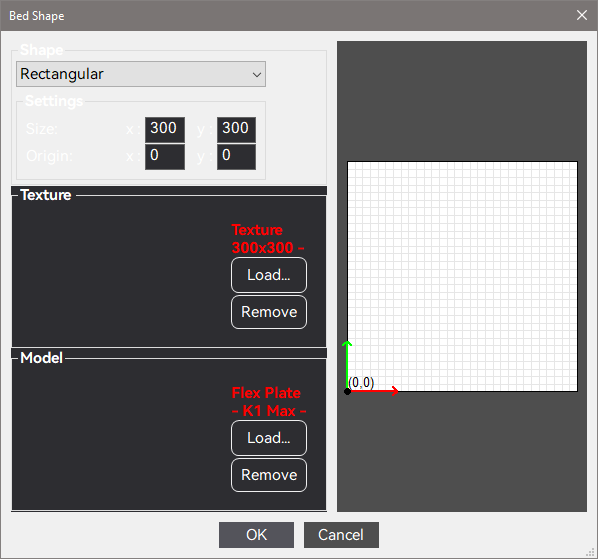
- Select Load in the Texture area and pick OrcaSlicer K1 Texture.png from the zip file.
- Select Load in the Model area and pick K1 Max Build Plate.stl.
- Click OK to save the changes.
8-23-23
Added a profile for the K1. I changed the build volume on the K1 Max profile leaving everything else the same, but it has not yet been tested as I only have a Max. Also, I still need a correct build plate STL for it.
8-18-23
Uploaded STL model of build plate. Added texture image to zip file.