
La Salle keychain (Multicolor)
Obliczymy ostateczną cenę na podstawie wybranego pliku. Sprawdzisz ją i zaakceptujesz przed płatnością.
Zapisane na tym urządzeniu.

La Salle keychain with different colors. Prepared for only one extruder.
- Ocena
- 0 / 5
- Polubienia
- 1
- Pobrania
- 10
- Wydruki
- 0
- Wyświetlenia
- 55
- Oceny
- 0
Aktualizacja u źródła:
Informacje o modelu
- Źródło
- Printables
- Kategoria
- 2D Plates & Logos
- Licencja
- Creative Commons — Attribution — Noncommercial — Share Alike
vvILa Salle logo keychain
This multicolor keychain is prepared for 1 extruder printers.
Instructions
1: Open the file in your Slicer. (I highly recommend Prusaslicer)

2: Place it upside down
3: Create 3 more extruders in Printer Settings, and assign them a color

4 (Important): Go to Custom GCode. Copy the code you have in Color Change (It usuallly is M600), and paste it the the Tool Change section.

5: Set the first layer height to 0.3mm, and activate a purge tower (optional).
Then select an extuder for each piece of the model. This will determinate the colors.
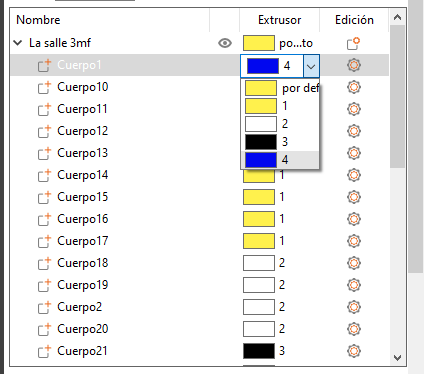
6: Slice the model. When you have the Gcode, open it and eliminate the first M600 (optional).
And, voilà! The print is ready. I've also posted a GCode for the Ender 3. if you print this, you won't have to do anything. Just press print!
Print settings
First layer: 0.3mm, 15mm/s
Layer height: 0.2mm
Time: 40 min
Filaments: Sunlu Blue, Polyterra White, Wrinkle Black and Triwee Yellow
This explanation was based in a video by XY.3D, in which he explains this.