
La Salle keychain (Multicolor)
We calculate the final price from your selected file. You review and accept it before payment.
Saved on this device.

La Salle keychain with different colors. Prepared for only one extruder.
- Rating
- 0 / 5
- Likes
- 1
- Downloads
- 10
- Makes
- 0
- Views
- 55
- Reviews
- 0
Updated at source:
Model information
- Source
- Printables
- Category
- 2D Plates & Logos
- License
- Creative Commons — Attribution — Noncommercial — Share Alike
vvILa Salle logo keychain
This multicolor keychain is prepared for 1 extruder printers.
Instructions
1: Open the file in your Slicer. (I highly recommend Prusaslicer)

2: Place it upside down
3: Create 3 more extruders in Printer Settings, and assign them a color

4 (Important): Go to Custom GCode. Copy the code you have in Color Change (It usuallly is M600), and paste it the the Tool Change section.

5: Set the first layer height to 0.3mm, and activate a purge tower (optional).
Then select an extuder for each piece of the model. This will determinate the colors.
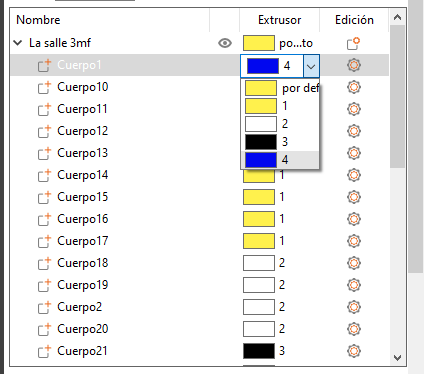
6: Slice the model. When you have the Gcode, open it and eliminate the first M600 (optional).
And, voilà! The print is ready. I've also posted a GCode for the Ender 3. if you print this, you won't have to do anything. Just press print!
Print settings
First layer: 0.3mm, 15mm/s
Layer height: 0.2mm
Time: 40 min
Filaments: Sunlu Blue, Polyterra White, Wrinkle Black and Triwee Yellow
This explanation was based in a video by XY.3D, in which he explains this.